39
ADVANCED
OPERATIONS
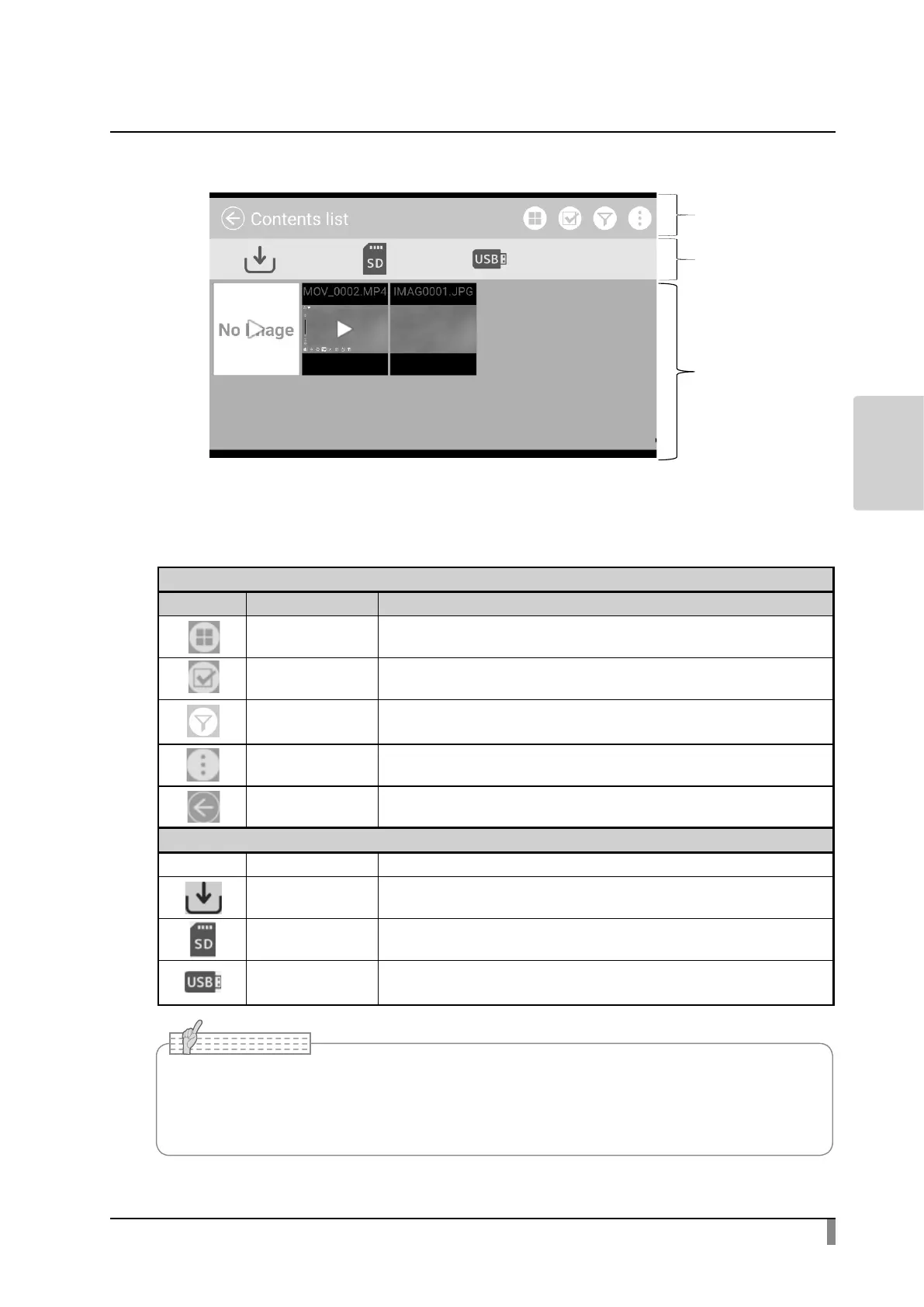
Menu
Icon Name Function
Split screen To enter the Split screen select mode. Select the content items to compare.
Content item select To enter the mode that multiple content items can be selected.
Narrow down
To display selected still images, videos, digital documents to the List of content
items screen.
Sub menu To display each function indicated by icons or recognized storage by text.
Return To return to the last screen before the List of content items screen.
Media select
Icon Name Function
Internal storage
To display the content items stored in the internal storage in the List of content
items screen.
SD card
To display the content items stored in the SD card in the List of content items
screen.
USB ash drive
To display the content items stored in the USB ash drive in the List of content
items screen.
Menu
Media select
→ Recognized
media will be
displayed.
List of content
items
→ Thumbnail
list of content
items stored
in the selected
media will be
displayed.
• Many, but not all images taken by other digital cameras can be displayed (viewed) on this
product.
(For example, images larger than 4000 x 3000 pixels in size can not be displayed.)



 To Next Page