Cerabar S/Deltabar S Level measurement (FF configuration program)
Endress+Hauser 13
!
Note!
1. For this level type, the measured variables %, volume and mass are available. → See Page 40 ff.
2. You can also specify customer-specific units. See parameter descriptions for CAL_UNIT
(→ Page 34), HEIGHT_UNIT (→ Page 41), VOLUME_UNIT (→ Page 42) and MASS_UNIT
(→ Page 43).
3. Once you have entered the maximum tank contents to be expected for SCALE_OUT, EU_100
element, the alarm "A719 Y-Val of lin. table out of edit limits" can appear. At this stage the
linearisation table already consists of two points as standard. It could be the case that the 2nd
value, and thus the highest Y-value of the linearisation table, is larger than the value entered
for SCALE_OUT, EU_100 element. The message goes out as soon as no Y-value is larger than
the value for SCALE_OUT, EU_100 element and the table entered is active.
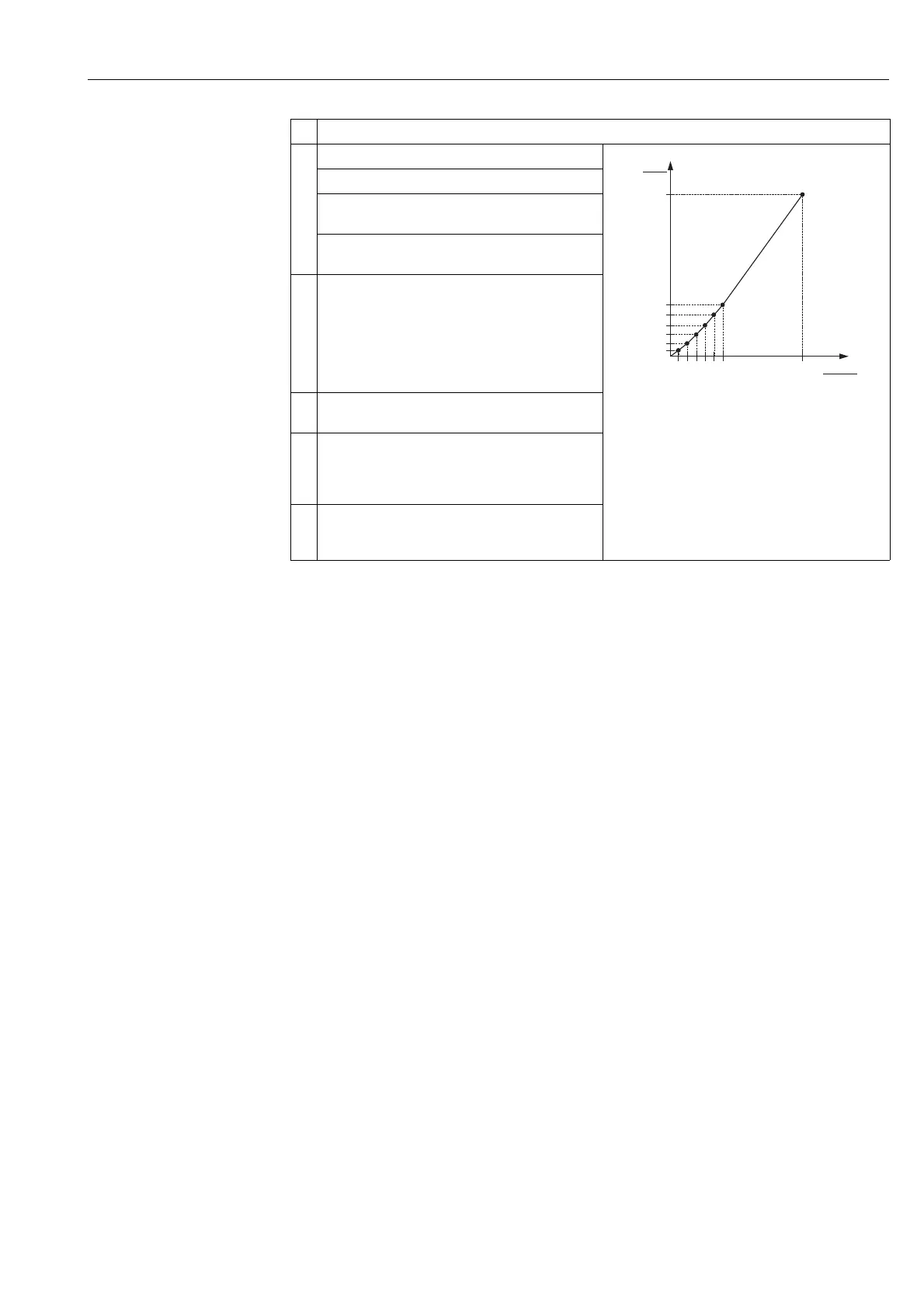
6 Enter linearisation table (min. 2 points, max. 32 points).
P01-xxxxxxxx-05-xx-xx-xx-015
Fig. 3: Manual entry of the linearisation table
1 See Section 4.3.1, Table, Step 9.
2 See Section 4.3.1, Table, Step 10.
3 See this Table, Step 2.
4 See this Table, Step 3.
5 See this Table, Steps 4 to 7.
TAB_ENTRY: enter the value of the corresponding point.
TAB_XY_VALUE, 1st element (X-value): enter the
pressure value.
TAB_XY_VALUE, 2nd element (Y-value): enter the
volume value, here 0 m
3
for example, and confirm.
7 You can enter further points for the linearisation table as
explained in Step 6. The previous point first has to be
saved in the linearisation table before the next point can
be entered. In other words, a complete linearisation table
cannot be saved to the device. Once all the points have
been entered, the table must be activated by means of
the TAB_OBCODE/TABLE SELECTION parameter.
8 Set the Pressure Transducer Block to the "Auto" block
mode.
9 If necessary, use the Analog Input Block to configure the
CHANNEL parameter (→ Page 67), L_TYPE parameter
(→ Page 69), XD_SCALE parameter (→ Page 73) and
OUT_SCALE parameter (→ Page 71).
10 Result:
The linearisation table is entered and the measuring
device is ready for level measurement.
Description
➀
3.5
0
0 350
V
[m ]
3
p
[mbar]
➂
➁
➃
➄






 To Next Page