EnGenius EOC2611P Version 1.0
83
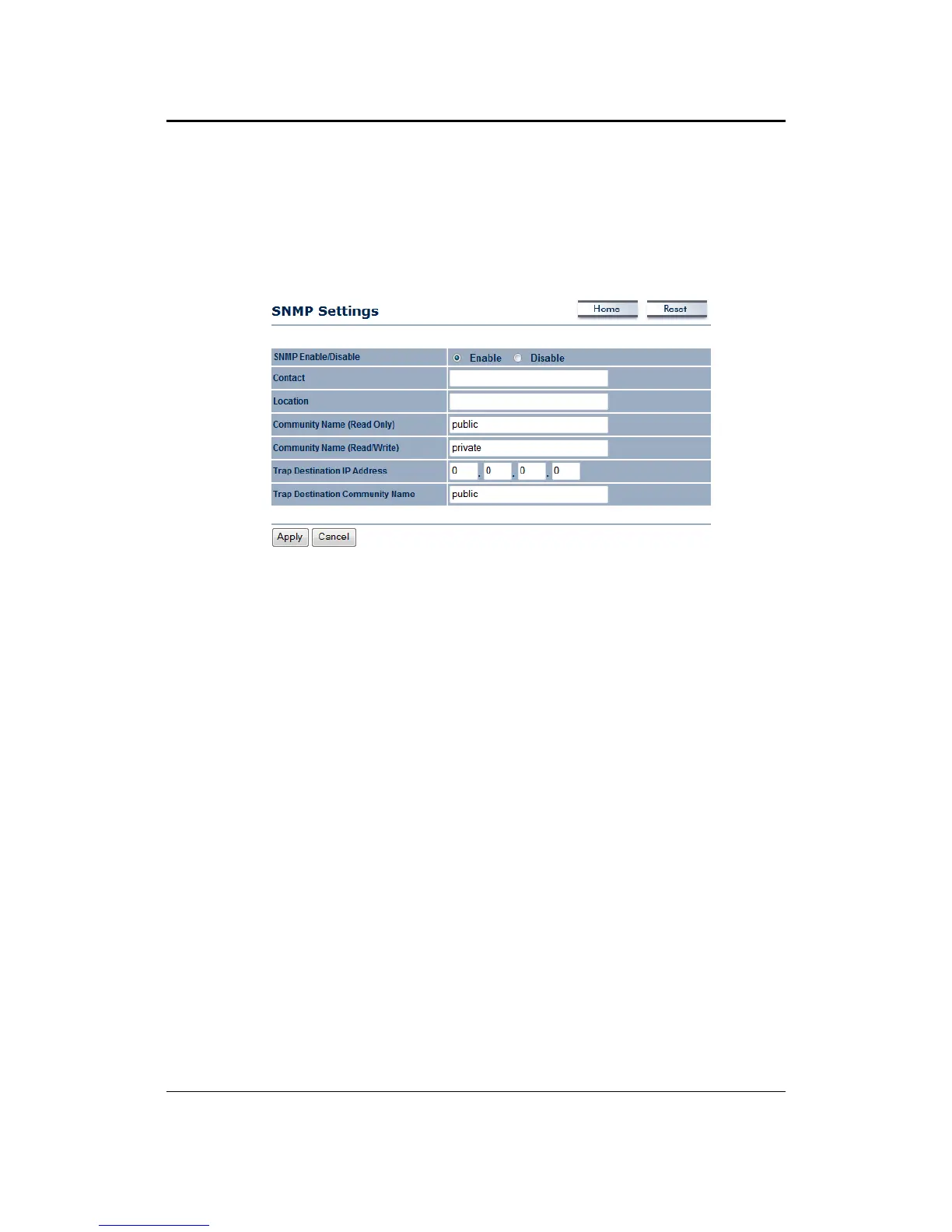
7.6.2 SNMPSettings
This option allows you to assign the contact details, location, and community name and trap
settingsforSNMP.Thisisanetworkingmanagementprotoco lusedtomonitornetwork ‐attached
devices. SNMP allows messages (called protocol data units) to be sent to various parts of a
network. Upon receiving these messages,
SNMP‐compatible devices (called agents) return data
storedintheirManagementInformationBases.
SNMPEnable/Disable:ChoosetoenableordisabletheSNMPfeature.
Contact:Specifythecontactdetailsofthedevice.
Location:Specifythelocationofthedevice.
Read‐Only Community Name: Specify the password for access the SNMP community for read
onlyaccess.
Read
‐Write Community Name: Specify the password for access to the SNMP community with
read/writeaccess.
TrapDestinationIPAddress:SpecifytheIPaddressofthecomputerthatwillreceivetheSNMP
traps.
TrapDestinationCommunityName:SpecifythepasswordfortheSNMPtrapcommunity.
Clickon
theApplybuttontosavethechanges.



 To Next Page