Loading paper in the front sheet or front paper guide
You can load single sheets or multi-part forms one at a time in
the front sheet or front paper guide.
c
Caution:
Do not load labels or envelopes in the front sheet or front paper
guide.
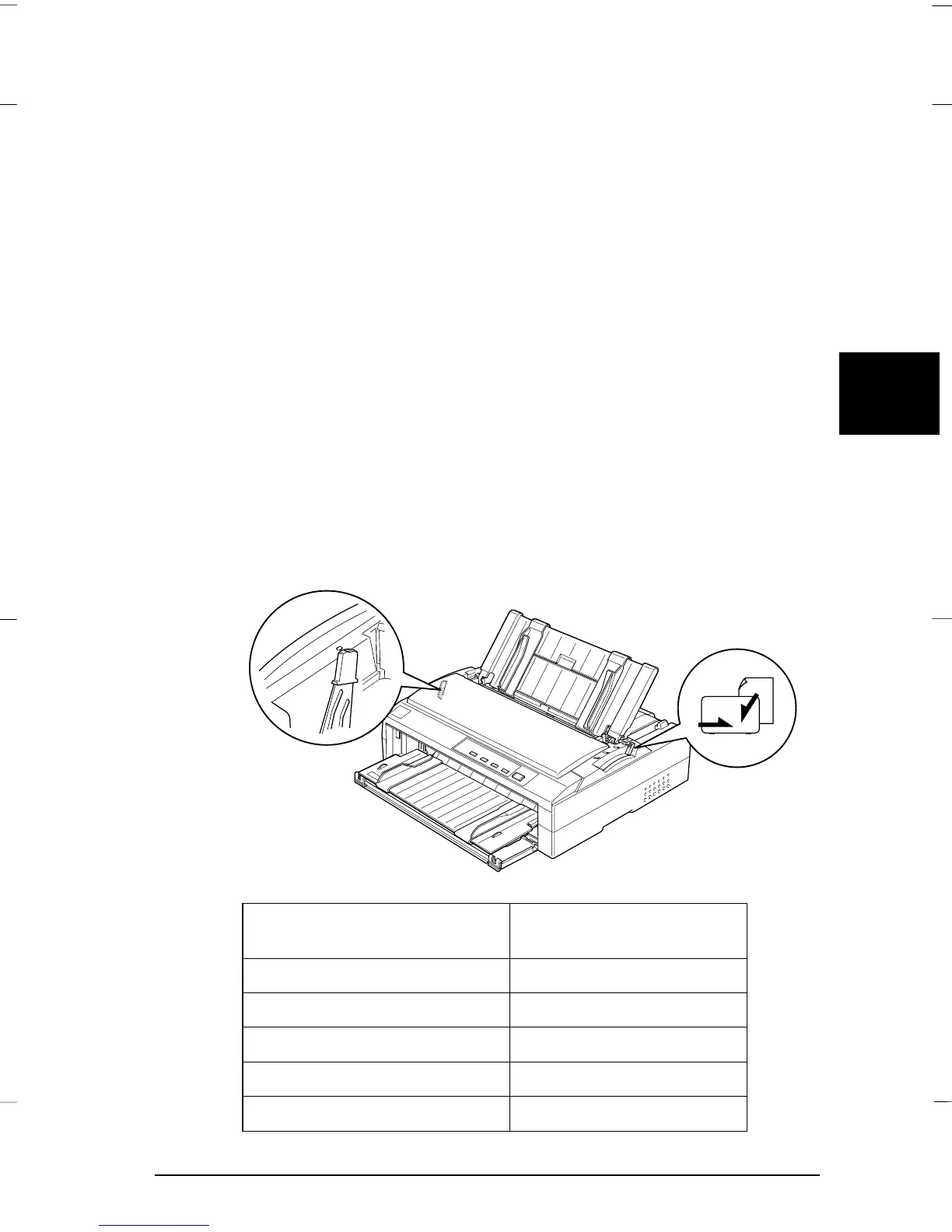
1. Make sure that the paper guide is in the upright position and
the edge guides are open all the way to the left and right. Set
the paper release lever to the single-sheet position.
2. If you are using ordinary single-sheet paper, set the paper
thickness lever (located under the printer cover) to 0 as shown
below. If you are loading a single-sheet multi-part form, set
the paper thickness lever to the proper position, as shown in
the table below.
Multi-part form type Paper thickness lever
position
2 parts (original + 1 copy) 1
3 parts (original + 2 copies) 2
4 parts (original + 3 copies) 3
5 parts (original + 4 copies) 4
6 parts (original + 5 copies) 5
-1
1
2
3
4
5
6
G4-19-3
4
Gentian Rev.c
A5 size Chapter 4
97/06/20 pass 0
Printing on Single Sheets
4-19



 To Next Page