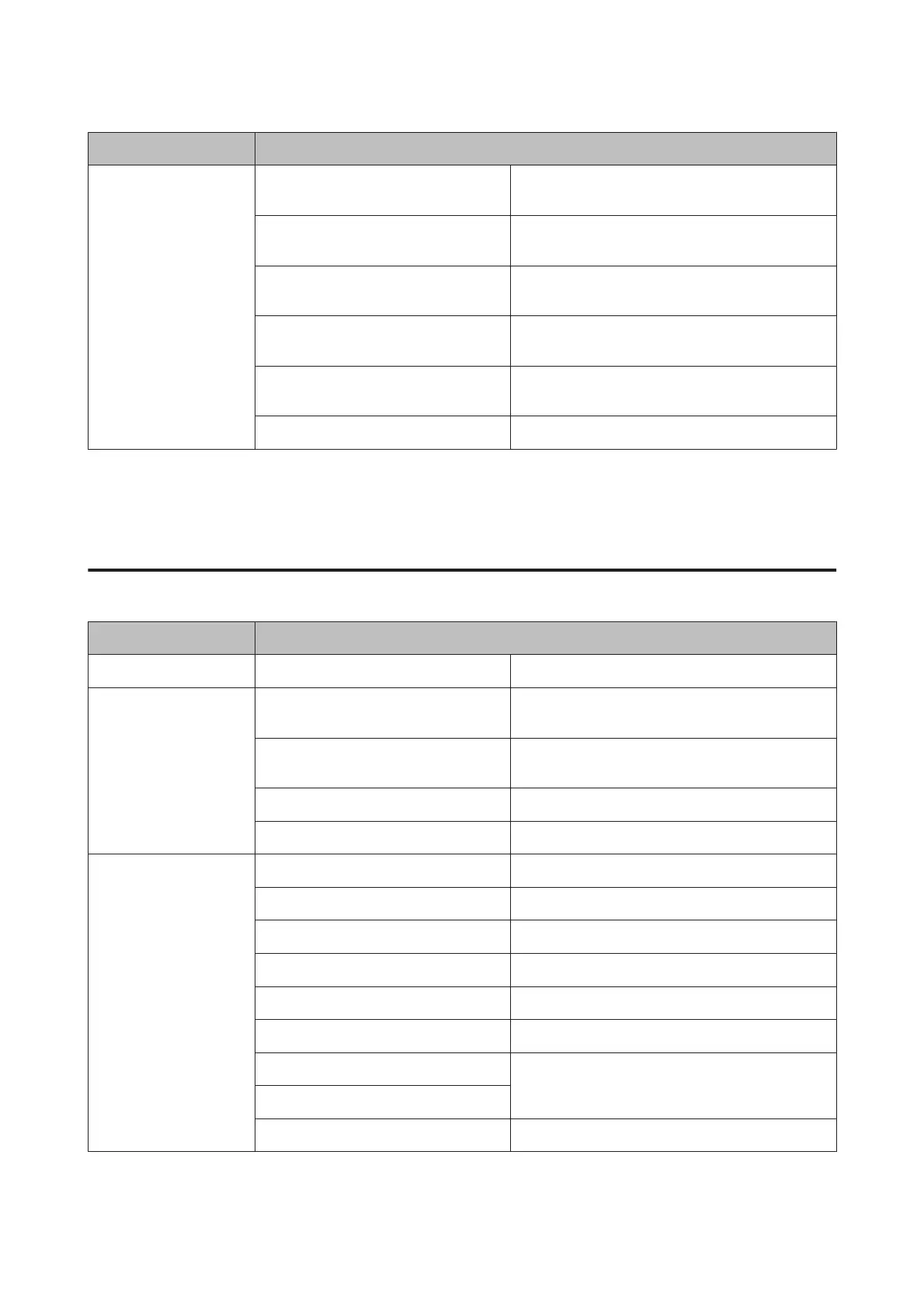
Menu Setting Item and Description
Restore Default Settings
Fax Send/Receive Settings
*2
Initializes Fax Send/Receive Settings to the factory
default settings.
Fax Data Settings
*2
Initializes Fax Data Settings to the factory default
settings.
Wi-Fi/Network Settings Initializes Wi-Fi/Network Settings to the factory
default settings.
All Except Wi-Fi/Network Settings
*1
Initializes all settings except for Wi-Fi/Network
Settings to the factory default settings.
All Except Wi-Fi/Network & Fax Settings
*1
Initializes all settings except for Wi-Fi/Network & Fax
Settings to the factory default settings.
All Settings Initializes all settings to the factory default settings.
*1This function is only available for XP-710 Series.
*2This function is only available for XP-810 Series.
*3This setting does not change your original image. It only affects your printout. Depending on the type of photo, parts of the image
other than the eyes may be corrected.
XP-610 Series
Menu Setting Item and Description
Ink Levels - Checks the status of ink cartridges.
Maintenance Nozzle Check Prints a nozzle check pattern to check the condition of
the print head.
Head Cleaning Cleans the print head to improve the condition of the
print head.
Print Head Alignment Adjusts the alignment of the print head.
Ink Cartridge(s) Replacement Replaces ink cartridges.
Printer Setup CD/DVD Adjusts the print position.
Stickers Adjusts the print position.
Thick Paper Turn on when printing on thick paper.
Sound Button Press, Error Notification, Volume
Quiet Mode Off, On
Screen Saver Off, Memory Card Data
Power Off Timer
& “Using the control panel” on page 154
Sleep Timer
Language -
User’s Guide
Menu List of Control Panel
127













 To Next Page