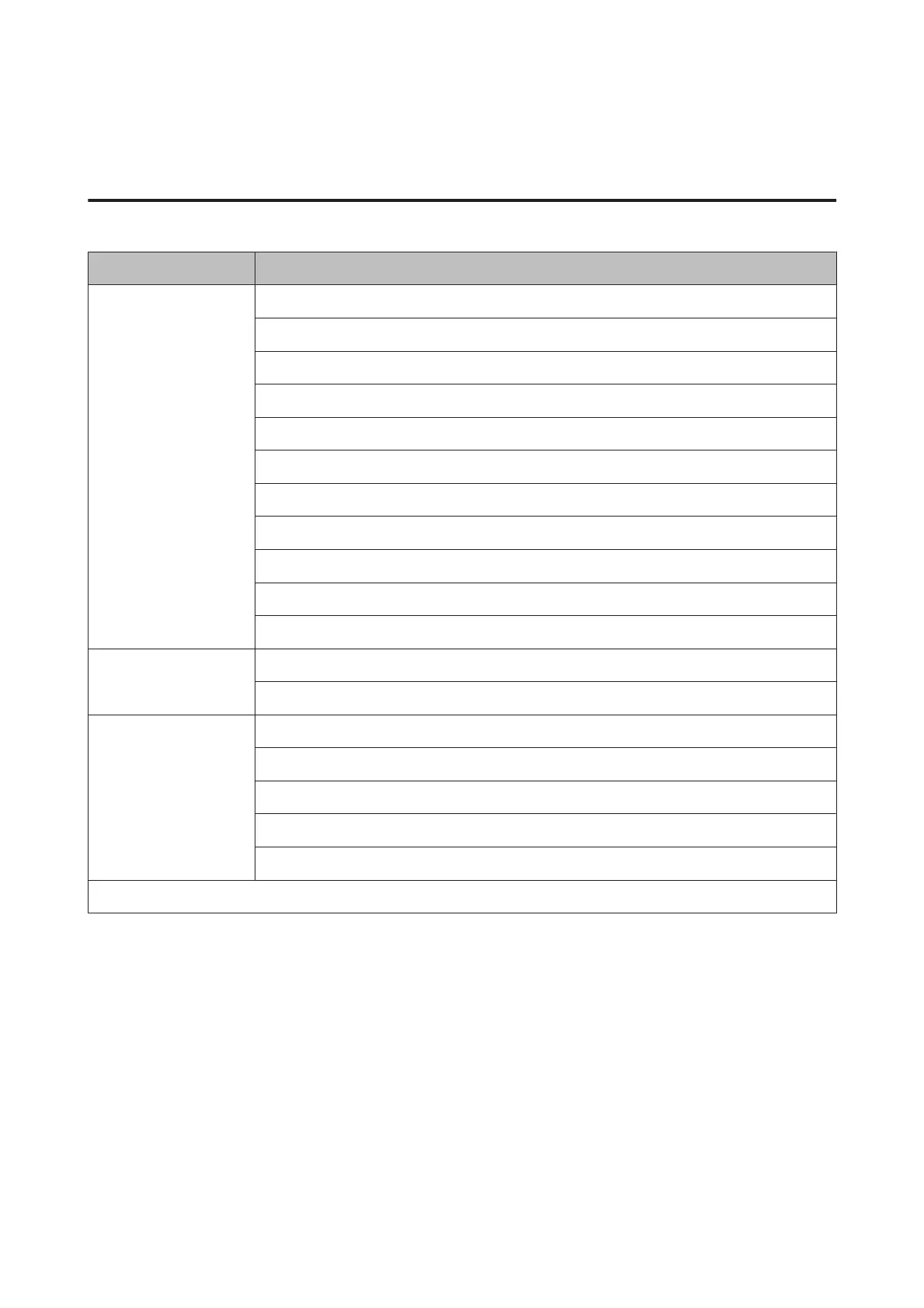
Help Mode
XP-710 Series/XP-810 Series
Menu Options
How to … Navigate Using the Touch Screen
Load Paper in the Rear Paper Feed Slot
Load Paper in the Paper Cassette 1
Load Paper in the Paper Cassette 2
Load an Envelope in the Rear Paper Feed Slot
Load Envelopes in the Paper Cassette
Load a CD/DVD
Place a Document in the ADF*
Place a Document on the Scanner Glass
Insert/Remove a Memory Card/USB Flash Drive
Adjust the Angle of the Control Panel
Ink Cartridges Check Ink Cartridges Status
Replace Ink Cartridge(s)
Troubleshooting Cannot Connect to a Wi-Fi
Paper Feeding Incorrectly
Poor Print Quality
Cannot Send or Receive Fax*
Cannot Scan to PC
Icon List
* This function is only available for XP-810 Series.
User’s Guide
Menu List of Control Panel
131













 To Next Page