Home
Epson
Printer
XP-710 Series
Page 174 (Removing Jammed Paper from the Paper Cassette)
Epson XP-710 Series - Removing Jammed Paper from the Paper Cassette
215 pages
Manual
Save Page as PDF
To Next Page
To Next Page
To Previous Page
To Previous Page
Loading...
C
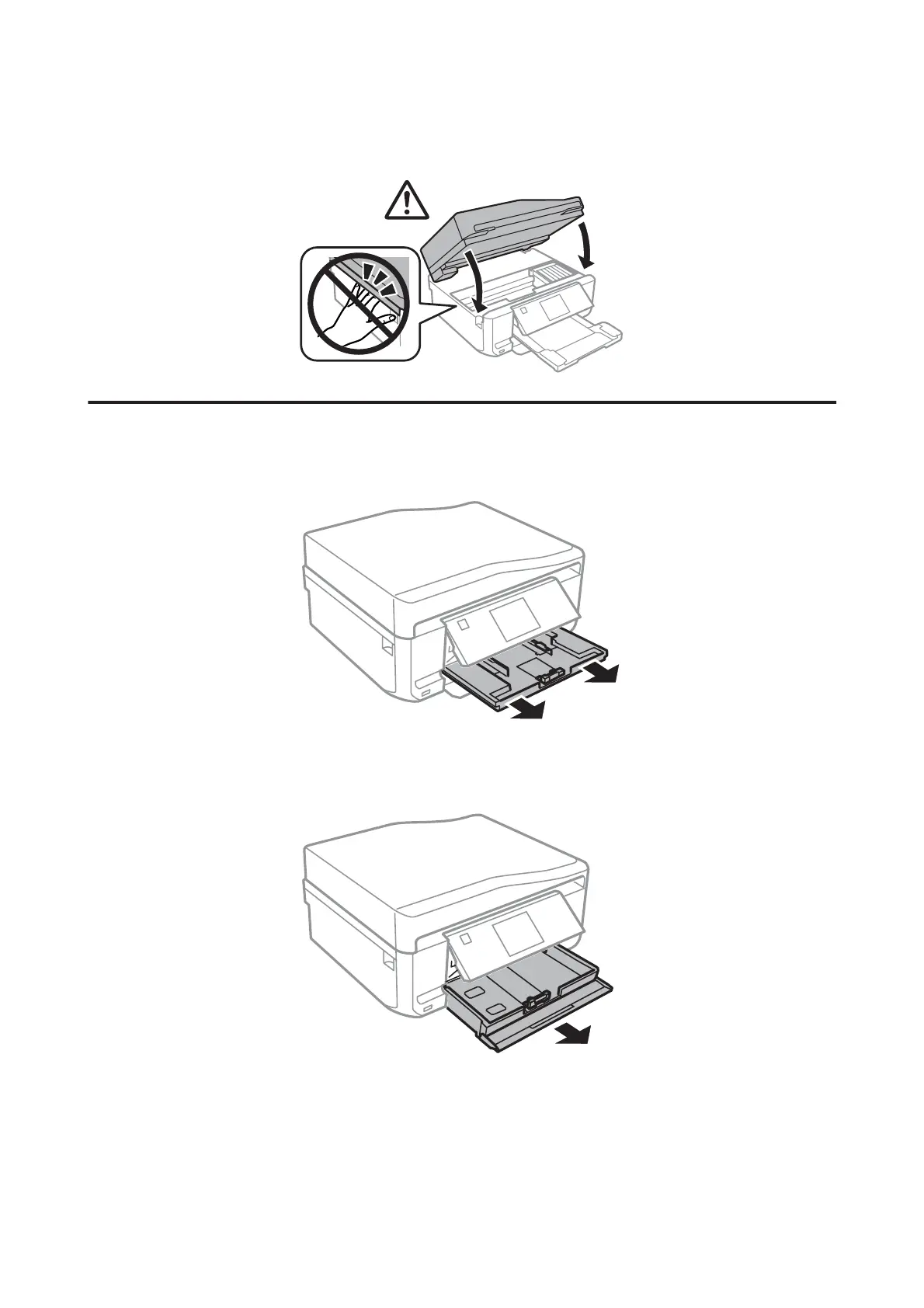
Close the scanner unit slowly.
Removing jammed paper from the paper cassette
A
Pull out the paper cassett
e1.
B
Pull out the paper cassett
e2.
C
Remove the jammed paper from th
e cassette.
User’s Guide
Troubleshooting for Printing/Copying
174
173
175
Table of Contents
Main Page
Copyright and Trademarks
2
Table of Contents
4
Introduction
8
Where to Find Information
8
Caution, Important and Note
8
Operating System Versions
8
Using Epson Connect Service
9
Important Instructions
10
Safety Instructions
10
Product Advisories and Warnings
10
Setting Up/Using the Product
11
Using the Product with a Wireless Connection
12
Using Memory Cards
12
Using the Touchscreen and Touchpad
12
Handling Ink Cartridges
13
Restrictions on Copying
13
Protecting Your Personal Information
13
Getting to Know Your Product
15
Available Features for Your Product
15
Product Parts
16
Notes Regarding the Control Panel and the Output Tray
19
Guide to the Control Panel
19
Button and LCD
20
Using the LCD Screen
21
Lights
22
Paper and Media Handling
23
Media
23
Storing Paper
23
Selecting Paper
23
Paper Type Settings on the LCD Screen
25
Paper Type Settings from the Printer Driver
26
Loading Paper
27
Into the Paper Cassette
27
Into the Rear Paper Feed Slot
34
Loading a CD/DVD
36
Removing a CD/DVD
38
Inserting a Memory Card
38
Placing Originals
39
Automatic Document Feeder (ADF)
39
Scanner Glass
42
Copying
45
Copying Documents
45
Basic Copying
45
2-Sided Copying
45
Layout Copying
46
Copy Mode Menu List
47
Printing
48
Basic Operation from the Control Panel
48
Printing Photos (XP-710 Series/Xp-810 Series)
48
Printing Photos (XP-610 Series)
49
Printing Photos from a Digital Camera
49
Print Photos Mode Menu List
51
Basic Operation from Your Computer
51
Printer Driver and Status Monitor
51
Basic Printing
53
Canceling Printing
57
Other Options
59
Printing Photos the Easy Way
59
Printing on CD/DVD
59
Product Presets (for Windows Only)
61
2-Sided Printing
62
Fit to Page Printing
64
Pages Per Sheet Printing
65
Sharing the Product for Printing
66
Setup for Windows
66
Setup for Mac os X
69
Scanning
70
Let's Try Scanning
70
Starting a Scan
70
Image Adjustment Features
72
Basic Scanning from the Control Panel
74
Scan Mode Menu List
75
Basic Scanning from Your Computer
75
Scanning in Full Auto Mode
75
Scanning in Home Mode
77
Scanning in Office Mode
79
Scanning in Professional Mode
81
Previewing and Adjusting the Scan Area
83
Various Types of Scanning
85
Scanning a Magazine
85
Scanning Multiple Documents to a PDF File
87
Scanning a Photo
90
Software Information
91
Starting Epson Scan Driver
91
Starting Epson Event Manager
92
Faxing
93
Introducing FAX Utility
93
Connecting to a Phone Line
93
About a Phone Cable
93
Using the Phone Line for Fax Only
94
Sharing Line with Phone Device
94
Setting the Line Type
96
Checking the Fax Connection
97
Setting up Fax Features
97
Setting up Speed Dial Entries
97
Setting up Group Dial Entries
98
Creating Header Information
99
Changing the Received Fax Output Settings
100
Sending Faxes
101
Sending Faxes by Entering a Number
101
Sending Faxes Using Speed Dial/Group Dial
102
Sending Faxes by Broadcasting
102
Sending a Fax at a Specified Time
103
Sending a Fax from a Connected Phone
104
Receiving Faxes
105
Setting up to Receive Faxes Automatically
105
Receiving Faxes Manually
106
Viewing Received Faxes on the LCD Screen
106
Receive a Fax by Polling
107
Printing Reports
108
Fax Mode Menu List
108
More Functions
109
Printing Origami Envelopes
111
More Functions Mode Menu List
112
Menu List of Control Panel
113
Copy Mode
113
XP-710 Series/Xp-810 Series
113
XP-610 Series
114
Print Photos Mode
114
XP-710 Series/Xp-810 Series
114
XP-610 Series
115
Scan Mode
117
XP-710 Series/Xp-810 Series
117
XP-610 Series
117
Fax Mode
118
More Functions Mode
119
XP-710 Series/Xp-810 Series
119
XP-610 Series
121
Wi-Fi Setup Mode
124
XP-710 Series/Xp-810 Series
124
XP-610 Series
124
Setup Mode
124
XP-610 Series
127
Setup Mode - Fax Settings
129
Help Mode
131
XP-710 Series/Xp-810 Series
131
XP-610 Series
132
Quiet Mode
132
Ink Cartridge Information
133
Replacing Ink Cartridges
134
Ink Cartridge Safety Instructions, Precautions
134
And Specifications
134
Safety Instructions
134
Precautions on Ink Cartridge Replacement
134
Ink Cartridge Specifications
135
Checking the Ink Cartridge Status
136
For Windows
136
For Mac os X
137
Using the Control Panel
138
Temporary Printing with Black Ink When Color Ink Cartridges or a Photo Black Ink Cartridge Are Expended
139
For Windows
139
For Mac os X
140
Conserving Black Ink When the Cartridge Is Low (for Windows Only)
142
Replacing an Ink Cartridge
142
Maintaining Your Product and Software
147
Checking the Print Head Nozzles
147
Using the Nozzle Check Utility for Windows
147
Using the Nozzle Check Utility for Mac os X
147
Using the Control Panel
148
Cleaning the Print Head
148
Using the Head Cleaning Utility for Windows
149
Using the Head Cleaning Utility for Mac os X
149
Using the Control Panel
150
Aligning the Print Head
150
Using the Print Head Alignment Utility for Windows
150
Using the Print Head Alignment Utility for Mac os X
151
Using the Control Panel
151
Setting/Changing Time and Region
152
Saving Power
153
For Windows
153
For Mac os X
153
Using the Control Panel
154
Quieter Printer Operations
154
For Windows
154
For Mac os X
154
Using the Control Panel
155
Making Network Service Settings
155
Cleaning the Product
156
Cleaning the Exterior of the Product
156
Cleaning the Interior of the Product
158
Transporting the Product
158
Checking and Installing Your Software
160
Checking the Software Installed on Your Computer
160
Installing the Software
161
Uninstalling Your Software
161
For Windows
162
For Mac os X
163
Transferring Data Using an External Storage Device
164
Precautions on Storage Devices
164
Copying Files between a Storage Device and Your Computer
164
Copying Files to Your Computer
164
Saving Files to a Storage Device
165
Error Indicators
167
Error Messages on the Control Panel
167
Troubleshooting for Printing/Copying
169
Diagnosing the Problem
169
Checking Product Status
169
Paper Jams
172
Removing Jammed Paper from the Rear Cover
172
Removing Jammed Paper from Inside the Product
173
Removing Jammed Paper from the Paper Cassette
174
Removing Jammed Paper from the Automatic Document Feeder (ADF)
175
Preventing Paper Jams
177
Reprinting after a Paper Jam (for Windows Only)
177
Print Quality Help
178
Horizontal Banding
179
Vertical Banding or Misalignment
179
Incorrect or Missing Colors
180
Blurry or Smeared Print
180
Miscellaneous Printout Problems
181
Incorrect or Garbled Characters
181
Incorrect Margins
181
Printout Has a Slight Slant
182
Size or Position of Copied Image Is Incorrect
182
Inverted Image
182
Paper or CD/DVD Only Prints Halfway or Is Blank
182
Printed Side Is Smeared or Scuffed
183
Printing Is too Slow
183
Paper Does Not Feed Correctly or the CD/DVD Tray Is Not Inserted Correctly
184
Paper Does Not Feed
184
Multiple Pages Feed
184
Paper Is Improperly Loaded
185
Paper Is Not Ejected Fully or Is Wrinkled
185
The CD/DVD Tray Is Ejected or Not Inserted
185
The Product Does Not Print
185
All Lights Are off
185
Lights Came on and then Went out
185
Only the Power Light Is on
186
An Ink Error Is Indicated after You Replace the Cartridge
186
Increasing the Print Speed (for Windows Only)
187
Troubleshooting for Scanning
189
Problems Indicated by Messages on the LCD Screen or Status Light
189
Problems When Starting a Scan
189
Using the Automatic Document Feeder (ADF)
189
Using the Button
190
Using Scanning Software Other than Epson Scan Driver
191
Problems When Feeding Paper
191
The Paper Gets Dirty
191
Multiple Sheets of Paper Are Fed
191
The Paper Jams in the Automatic Document Feeder (ADF)
191
Problems with Scanning Time
191
Problems with Scanned Images
192
Scan Quality Is Unsatisfactory
192
The Scanning Area or Direction Is Unsatisfactory
193
Problems Remain after Trying All Solutions
194
Troubleshooting for Faxing
195
Cannot Send and Receive Fax
195
Quality Problems (Sending)
195
Quality Problems (Receiving)
196
Answering Machine Cannot Answer Voice Calls
196
Incorrect Time
196
Product Information
197
System Requirements
197
For Windows
197
For Mac os X
197
Technical Specifications
197
Printer Specifications
197
Scanner Specifications
201
Automatic Document Feeder (ADF) Specifications
201
Fax Specifications
201
Network Interface Specification
202
Memory Card
202
Mechanical
203
Electrical
205
Environmental
206
Standards and Approvals
206
Interface
207
External USB Device
207
Where to Get Help
209
Technical Support Web Site
209
Contacting Epson Support
209
Before Contacting Epson
209
Help for Users in Europe
210
Help for Users in Australia
210
Related product manuals
Epson XP-7100
340 pages
Epson XP-750
2 pages
Epson XP-720 Series
202 pages
Epson XP-760 series
202 pages
Epson XP-700 Series
24 pages
Epson Small-in-One XP-700
40 pages
Epson Expression Photo XP-750
187 pages
Epson Expression Premium XP-700
190 pages
Epson XP-446
251 pages
Epson XP-430
275 pages
Epson XP-630
308 pages
Epson XP-400
245 pages













 To Next Page