VEHICLE OPERATION
3-3
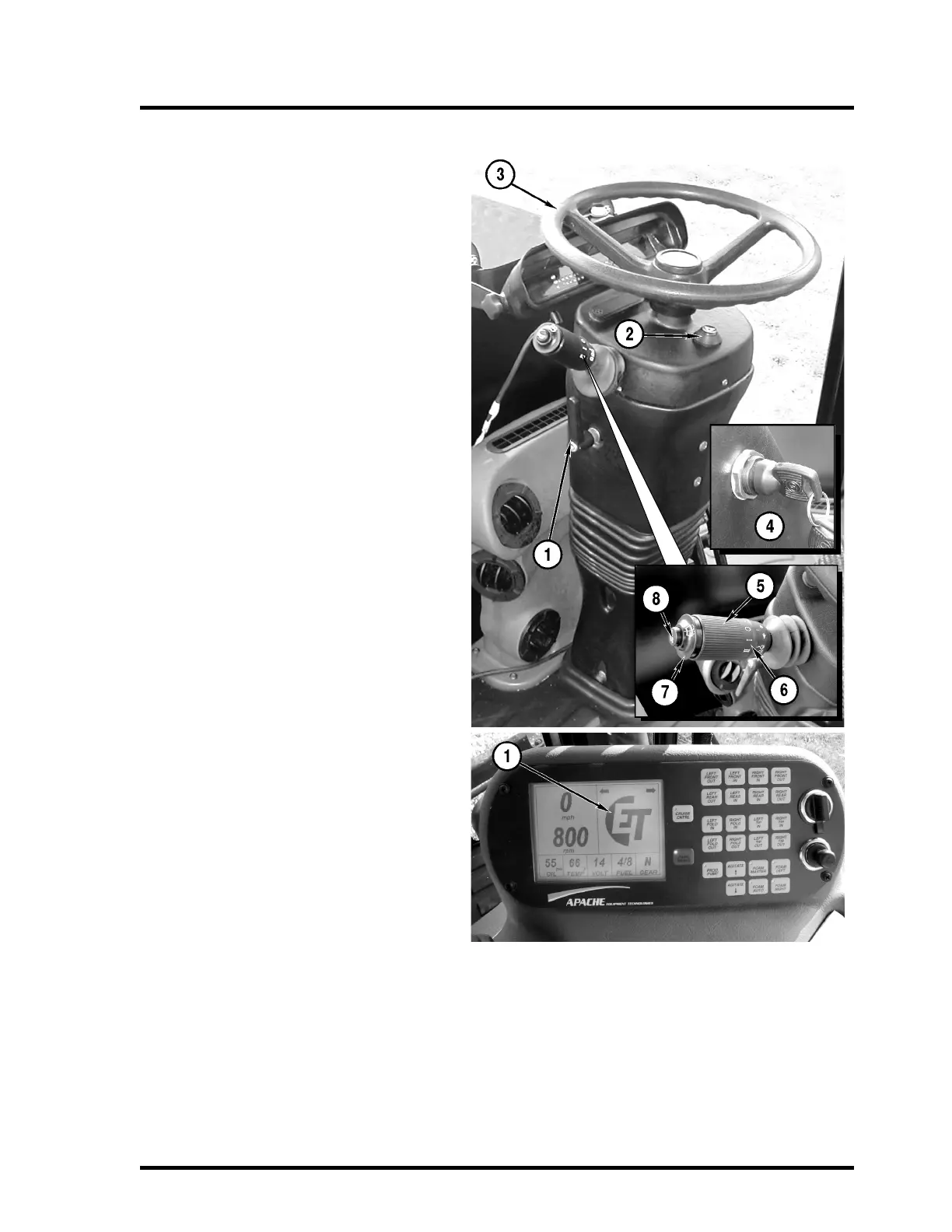
Steering Column
1. Adjustment Lever
Turn the lever counter-clockwise to
release the column. Set the tilt and tele-
scope to the desired position. Turn the
lever clockwise to lock the column.
2. Hazard Flasher Button
3. Steering Wheel
4. Key Switch
Shown in “OFF” position. See Starting
and Stopping the Engine for more details.
5. Turn Signal Lever
Push lever up for right turn signal, push
down for left turn signal.
6. Windshield Wiper Switch
Turn lever to the “I” position for low speed
wiper. Turn lever to the “II” position for
high-speed wiper.
7. Windshield Washer
Push ring to operate washer.
8. Horn Button
Push to sound horn.
Fault Code Indicator:
1. Fault Code Indicator on Console
When a fault code is logged, the ET logo
will disappear on the right side of the con-
sole display and one or more of the fol-
lowing fault codes will appear:
• Stop Engine
• Check Engine
• Water In Fuel
• Wait To Start
• Water Temperature
• Failed Fuse F11
• Low Oil Pressure
• Change Air Filter
• High Hyd Temp
• High Trans Temp
• Low Coolant
•ECU Failure
• SPN 00000 FMI 00
Refer to Fault Codes in the Maintenance Section; See “Cummins Engine Fault Codes” on page 6-1.



 To Next Page