41
PRIMACY 2
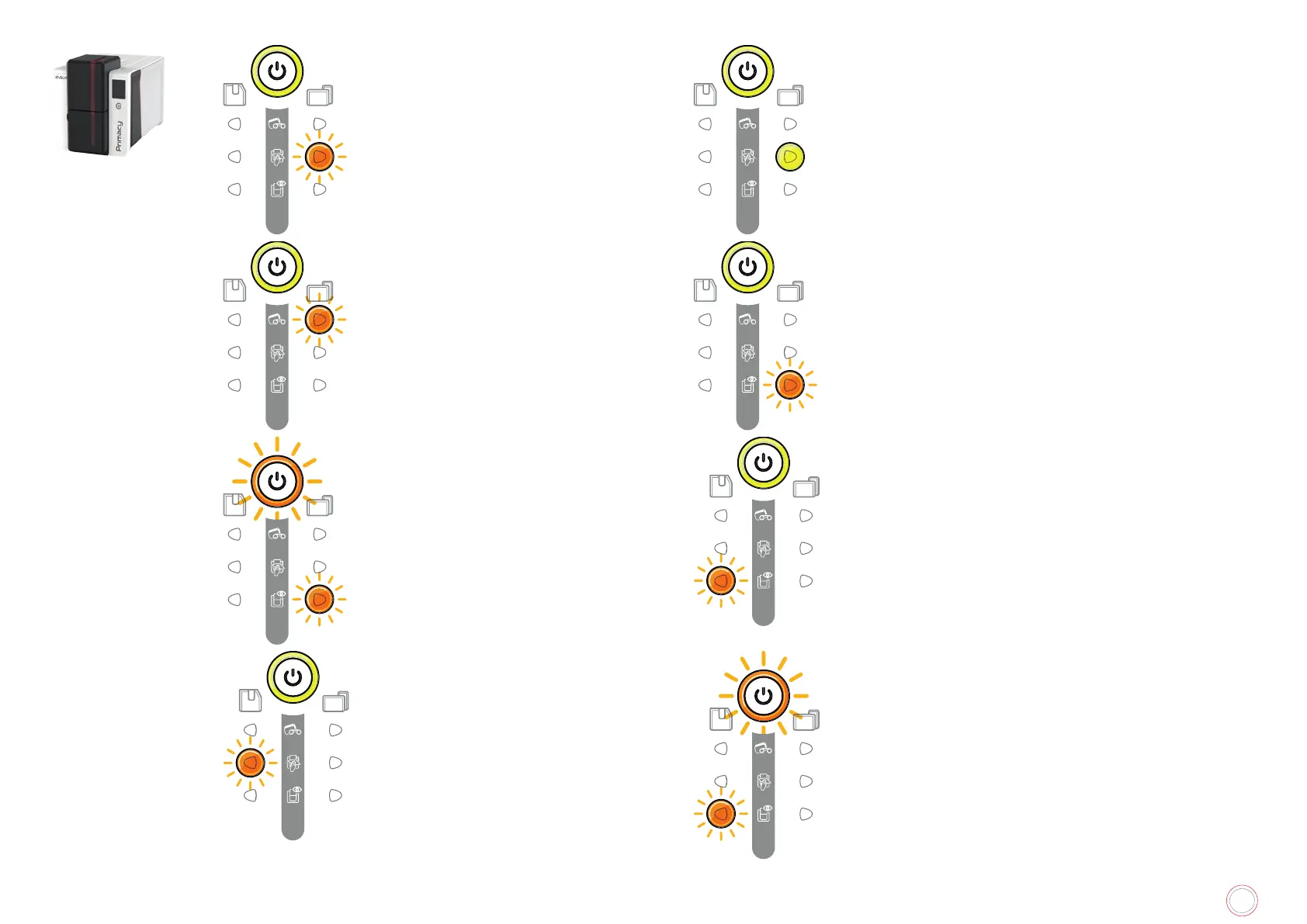
REGULAR CLEANING OF THE PRINTER
(after 1,000 cards inserted)
• The printer must be cleaned.
See “Regular printer cleaning”, page 51
ADVANCED CLEANING OF THE PRINTER
• The printer requires advanced cleaning.
See “Advanced cleaning”, page 55
CLEANING OF THE PRINTER
(after 1,200 cards inserted)
• The printer must be cleaned to avoid the risk of the warranty
being voided.
WAITING FOR CARD INSERTION OR REMOVAL
• The printer is waiting for a card to be inserted
or removed.
Insert a card or remove the card from the
manual feeder.
COOLING MODE
• The cooling system has been activated.
The printer pauses for a few seconds and restarts once it
is back at its normal operating temperature.
FIRMWARE UPDATE OF THE PRINTER
•
The printer is operational again after the
update.
REGULATING TEMPERATURE
• The lamination module heats up for a few seconds and is
reactivated when the required temperature is reached.
ADVANCED CLEANING OF THE LAMINATOR
• The lamination module requires advanced
cleaning.
See “Lamination module cleaning”, page
59
FIRMWARE UPDATE OF THE LAMINATOR
•
The printer is operational again after the update.



 To Next Page