67
PRIMACY 2
Replacing the print head
The print head is a sensitive component of the printer. It determines the print quality. A regular cleaning and an environment free from dust or other
particles ensure a lengthy useful life. See “Print head cleaning”, page 54 to clean the print head.
In case the user needs to replace the print head, Evolis designed a unique device that requires no tools for the replacement.
Before replacing the print head, contact your Evolis dealer. The dealer can give advise and supply a new print head if necessary.
NOTE
For more information on print head warranties, refer to the Evolis warranty available on myplace.evolis.com.
Unplug the printer before replacing the print head.
Avoid touching print heads with bare hands.
Follow the instructions carefully.
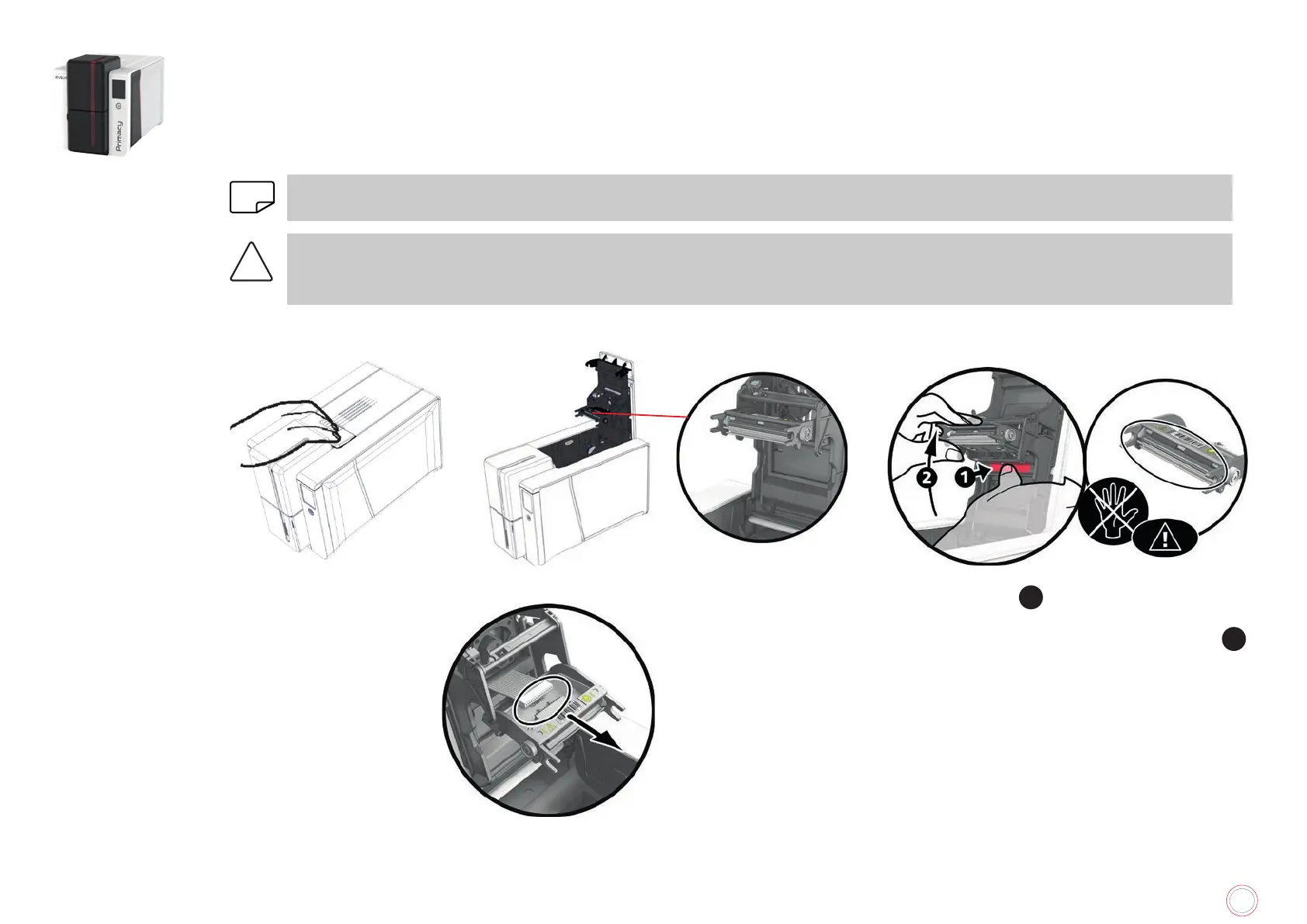
Removing the defective print head
1
Open the printer cover.
2
Locate the print head.
3
Press on the plastic part behind the print head
(pressure plate)
1
.
4
Pull on the print head with the other hand as
shown to free the lugs from the holding fork
2
.
5
Remove the lugs from their slots.
6
Tilt the head carefully downwards and disconnect the connector linked to the cable.
Avoid forcing the mechanism.



 To Next Page