Operation
10
Rivo™ I Controller EN
63
Evoqua Water Technologies GmbH | W3T597263 Issue 01-0624
10 OPERATION
10.1 Display and control elements
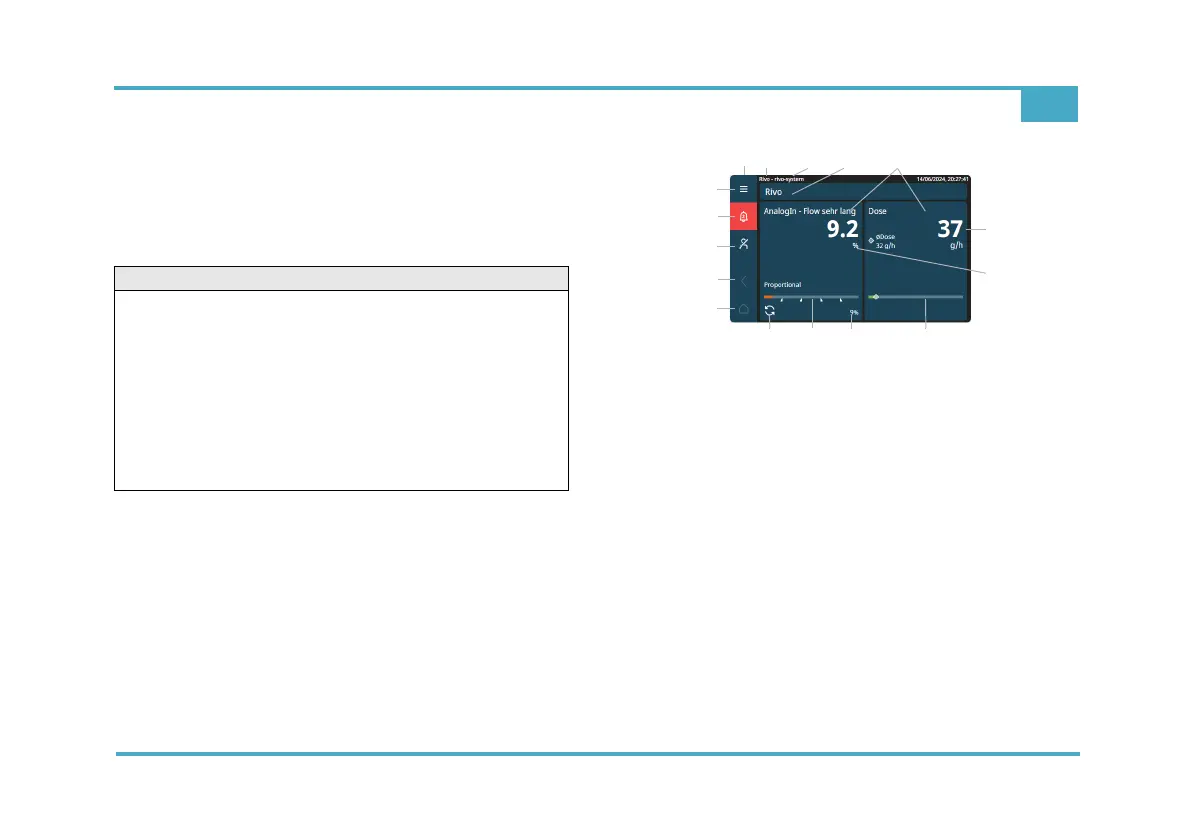
The colored graphic display with resistive touchscreen is
the display and control element.
Fig. 11 Main menu (example)
1 Menu bar
2 Device name (factory setting - cannot be changed)
3 Device name affix (input individual)
4 Application settings (input individual)
5 Menu field Measurement (depending on the
measuring module)
6 Display of dosing quantity (%/h)
7 Display of flow rate (liters/min, %/h)
8 Bar graph display with limit value indication
9 Control output/actuator feedback
10 Operation mode (example: Automatic mode)
11 Home key (main menu)
12 Back key
13 Login
14 Alarms - ACK
15 System menu
CAUTION
Damage to the touchscreen!
Touching the touchscreen with pointed or sharp objects
or striking the touchscreen with hard objects will damage
the glass surface and have a negative impact on the
functionality.
Possible consequence: Significant material damage.
• Only touch the touchscreen with your finger or a pen
(PDA pen for touch panels). The PDA pen is
included in accessory set EM E10.



 To Next Page