2. Commissioning
2-32
Festo P.BE-CPX-PNIO-E N en 1407c English
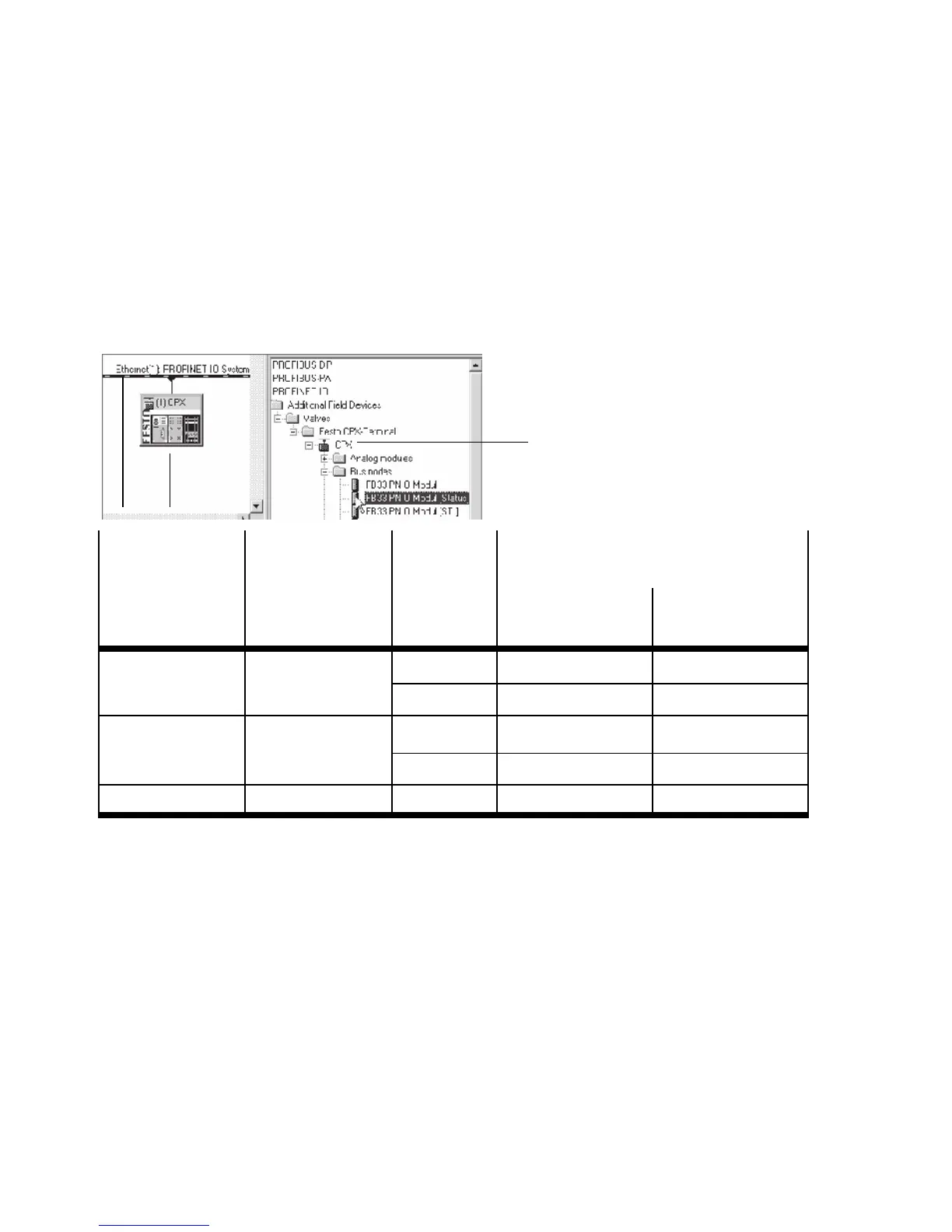
Example: With use of a bus node CPX-FB33 – with Rev 14
– in the Remote I/O operating mode, without the addition-
al function “Fast Start-up”, open the station symbol CPX
( 1 in Tab. 2/11).
1
3
2
CPX revision
code
of the bus node
Operating
mode
of the bus node
Additional
function
Fast S tart-up
(FSU)
Station symbol 1
(field device group)
FB33 (M12),
FB34 (RJ45)
FB35 (S CRJ)
Rev 12 … Rev 18 Remote I/ O
No CPX Rev 18 CPX-FO Rev 18
Yes, with FSU CPX FSU Rev 18 CPX-FO FSU Rev 18
Rev 20 … Rev 23 Remote I/O
No CPX CPX-FO
Yes, with FSU CPX FSU CPX-FO FSU
Rev 12 … Rev 23 Remote controller – CPX RC CPX-RC-FO
Tab. 2/11: S tati o n symbol selection as part of CPX-terminal confi guration
with Siemens SIMATIC STEP 7
5. Drag the selected station symbol 1 onto the bus line of
the PROFINET-IO system ( 2 in Tab. 2/11).
The CPX terminal is displayed as a symbol ( 3 ) and con-
nected to the bus of the PROFINET-IO system.



 To Next Page