66
20 Other functions
This menu allows the adjustment of all functions that modify the operation of auxiliary outputs and
compensations of idle speed, etc.
20.1 Internal datalogger
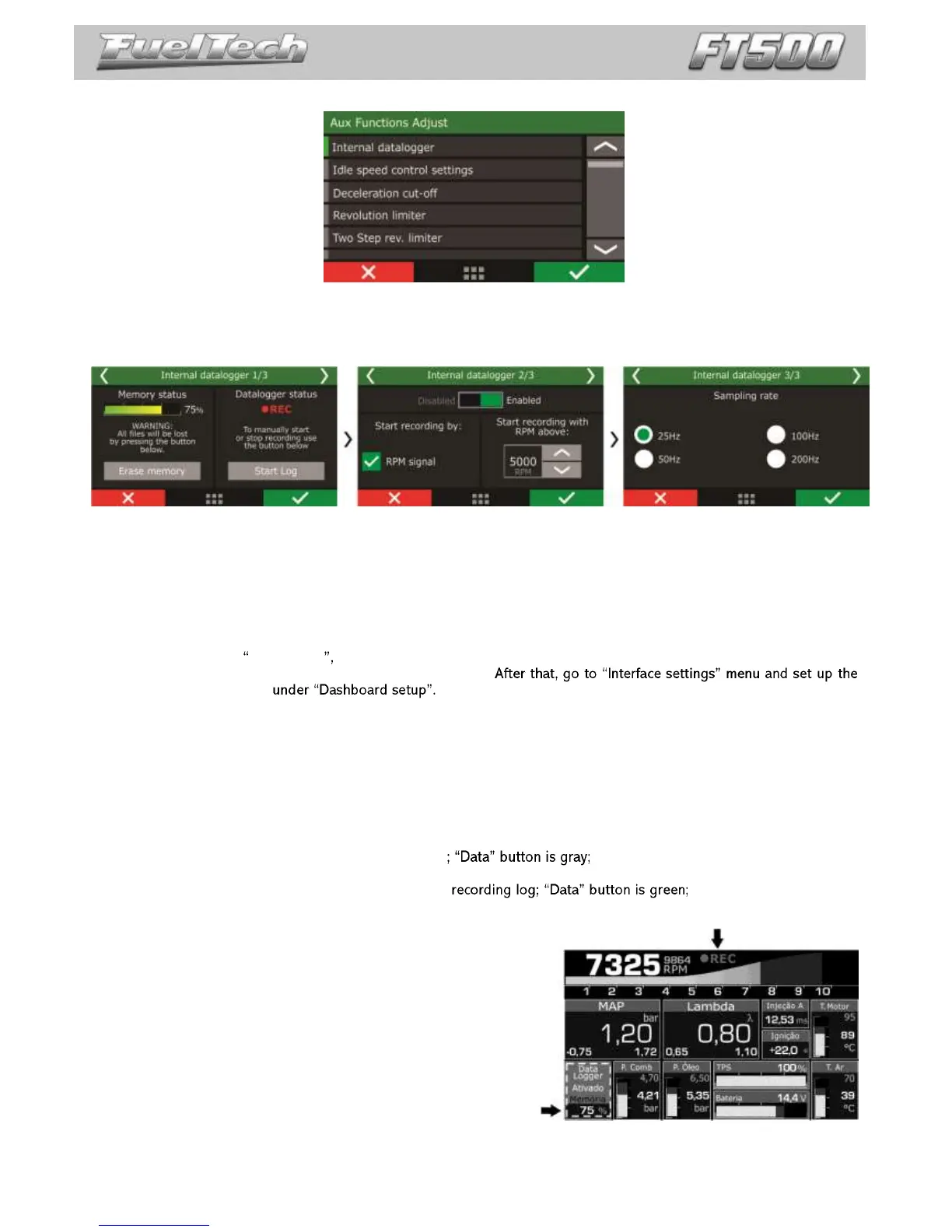
This function is used to log all the engine data read by FuelTech ECU. The Internal Datalogger can record up to
64 channels like: injection time (banks A and B), injectors duty cycle (banks A and B), timing, engine rpm, auxiliary output
status, TPS, coolant and air temperature, oil and fuel pressure, O2 sensor, two-step button, MAP sensor, camshaft
position sensor and battery voltage.
Log download and data analysis are done through the computer and FT Manager Software.
Log start and stop
The internal datalogger start and stop trigger can be set up by RPM signal or by a button on the ECU dashboard.
When selecting RPM Signal the log will be started only when the programmed RPM is reached. If a button on
the dashboard is preferred, select it on the internal datalogger.
datalogger button on a spot
Log is automatically stopped when memory is full, ECU is turned off or the button is pressed.
Sampling rate
The sample rate defines log quality. Higher the sample rates created more detailed logs, however, the logging
time available will be shortened. For competition vehicles, especially drag racing, it is recommended to use a high sample
rate to have high detail level on the log.
Internal datalogger status
At the Dashboard Screen of the ECU, a round icon is shown besides engine RPM. This icon indicates the Internal
Datalogger status.
o Gray Icon: Internal Datalogger disabled
o Dark Red Icon: Awaiting log start;
o Light Red Icon (REC blinking besides):
o Dark Red Icon (FULL written besides): memory full, data need to be downloaded to a PC in order to
continue recording.
Note: When memory is full, connect the ECU to the PC and
download the data through FT Manager Software.


 To Next Page