83
25 File manager
With the file manager it is possible to alternate between the 5
memories positions stored in the ECU. With this, you can have up to 5 totally
different calibrations for different fuels or engines.
25.1 FuelTech base map generator
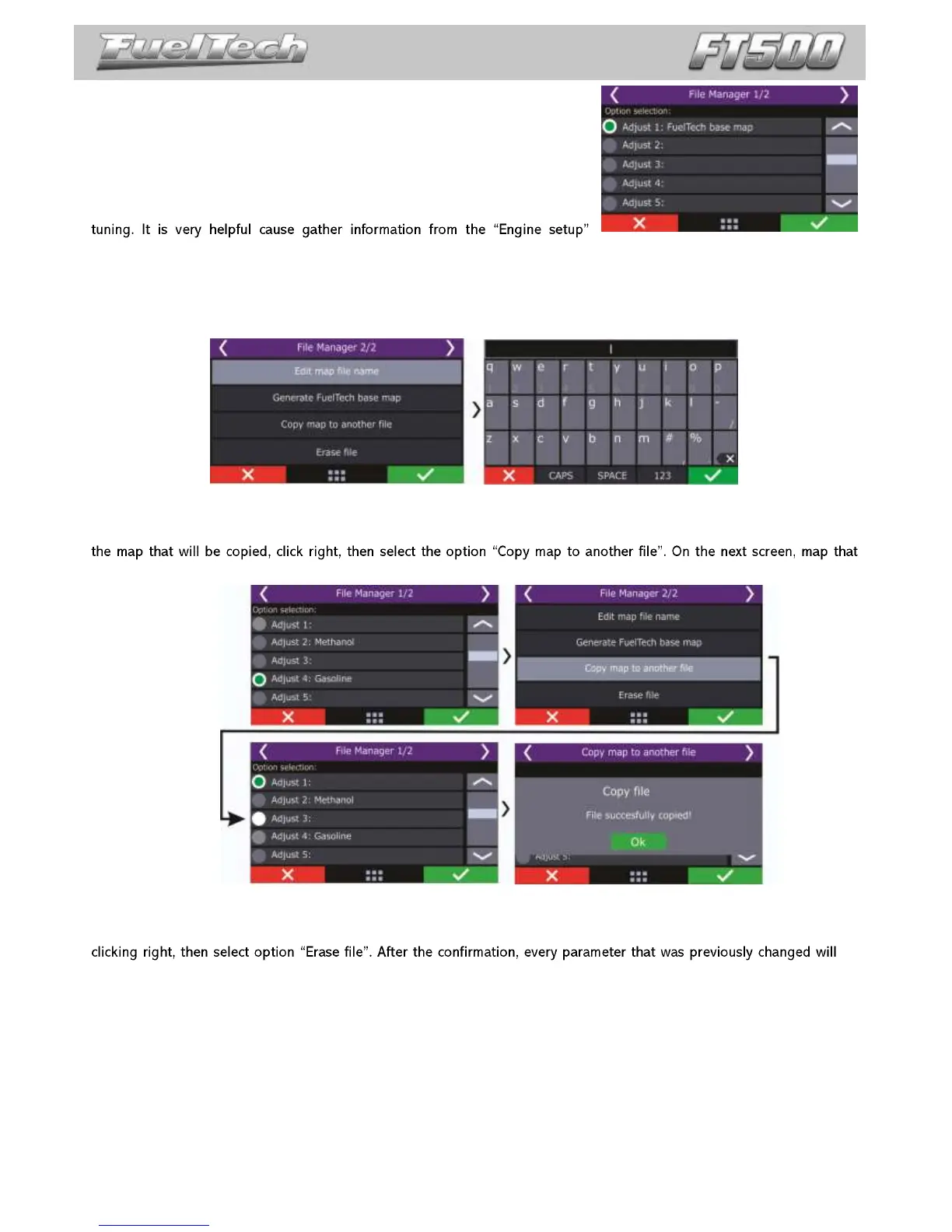
This function generates a base map that can be used to start engine
menu to create a base map more accurate to the engine needs.
Before using this function, make sure you have followed chapter 5 in this guide.
25.2 Edit map file name
Edit the file map name after generating the FuelTech base map.
25.3 Copy map to another file
This option copies a map that is already setup, to an empty position or to overwrite a previous map. First, select
will be copied is not shown, only the positions available to be overwritten.
25.4 Erase file
Map files that will no longer be used can be easily erased with this option. To erase a file, simply enter on in by
be
erased to factory default.


 To Next Page