81
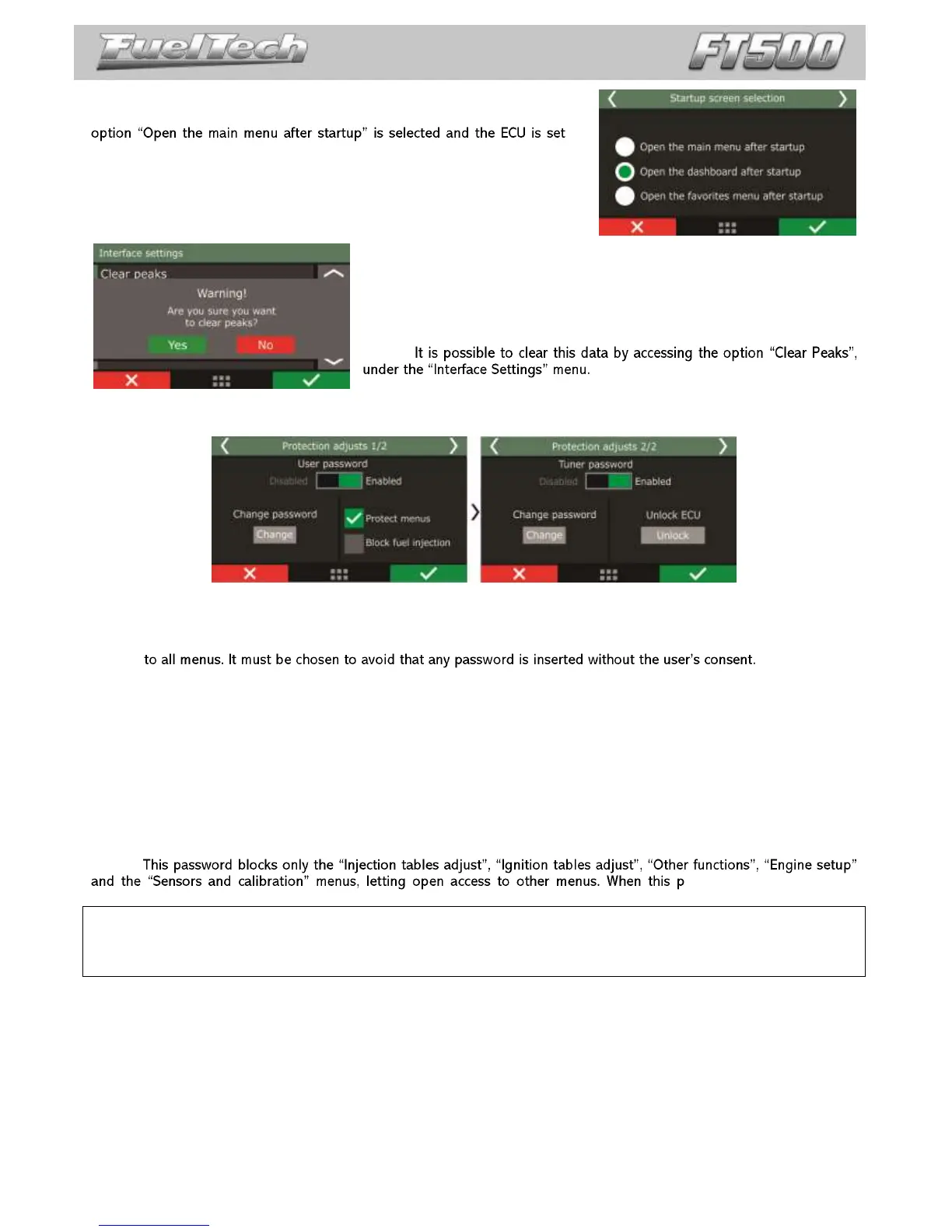
24.4 Startup screen selection
Select the screen shown right after the ECU is turned on. In case the
up
with a user password, the ECU will ask for the user password.
24.5 Clear peaks
At the Instrument Panel, values read by the sensors connected to the
module are displayed in real time. On the bottom of each box on the display,
the minimum (on the left) and maximum (on the right) values read by the
sensor are shown.
24.6 Protection setup
User password
Enabling the user password allows the setup of 4 different protection behaviors:
Protection disabled: this option must be selected when the user wants to insert a password but keep free access
Protect adjust parameters: with this option, all menus are protected against changes. Open access is given only
to the information read on the dashboard screen, and engine operation.
Block engine start: this option blocks the engine start only. All menus are open for visualization and tuning, but
the injection system is blocked until a password is inserted.
Protect adjust and engine start: in this mode, engine start and the visualization and changing of all ECU
parameters are blocked until a password is inserted.
When touching the screen to enter the menu and a password has already been set and protecting the menus, the
system will request it to be inserted to open access. Type the current password on the screen for access to be given until
injection is restarted or the password is disabled.
Tuner Password
assword is active, it is not
possible to change any fuel or ignition map.
Important Note: This ECU leaves FuelTech factory with all passwords disabled. Once inserting a protection password, the
user will be blocking other people from accessing the ECU and even blocking him/herself. When choosing a password,
make sure you will remember it, as, for safety matters, this password can only be changed at FuelTech factory (being the
owner in charge of shipping the ECU along with its purchase invoice).


 To Next Page