Messaging on Secury Server and Mobility Server I 33 / CS I55
80
GB
Receiving a message
Your handset rings with a special ring tone
1
.
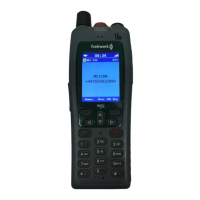
As far as this is available, the display shows the telephone number of the
sender and the message, e.g. «5371 Meeting in room 109».
As long as the message is visible, you have the following options:
Switching off the ring tone
R
Press the [R] key.
Deleting the message from the display
Press the left softkey. The message goes to the message list. The
idle display reads «mail».
Deleting the message definitively
0
Press the [0] key.
Manual acknowledgement
Important messages are preceded by an exclamation mark, e.g. « ! Mee-
ting in room 109». In the display «acknowledge» is flashing. You must
acknowledge this message manually. There are two options:
• Positive manual acknowledgement
Press the left softkey. The display reads «+++OK» when the positive
acknowledgement was successfully transmitted.
• Negative manual acknowledgement
Press the right softkey. The display reads «---OK» when the negati-
ve acknowledgement was successfully transmitted.
1
The ring tones are different, depending on the urgency.



 To Next Page