7. OTHER FUNCTIONS
7-13
7.8.3 Importing data from GP-32
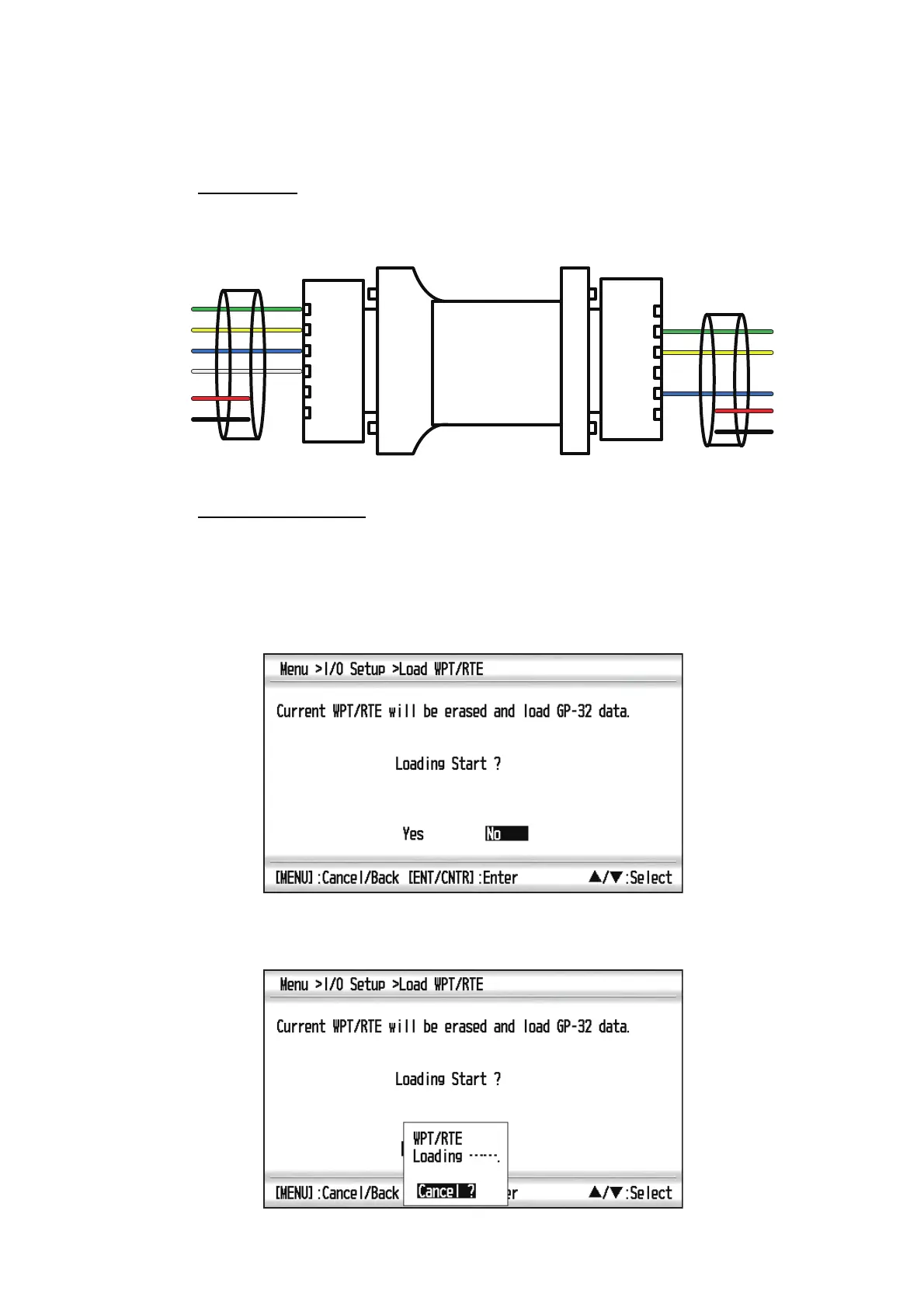
Waypoint and route data can be imported from GP-32 to GP-39 by connecting two GP
units with serial cable.
Preparation
1. Connect the serial cables of GP-32 and GP-39 as below illustration using the sig-
nal converter.
2. Turn on the display units of GP-32 and GP-39.
Operation on GP-39
1. Press the MENU key to show the main menu.
2. Select [I/O Setup], and press the ENT/CNTR key.
3. Select [Load WPT/RTE <- USB], and press the ENT/CNTR key.
4. Select [Yes] and press the ENT/CNTR key.
Note: After selecting [Yes], all waypoints and routes are erased from GP-32.
5. The below screen appears on the GP-39 display.
Green
Yellow
Blue
White
Red
Black
Green
Yellow
Blue
Red
Black
GP-32
GP-39
RS422 - RS232
12V+12V+12V+
12V
-12V-12V-
12V+12V+12V+
12V
-12V-12V-
T/R+
T/R-
RXD+
RXD-
GND
VCC
T/R+
T/R-
RXD+
RXD-
GND
VCC
Signal converter



 To Next Page