Title Status Bar Icons
Identifier GUID-8B8AA7E7-CB37-4048-A9CF-39C9F62A2CA0
Language EN-US
Description
Version 17
Revision 3
Changes Updating Transportation Mode to Usage Mode
Status Released
Last Modified 15/10/2021 09:21:10
Author tillmonmartha
Status Bar Icons
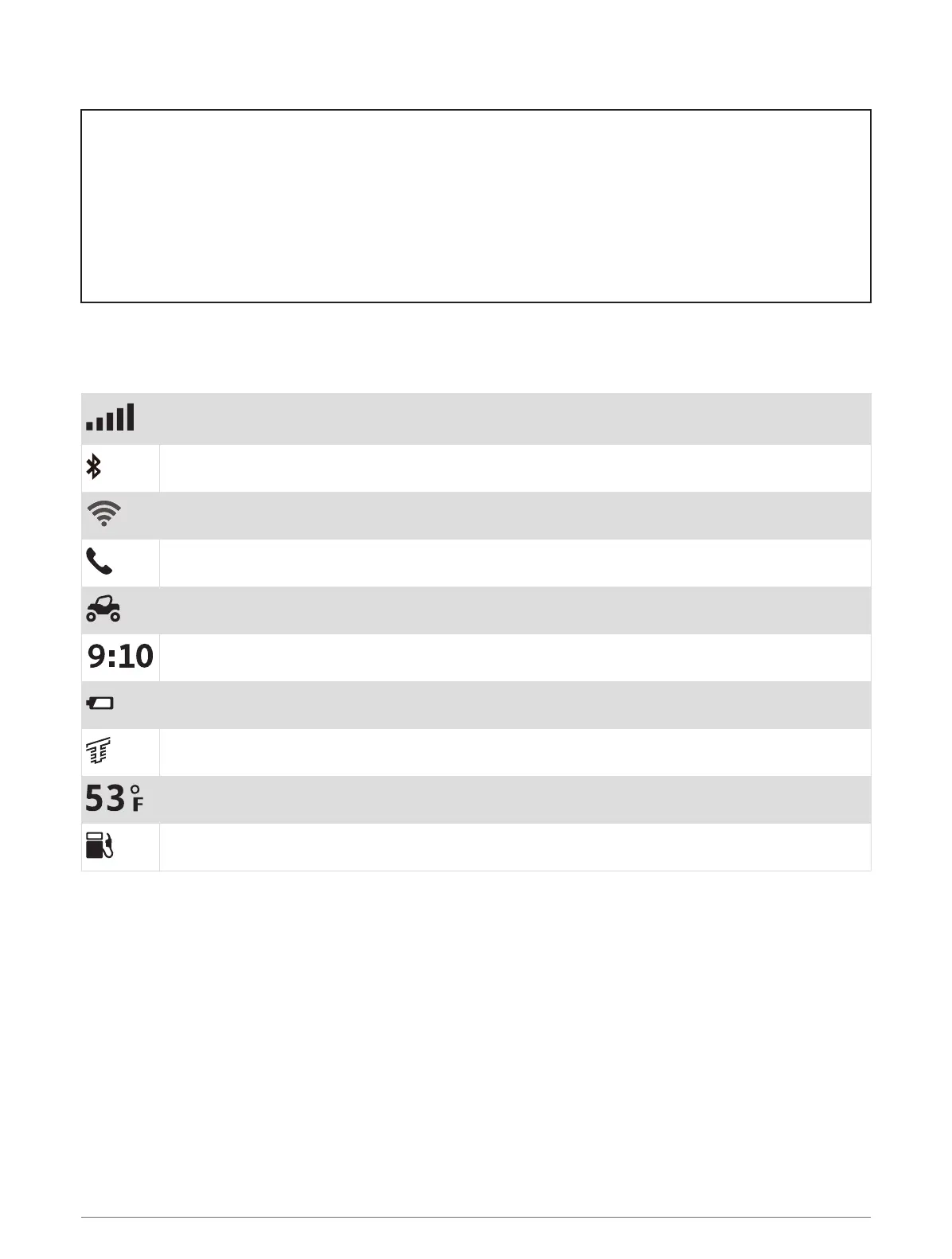
The status bar is located at the top of the main menu. The status bar icons display information about features
on the device. You can select some icons to change settings or view additional information.
GPS signal status. Hold to view GPS accuracy and acquired satellite information (Viewing GPS
Signal Status, page 166).
Bluetooth technology status. Select to view the Bluetooth settings (Bluetooth Settings, page 129).
Wi-fi signal strength. Select to change the wi-fi settings (Wi‑Fi Settings, page 129).
Connected to hands-free calling. Select to place a phone call (Hands-Free Calling, page 79).
Active vehicle profile. Select to view the vehicle profile settings.
Current time. Select to set the time (Setting the Time, page 132).
Battery charge level.
Tread app connection status (Pairing Your Phone and Headset, page 76).
Temperature. Select to view the weather forecast (Viewing the Weather Forecast, page 59).
Fuel status. Select to view fuel tracking information (Fuel Tracking, page 122).
4 Getting Started














 To Next Page