Title Connecting the Device to Vehicle Power
Identifier GUID-CBDBB56A-EE3C-4E77-A110-DEBDC21E24A8
Language EN-US
Description
Version 2
Revision 1
Changes No English change. Versioned to fix HR and HU.
Status Released
Last Modified 15/01/2021 11:43:23
Author pullins
Connecting the Device to Vehicle Power
Before you can connect the device to vehicle power, you must remove the warning tag from the +12V terminal
on the device.
You should always confirm all electrical connections are secure and will not come loose while operating the
device.
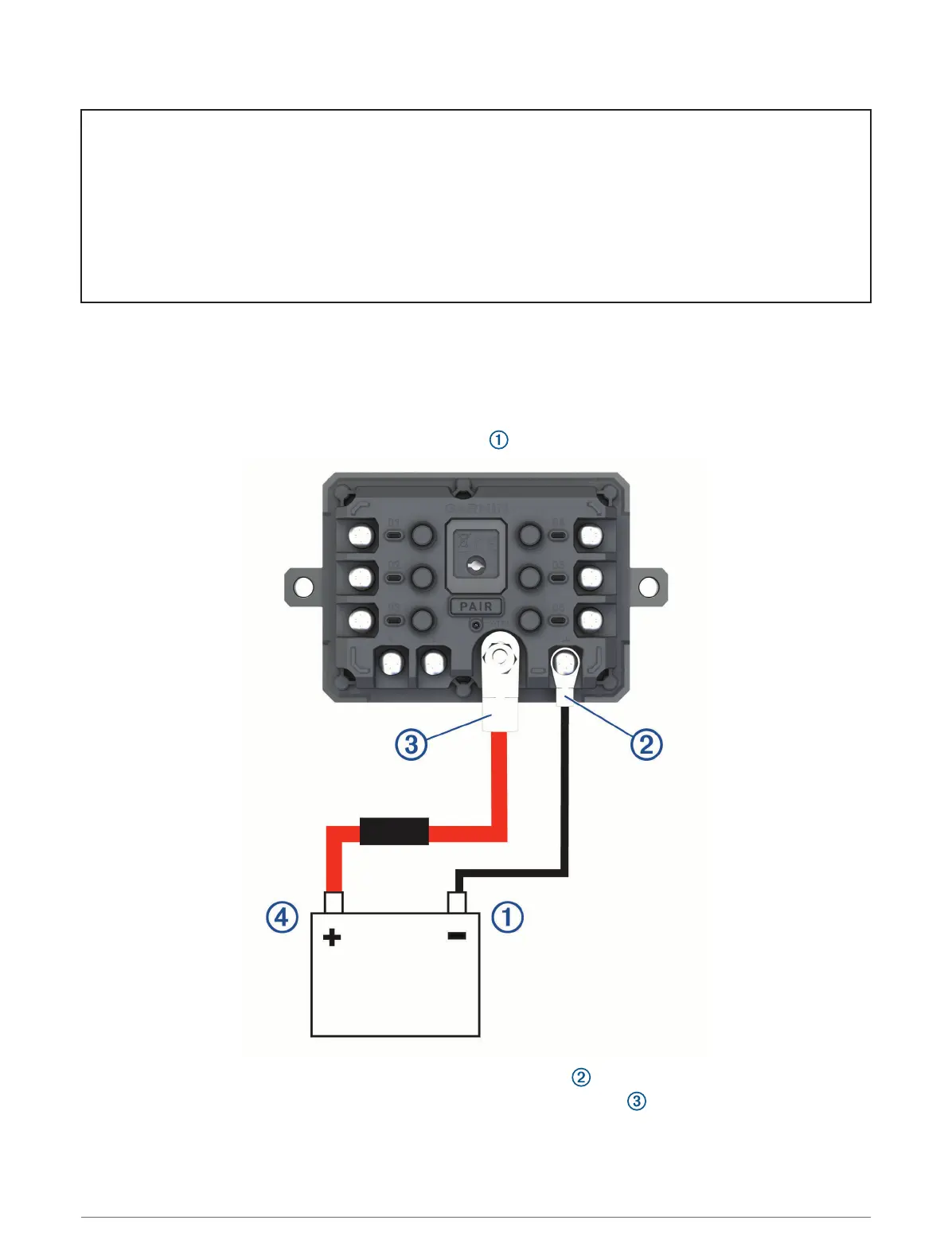
1 Connect the large ring end of the included ground wire to the negative terminal on the vehicle battery.
2 Connect the small ring end of the ground wire to the GND terminal on the device.
3 Connect the small ring end of the included 12V cable to the +12V terminal on the device.
4 Tighten the
3
/
8
in. nut on the +12V terminal to a maximum torque specification of 4.52 N-m (40 lbf-in.).
You should confirm the nut cannot be loosened by hand.
156 Appendix














 To Next Page