Title Mounting Your Device in an Automobile
Identifier GUID-0E6D9179-C128-4D5F-A8BF-695C7FC21F09
Language EN-US
Description
Version 7.1.1
Revision 6
Changes Updating the title for use in Tread and changing the image variable.
Status Released
Last Modified 15/12/2021 13:41:44
Author hizerdanielle
Mounting Your Tread Base Edition in an Automobile
NOTICE
Before mounting the device, check the local laws pertaining to windshield mounting.
WARNING
Do not use the suction cup mount on a motorcycle.
See the Important Safety and Product Information guide in the product box for product warnings and other
important information.
NOTE: The automobile mount is not included with all device models. Go to garmin.com to purchase optional
accessories.
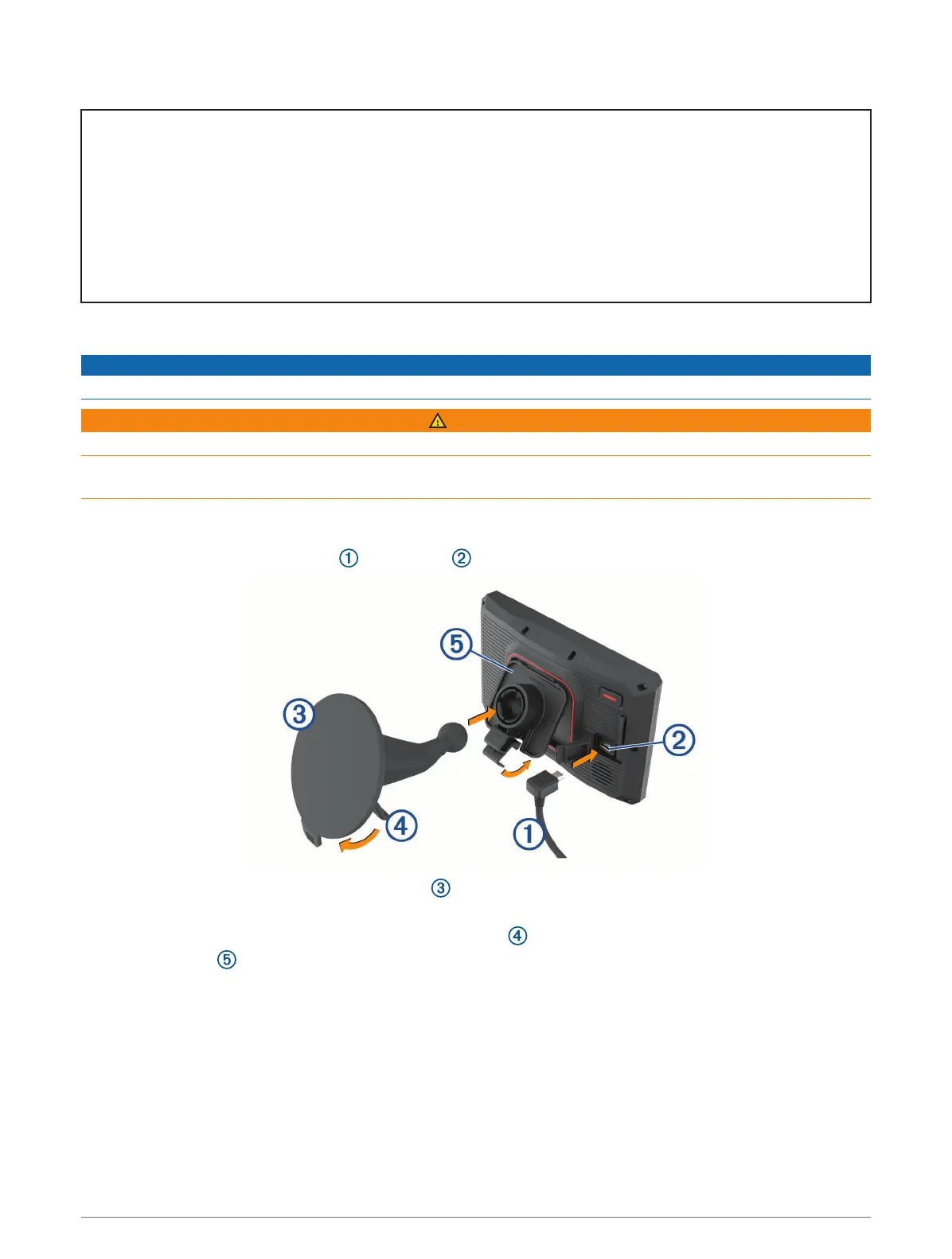
1 Plug the automotive power cable into the port on the device.
2 Remove the clear plastic from the suction cup .
3 Clean and dry your windshield and the suction cup with a lint-free cloth.
4 Press the suction cup to the windshield, and flip the lever back toward the windshield.
5 Snap the cradle onto the suction cup arm.
6 Fit the bottom of your device into the cradle.
7 Press the device into the cradle until it snaps into place.
8 Plug the other end of the automotive power cable into a power outlet.
Appendix 149














 To Next Page