Title Installing a Memory Card for Maps and Data (Locking SD card)
Identifier GUID-7FF30E4E-3C5A-4AB2-9B56-FCA856B66D8F
Language EN-US
Description
Version 2
Revision 3
Changes Updating orientation of SD card slot cover
Status Released
Last Modified 02/01/2020 17:19:05
Author tillmonmartha
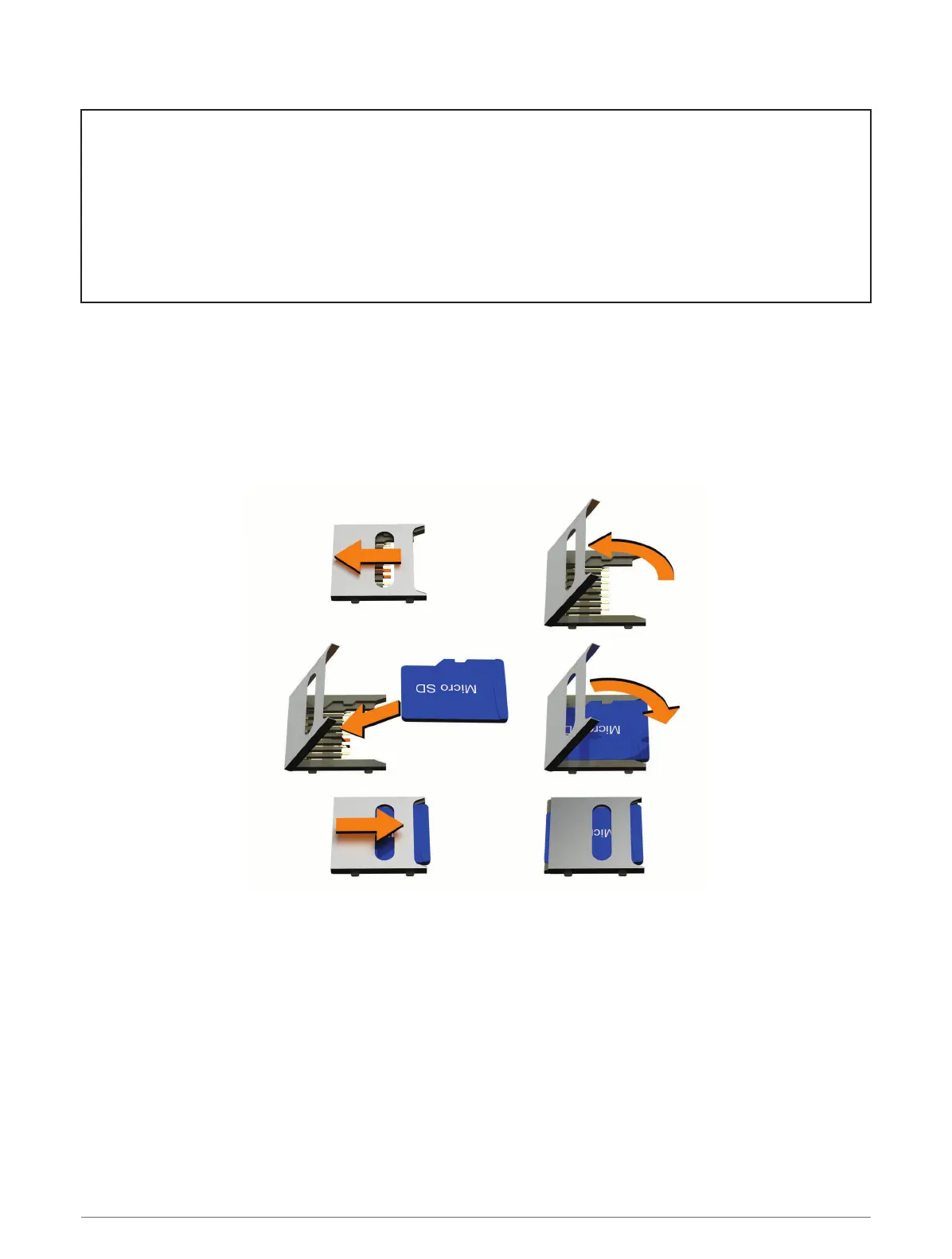
Installing a Memory Card for Maps and Data
You can install a memory card to increase the storage space for maps and other data on your device. You can
purchase memory cards from an electronics supplier, or go to www.garmin.com/maps to purchase a memory
card with pre-loaded Garmin mapping software. The device supports microSD memory cards from 4 to 256 GB.
1 Locate the map and data memory card slot on your device (Device Overview, page 2).
2 Pull up the weather cap from the microSD card slot.
3 Slide the microSD card slot cover toward the edge of the device.
4 Pull the microSD card slot cover up.
5 Insert a microSD card into the slot.
NOTE: Confirm the microSD card fits flush against the card slot contacts.
6 Close the SD card cover.
7 Slide the SD card cover toward the center of the device.
Appendix 161














 To Next Page