Title Installing the Roll Bar Mount
Identifier GUID-5C7C5447-144C-4900-8D0F-F30C53287982
Language EN-US
Description
Version 2
Revision 3
Changes Removing "Radio" from Group Ride Mount
Status Released
Last Modified 13/10/2021 09:40:37
Author hizerdanielle
Mounting the Device on a Roll Bar
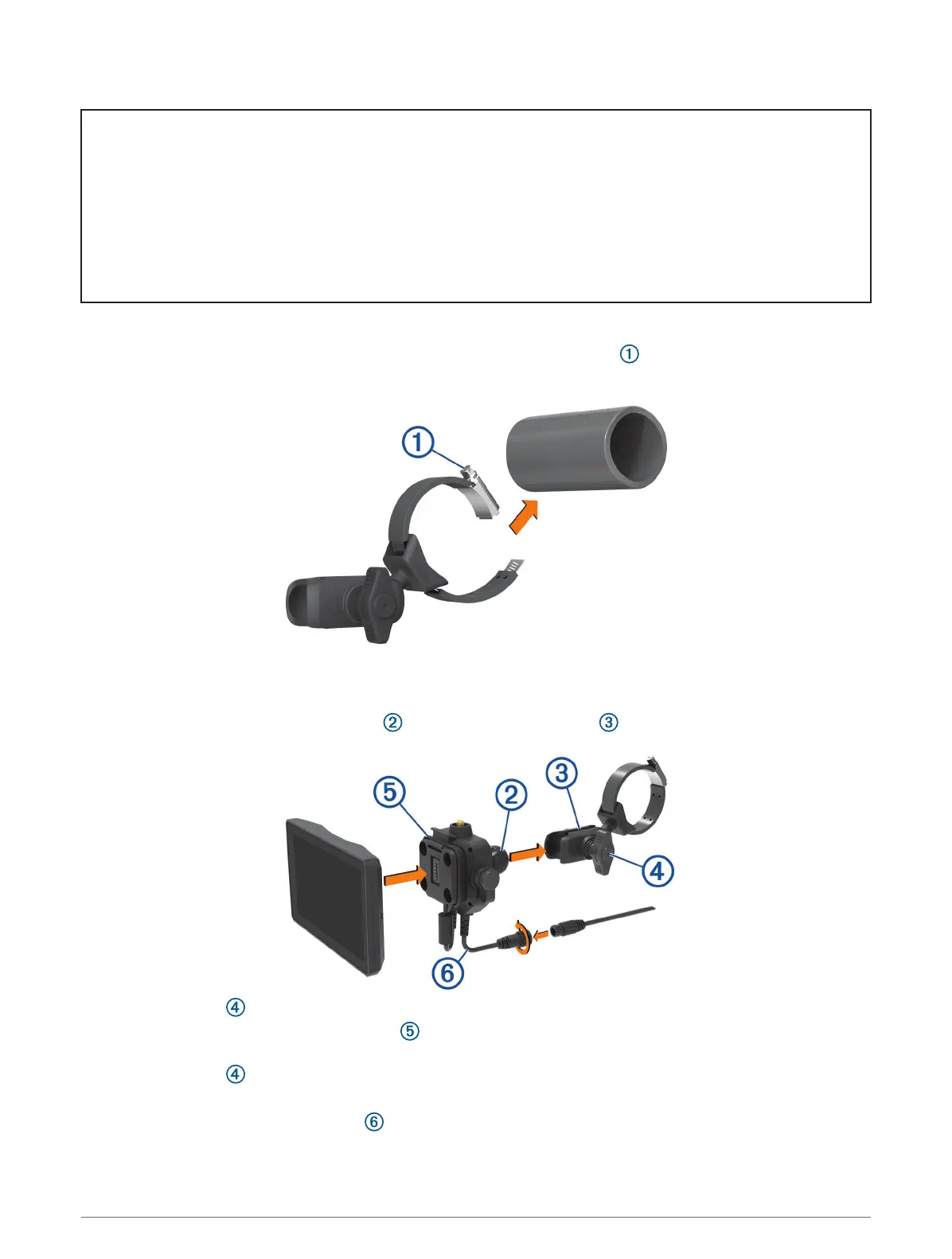
1 Using a flat head screwdriver or
9
/
32
in. (7 mm) nut driver, loosen the bolt on the roll bar mount until the
ring separates.
2 Place the mount around the roll bar.
3 Tighten the bolt on the mount until the ring is secure.
4 Insert the ball on the Group Ride mount into the double-socket arm .
5 Tighten the knob slightly.
6 If necessary, rotate the Group Ride mount so the Garmin logo faces up, and adjust the mount for better
viewing and operation.
7 Tighten the knob to secure the mount.
8 Press the device into the Group Ride mount until it snaps into place.
9 Connect the Group Ride power cable to the connector on the vehicle wiring harness.
10 Tighten the collar around the connected power cables.
Installation 11














 To Next Page