
 To Next Page

B
Brian NguyenSep 15, 2025
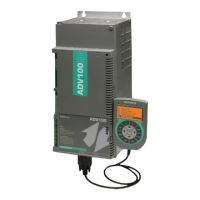
What to do if my gefran SIEIDrive ADV100 Controller displays an external alarm?
- YyhamptonSep 16, 2025
If your Gefran Controller displays an external alarm, check that the terminal screws are tight.

What to do if my gefran SIEIDrive ADV100 Controller displays an external alarm?
If your Gefran Controller displays an external alarm, check that the terminal screws are tight.
What to do if my Gefran Controller displays a 'Heatsink temperature too high or too low' alarm?
If your Gefran Controller displays a 'Heatsink temperature too high or too low' alarm, it signifies that the temperature has exceeded the upper or lower limit set for the linear temperature transducer. You should: - Verify the correct operation of the cooling fan. - Check that the heatsinks are not clogged. - Check that the openings for the cabinet cooling air are not blocked.
What to do if my gefran SIEIDrive ADV100 Controller displays an intake air temperature too high alarm?
If your Gefran Controller shows an intake air temperature too high alarm, check correct fan operation.
Why does my Gefran Controller show a motor overtemperature alarm?
A motor overtemperature alarm on your Gefran Controller can be due to several reasons: - Load cycle too heavy. - The motor is installed in a place where the ambient temperature is too high. - If the motor is provided with a blower: the fan is not working. - If the motor is not provided with a blower: the load is too high at slow speeds. Cooling the fan on the motor shaft is not sufficient for this load cycle. - The motor is used at less than the rated frequency, causing additional magnetic losses. To resolve this, change the processing cycle or use a cooling fan to cool the motor.
What does it mean if my gefran SIEIDrive ADV100 shows the number of attempted automatic restarts after the Undervoltage alarm has exceeded the set PAR 4650 UVRep attempts value?
If your Gefran Controller shows that the number of attempted automatic restarts after the Undervoltage alarm has exceeded the set PAR 4650 UVRep attempts value, it means there are too many Undervoltage alarms. Adopt the proposed solutions for the Undervoltage alarm.
What to do if my Gefran Controller displays an emergency stop alarm?
If your Gefran Controller displays an emergency stop alarm, eliminate the reason for which the Stop key on the keypad was pressed and reset the drive.
What does it mean if my gefran SIEIDrive ADV100 shows 'The number of attempted automatic restarts after the Undervoltage alarm has exceeded the set PAR 4650 UVRep attempts'?
This indicates that there have been too many Undervoltage alarms. Adopt the proposed solutions for the Undervoltage alarm.
What to do if my gefran SIEIDrive ADV100 displays an instantaneous overcurrent in the IGBT bridge alarm?
Switch the drive off and then switch it on again. If the alarm persists, contact the technical service centre.
What to do if my Gefran Controller shows a DC link undervoltage alarm?
If your Gefran Controller is showing a DC link undervoltage alarm, the voltage arriving at the drive power section is too low compared to the minimum threshold relating to the 560 Mains voltage parameter setting. This could be due to the mains voltage being too low, overextended voltage drops, or poor cable connections. Check the connections.
What to do if my gefran SIEIDrive ADV100 shows a DC link overvoltage alarm due to energy recovered?
If your Gefran Controller displays a DC link overvoltage alarm, it means the voltage arriving at the drive power section is too high compared to the maximum threshold relating to the PAR 560 Mains voltage parameter setting. You can try to extend the deceleration ramp or use a braking resistor between terminals BR and C to dissipate the recovered energy.
Lists and describes parameters for monitoring drive status and operational values.
Details parameters for identifying and configuring the drive, including version and series.
Covers parameters for saving settings, setting regulation mode, and managing access.
Details how speed and torque references are adapted and set using various input sources.
Explains how to enter motor plate data for regulation and self-tuning procedures.
Covers parameters for encoder pulses, supply, input configuration, and signal checks.
Explains parameters for setting proportional, integral, and derivative gains for speed regulation.
Details parameters for current, flux, and voltage regulator gains and time constants.
Covers parameters for setting torque current limits and selection of torque limit behavior.
Details various functional blocks and features of the drive for enhanced control.
Defines how alarms affect drive behavior, including status, reaction types, and auto-restart.
 General
| Category | Controller |
|---|---|
| Safety | STO (Safe Torque Off) |
| Protection class | IP20 |
| Switching frequency | 16 kHz |
| Fieldbus | CANopen, Modbus RTU |
| Communication interface | RS485 |
| Storage temperature range | -25°C to 70°C |
| Relative humidity | 5% to 95% (non-condensing) |
| Dimensions | Varies by model |
| Weight | Varies by model |