EasyManua.ls Logo

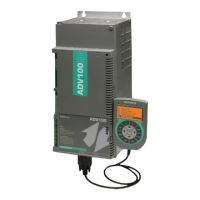
gefran SIEIDrive ADV100 - User Manual

gefran SIEIDrive ADV100
172 pages
Print Icon
To Next Page IconTo Next Page
Loading...
.... Functions description
and parameters list
SIEIDrive
Field oriented
vector AC Drive
ADV100

Table of Contents

Other manuals for gefran SIEIDrive ADV100

Questions and Answers

  • M
    michaelbrownSep 3, 2025
    What to do if my gefran SIEIDrive ADV100 is showing a motor overload?
    • T
      Tony NelsonSep 3, 2025
      If your Gefran Controller indicates a motor overload, it means the current absorbed during operation is greater than that specified on the motor data plate, and the overload threshold of the accumulator of the I²t motor thermal image has been exceeded. Try to reduce the motor load or increase the size of the motor.
  • T
    Tabitha LongSep 2, 2025
    What to do if my Gefran Controller shows a DC link undervoltage alarm?
    • A
      andrewholdenSep 2, 2025
      If your Gefran Controller is showing a DC link undervoltage alarm, the voltage arriving at the drive power section is too low compared to the minimum threshold relating to the 560 Mains voltage parameter setting. This could be due to the mains voltage being too low, overextended voltage drops, or poor cable connections. Check the connections.
  • P
    Peter BowenSep 1, 2025
    What to do if my gefran SIEIDrive ADV100 Controller displays an instantaneous overcurrent protection intervention alarm?
    • D
      Devin SchmittSep 1, 2025
      If you are getting an instantaneous overcurrent protection intervention alarm on your Gefran Controller, it could be due to incorrect current regulator parameter settings or a short circuit between phases or a ground fault on the drive output. Check the current regulator parameters and the wiring towards the motor.
  • C
    Connie JacksonAug 31, 2025
    What to do if my gefran SIEIDrive ADV100 shows a DC link overvoltage alarm due to energy recovered?
    • D
      David WallsAug 31, 2025
      If your Gefran Controller displays a DC link overvoltage alarm, it means the voltage arriving at the drive power section is too high compared to the maximum threshold relating to the PAR 560 Mains voltage parameter setting. You can try to extend the deceleration ramp or use a braking resistor between terminals BR and C to dissipate the recovered energy.
  • M
    Michael ChapmanAug 31, 2025
    What to do if my gefran SIEIDrive ADV100 Controller displays an error in the communication between Regulation and Encoder feedback card?
    • G
      gregory56Aug 31, 2025
      If your Gefran Controller displays an error in the communication between Regulation and Encoder feedback card, check that it has been inserted correctly.
  • D
    debra88Aug 30, 2025
    What to do if my gefran SIEIDrive ADV100 Controller displays an error in the communication between Regulation and I/O expansion card in slot 1?
    • Y
      Yolanda AllenAug 30, 2025
      If your Gefran Controller displays an error in the communication between Regulation and I/O expansion card in slot 1, check that it has been inserted correctly.
  • G
    Gary Koch DDSAug 29, 2025
    What should I do if the gefran SIEIDrive ADV100 Controller intake air temperature is too high?
    • S
      Sean SullivanAug 29, 2025
      If the intake air temperature is too high on your Gefran Controller, check the correct fan operation.
  • M
    martinezannaAug 28, 2025
    What to do if my gefran SIEIDrive ADV100 displays a heatsink temperature too high or too low alarm?
    • P
      Patricia AdamsAug 28, 2025
      If your Gefran Controller displays a heatsink temperature that is too high or too low, verify the correct operation of the cooling fan, check that the heatsinks are not clogged, and ensure that the openings for the cabinet cooling air are not blocked.
  • W
    whitejeffreyAug 27, 2025
    What to do if my gefran SIEIDrive ADV100 Controller displays a heatsink temperature too high alarm?
    • M
      Michael MooreAug 27, 2025
      If your Gefran Controller displays a heatsink temperature too high alarm, verify the correct operation of the cooling fan and check that the heatsinks are not clogged.
  • N
    Nathaniel BoydAug 26, 2025
    Why does my Gefran Controller show a motor overtemperature alarm?
    • B
      Brooke BlackburnAug 27, 2025
      A motor overtemperature alarm on your Gefran Controller can be due to several reasons: - Load cycle too heavy. - The motor is installed in a place where the ambient temperature is too high. - If the motor is provided with a blower: the fan is not working. - If the motor is not provided with a blower: the load is too high at slow speeds. Cooling the fan on the motor shaft is not sufficient for this load cycle. - The motor is used at less than the rated frequency, causing additional magnetic losses. To resolve this, change the processing cycle or use a cooling fan to cool the motor.

Summary

Programming the Drive

Parameter and Function Descriptions (Expert List)

Monitor Function Parameters

Lists and describes parameters for monitoring drive status and operational values.

Drive Information Parameters

Details parameters for identifying and configuring the drive, including version and series.

Drive Configuration

Covers parameters for saving settings, setting regulation mode, and managing access.

Speed and Torque References

Details how speed and torque references are adapted and set using various input sources.

Motor Data Entry

Explains how to enter motor plate data for regulation and self-tuning procedures.

Encoder Configuration

Covers parameters for encoder pulses, supply, input configuration, and signal checks.

Speed Regulator Gains

Explains parameters for setting proportional, integral, and derivative gains for speed regulation.

Regulator Parameter Settings

Details parameters for current, flux, and voltage regulator gains and time constants.

Torque Configuration

Covers parameters for setting torque current limits and selection of torque limit behavior.

Drive Functions

Details various functional blocks and features of the drive for enhanced control.

Alarm Configuration

Defines how alarms affect drive behavior, including status, reaction types, and auto-restart.

Troubleshooting Alarms

Drive Messages and Conditions

Block Diagrams

gefran SIEIDrive ADV100 Specifications

General IconGeneral
CategoryController
SafetySTO (Safe Torque Off)
Protection classIP20
Switching frequency16 kHz
FieldbusCANopen, Modbus RTU
Communication interfaceRS485
Storage temperature range-25°C to 70°C
Relative humidity5% to 95% (non-condensing)
DimensionsVaries by model
WeightVaries by model

Related product manuals