Using The Handheld Tester
1
PAGE 15
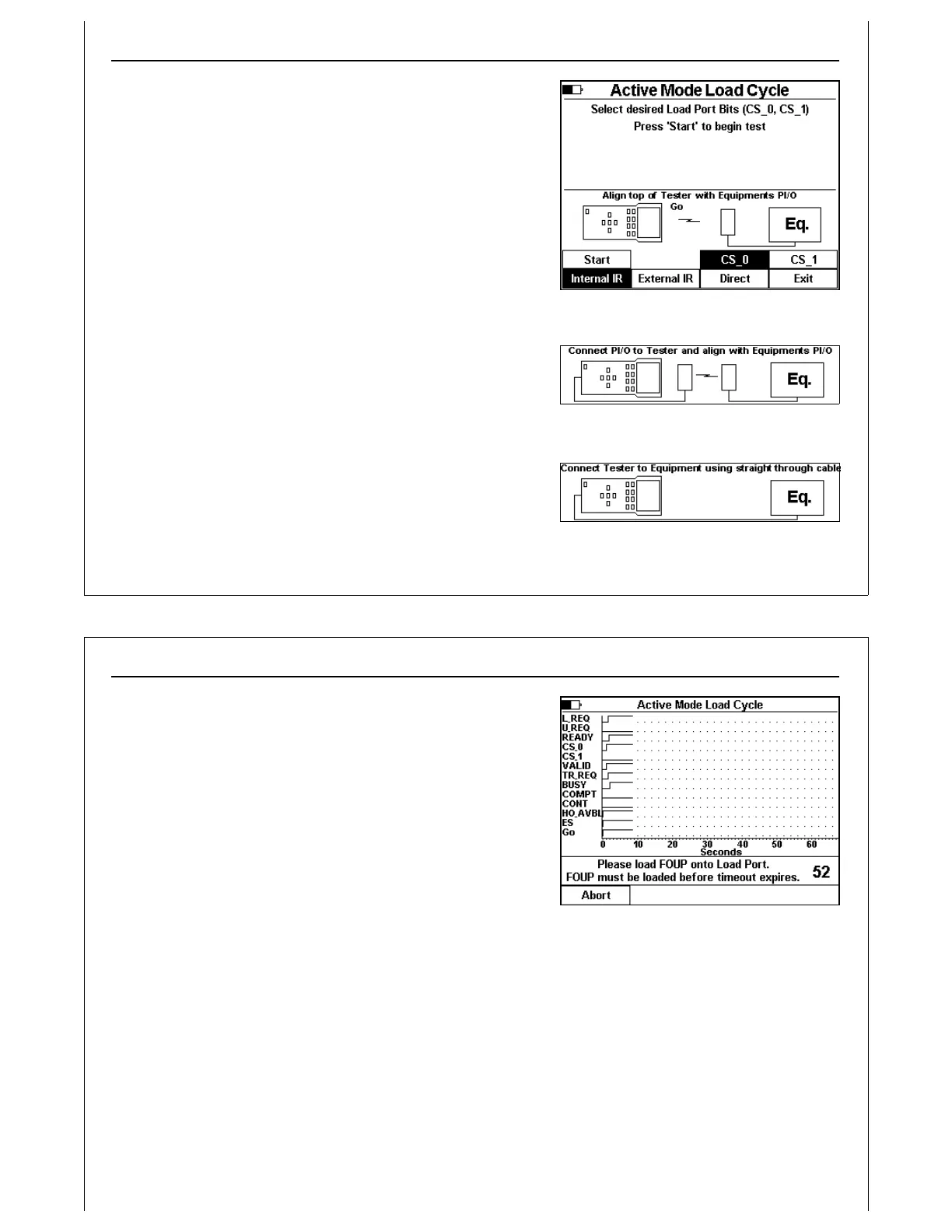
Figure 11 - Active Mode Load Cycle -
Internal IR
Figure 12 - External IR Connection
Figure 13 - Direct Connection
Press the CS_0 and CS_1 soft keys to toggle the CS_0 and CS_1
output states prior to handoff.
CS_0 is set exclusively for a single load port per E84 port
configuration (HHT default). CS_0 and CS_1 select left and right
load port respectively in a one E84 port per two load ports
configuration.
Use the soft keys to select the type of connection between the
HHT and the Load Port: Internal IR, External IR, or Direct. The
status window displays a graphic depicting the physical
configuration of the interface between the HHT and load port
(Figure 11 - Figure 13).
Press the Start soft key to initiate the Active Mode Load Cycle
Test.
Press the Exit soft key to return to the Main Menu.
Using The Handheld Tester
1
PAGE 16
Figure 14 - Load Cycle Graph Window
The real-time graph window displays the states of all E84 signals
during Active Mode Load and Unload Cycles.
The HHT prompts the operator when intervention is required to
place (load) or remove (unload) a FOUP at the load port. It
displays a countdown timer to indicate the time remaining
before a timeout error will occur.
Press the Abort soft key to abort the current load or unload
cycle.



 To Next Page