Using The Handheld Tester
1
PAGE 27
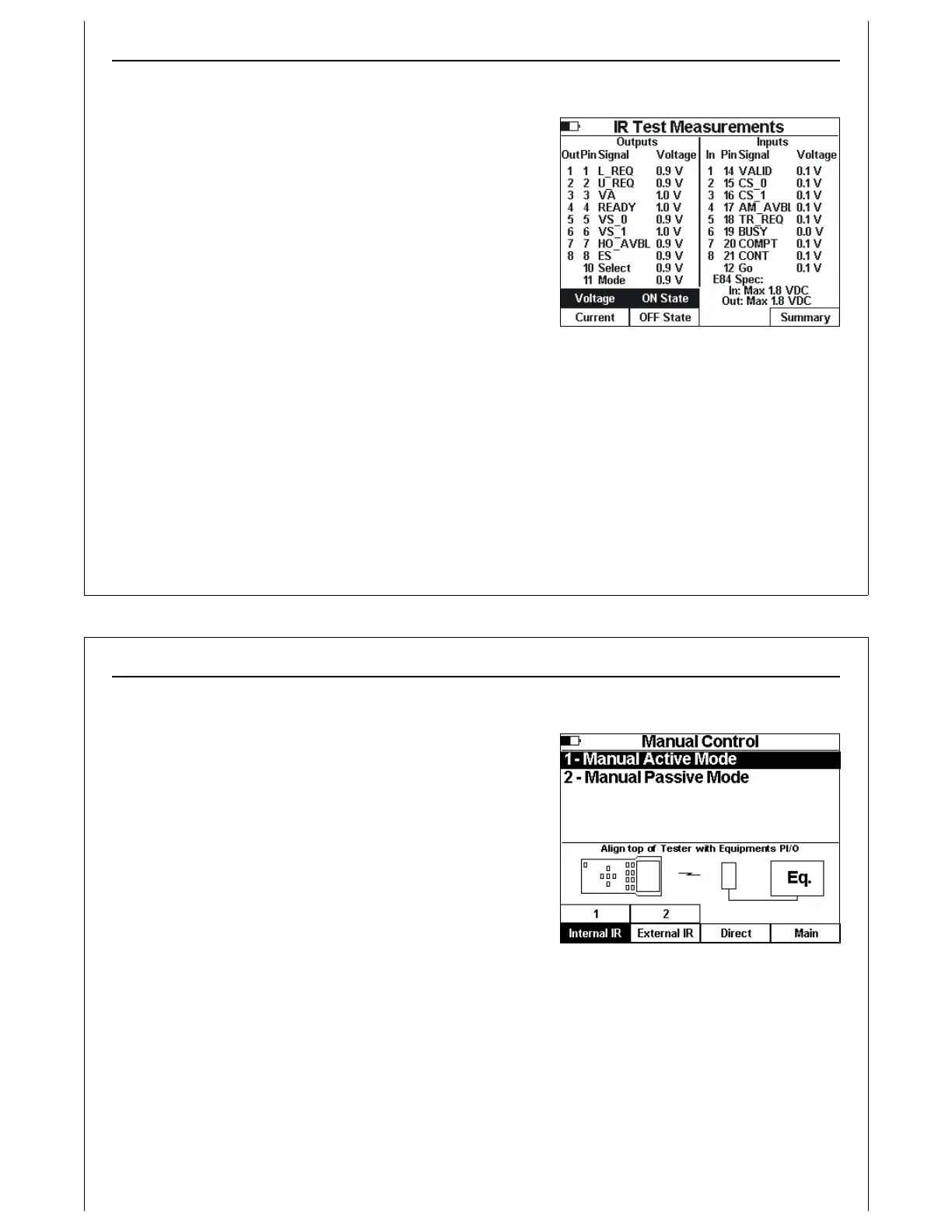
Figure 28 - IR Test ‘On’ Measurements
IR On / OFF State Levels
This screen shows voltage and current measurements taken
during the IR Transceiver Test.
Press the Voltage soft key to display voltage measurements.
Press the Current soft key to display current measurements.
Press the ON State soft key to display the voltage or current of
the inputs and outputs as measured in their ON state.
Press the OFF State soft key to display the voltage or current
of the inputs and outputs as measured in their OFF state.
Press the Summary soft key to return to the IR Test Summary
Screen.
Using The Handheld Tester
1
PAGE 28
Figure 29 - Manual Control Menu
Manual Mode Control
Manual Mode Control is available using Test Menu Option 4.
The Manual Control menu provides options to run Active or
Passive Mode Manual Control.
Press the 1 soft key to run Manual Control in Active Mode (HHT
as delivery vehicle).
Press the 2 soft key to run Manual Control in Passive Mode
(HHT as load port).
Use the soft keys to select the type of connection between
the HHT and the equipment being tested: Internal IR,
External IR, Direct. The status window displays a graphic
depicting the physical configuration of the interface between the HHT and the equipement.
Press the Main soft key to return to the Main Test menu.



 To Next Page