Handheld Tester Emulator Test Suite
2
PAGE 75
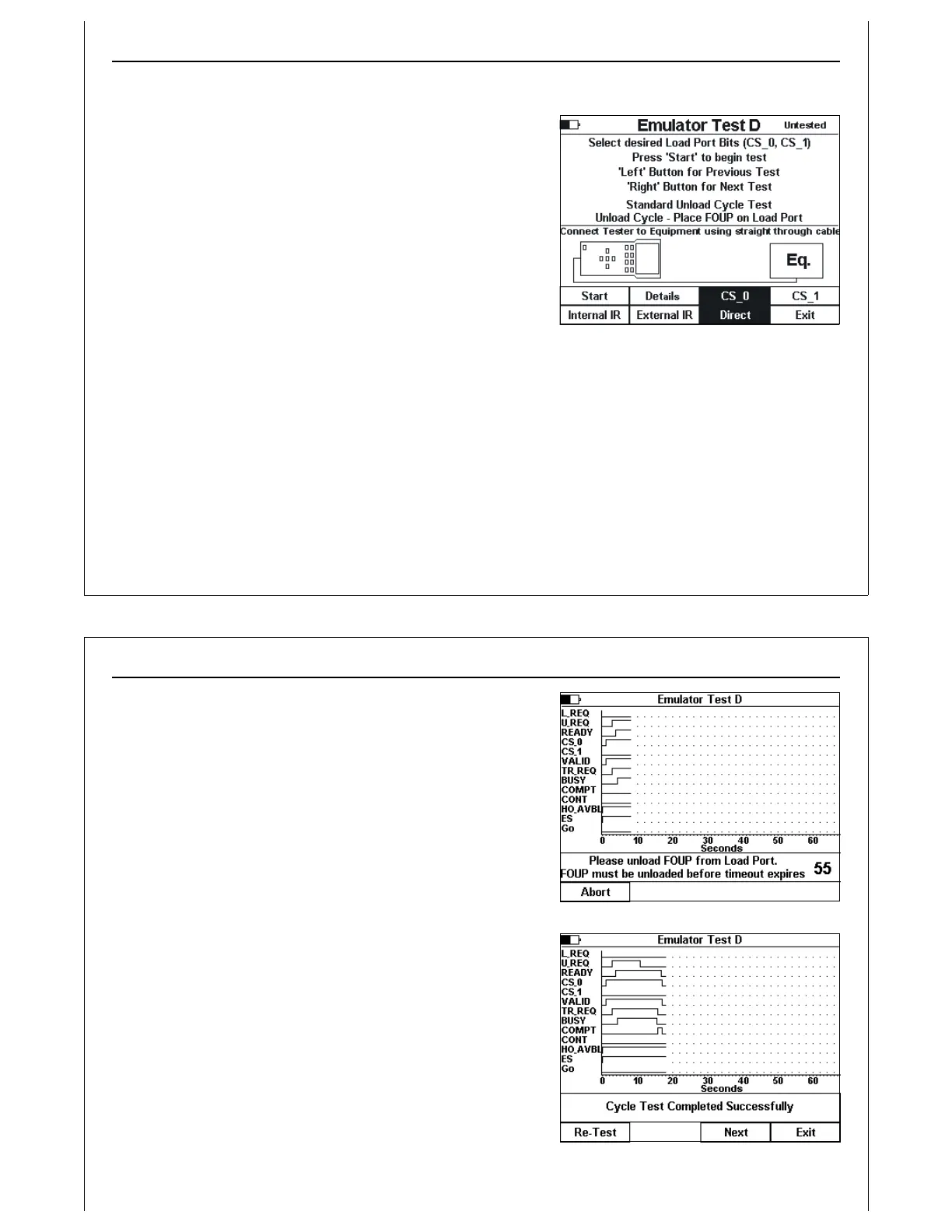
Figure 65 - Test D Setup Screen
Active Mode Functionality Test D
Verify Single Handoff Unload Sequence
Verify single handoff sequence for Unloading. See
Figure 3 for example signal timing diagram.
Figure 65 shows the test setup screen for Test D. Test D is
implemented using the standard Unload Cycle screens.
The Unload Cycle test prompts the operator to remove a
FOUP from the UUT at the proper point in the E84 handoff. A
Test completion message (pass or fail) is displayed, and
recorded in the HHT Test Suite Test Results data structure.
When the Start button is selected, the Active Mode Unload
Cycle screen is displayed.
To return to the previous test, press the ‘Left’ arrow button. To skip the current test, and advance to the
next test in the Test Suite, press the ‘Right’ arrow button.
Handheld Tester Emulator Test Suite
2
PAGE 76
Figure 66 - Test D In Progress
Figure 67 - Test D Completed
The operator is prompted to remove a FOUP from the UUT at
the proper point in the E8 4handoff. A TP3 timeout counter is
displayed in the status window showing the operator how
much time is available to remove the FOUP.
Final test completion status is displayed, and the operator is
given options to re-run the current test, advance to the next
test in the HHT Test Suite, or exit the HHT Test Suite.



 To Next Page