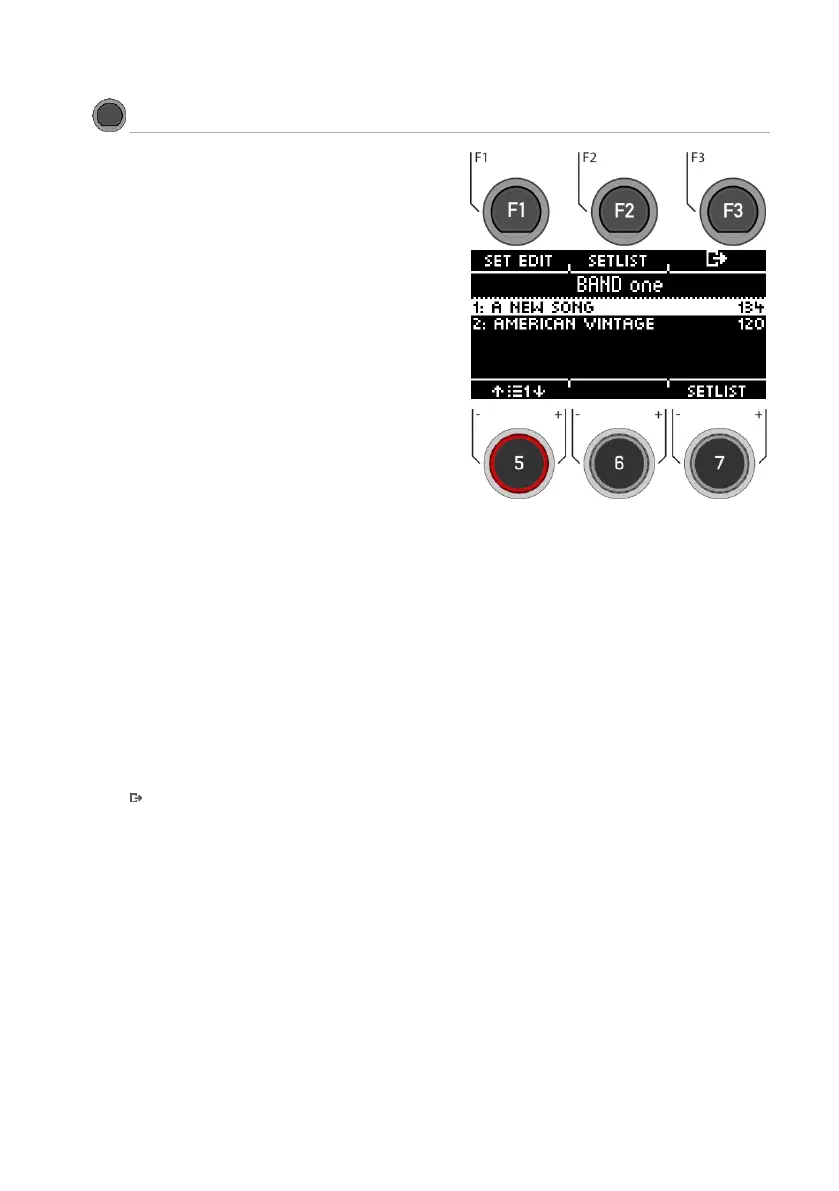
You can create up to 50 set lists with your G5
module and save 50 songs each. This way, you
are also well equipped for live use and can quick-
ly change drum kits and tempo between songs.
You can name the set lists and create song pre-
sets and change their order. Read the following
chapters for more information.
Below the menu line you can see the currently
loaded setlist (e.g. "BAND one *").
Selecting the setlist
Use the dial [7] [SETLIST], the [+] and [-] buttons or
the navigation keys [8] to select an existing list.
The set list is loaded immediately and does not
need to be confirmed.
Alternatively, you can press [F2] [SETLIST]. Here you
have the option to load, save or rename set lists.
Select song
Select the desired song with the dial [5] or the
navigation keys [8].
The song is loaded immediately and does not
need to be confirmed.
Editing the setlist
To change a set list or add new songs, press [1]
[SET EDIT].
Metronome - Start and stop
Press [ENTER] to start or stop the metronome. You
will also get visual feedback in the display.
Exit
Press [F3] to exit the level or any menu key to
exit the entire menu.



 To Next Page