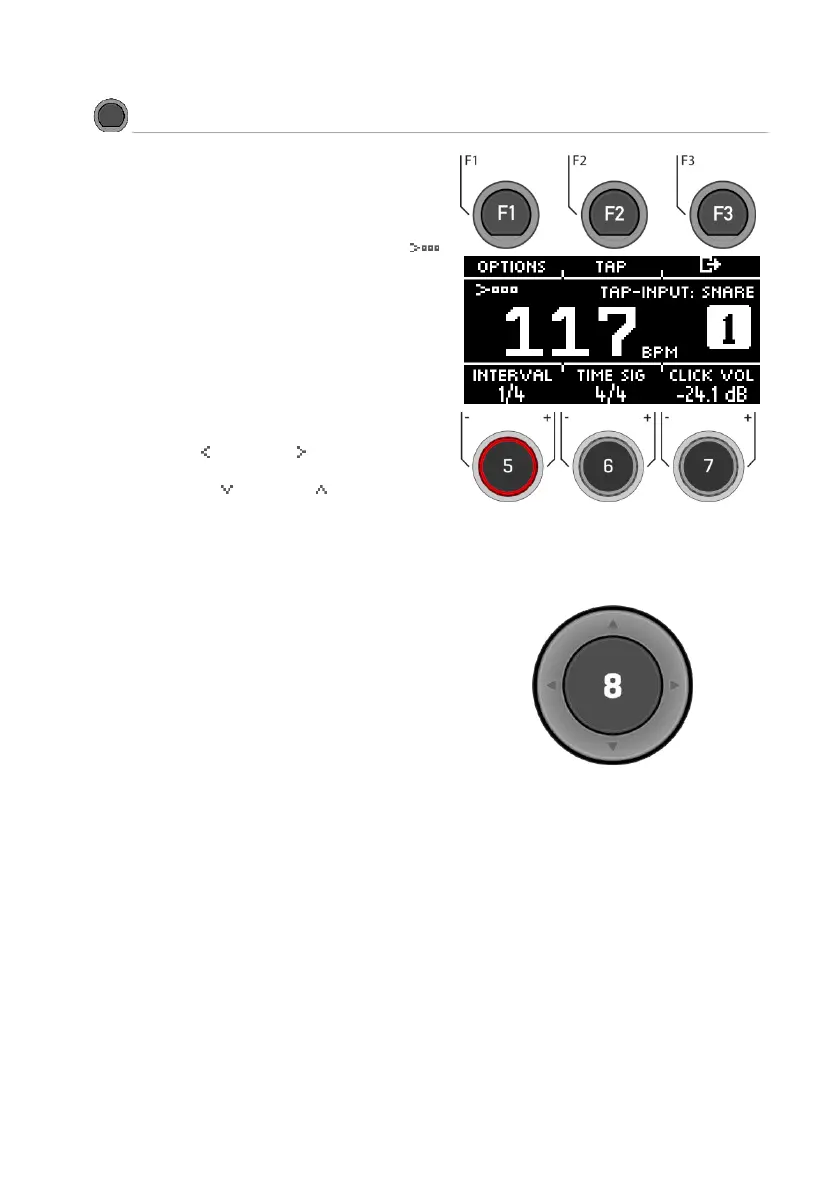
This view contains all metronome functions. In the
middle of the display you see the set tempo in
beats per minute (bpm). The highlighted number
on the right side of the screen shows the current
count of the set time signature (bottom centre -
TIME SIG). If activated, the ACCENT symbol (
)on the left side of the display shows whether the
first beat is emphasised or not.
If the tap channel function is switched on, the
corresponding channel is also displayed.
Start and stop the metronome by pressing the
[ENTER] key [8].
Setting the tempo (bpm)
With the navigation keys [8]:
Left [ ] and right [ ] for steps in 1 bpm
per key tap.
Down [ ] and up [ ] for steps in 10
bpm per key tap.
Alternatively, the tempo can also be
adjusted with the [-] (22) and [+] (23)
keys.
Parallel to this, you can select a trigger input (pad)
with which you can determine the tempo by
playing on the pad (tap input).
The tap channel settings can be found under
"Options" [F1].



 To Next Page