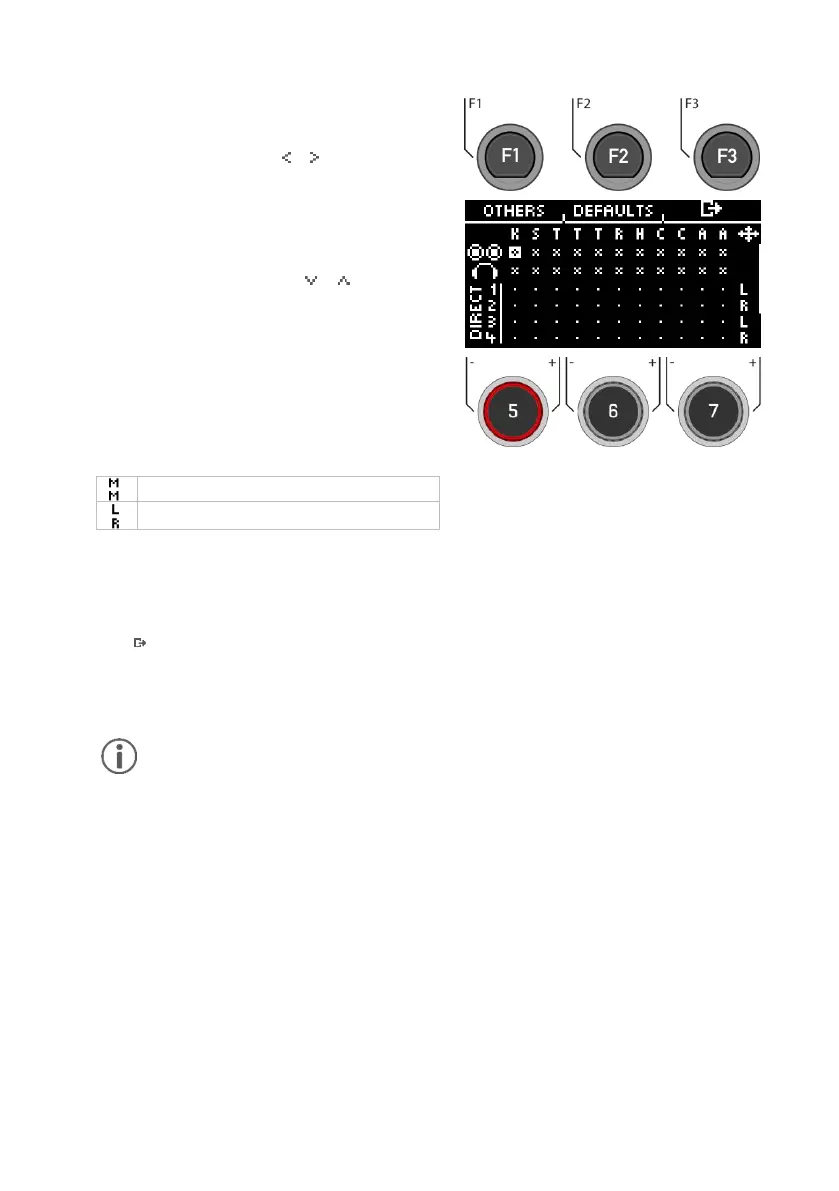
Input channel/ Input
First select the input channel you want to acti-
vate/deactivate (horizontally) with the dial [5] or
the navigation buttons [8] [ ] [ ].
Alternatively, you can also use the [+] and [-]
keys.
Output channel/ Output
Use the dial [6] or the navigation keys [8] to select
the output channel (vertical) [ ] [ ].
Activate / Deactivate
If you have selected In & Output in the matrix,
then press [ENTER] or use the dial [7] to de-
/activate the channel accordingly.
Mono/Stereo
You have the choice between stereo and mono
routings. Use the dials [5] and [6] or the naviga-
tion keys [8] to move to the symbols.
Press [ENTER] or turn control [7] to switch between
the mono and stereo function.
Exit
Press [F3] to exit the level or any menu key to
exit the entire menu.
Automatic saving takes place.
Changes are saved automatically. This is a global function that affects all drum kit
presets and is not saved in the presets.



 To Next Page