31
Fryer Operation
GBF-50 Fryer
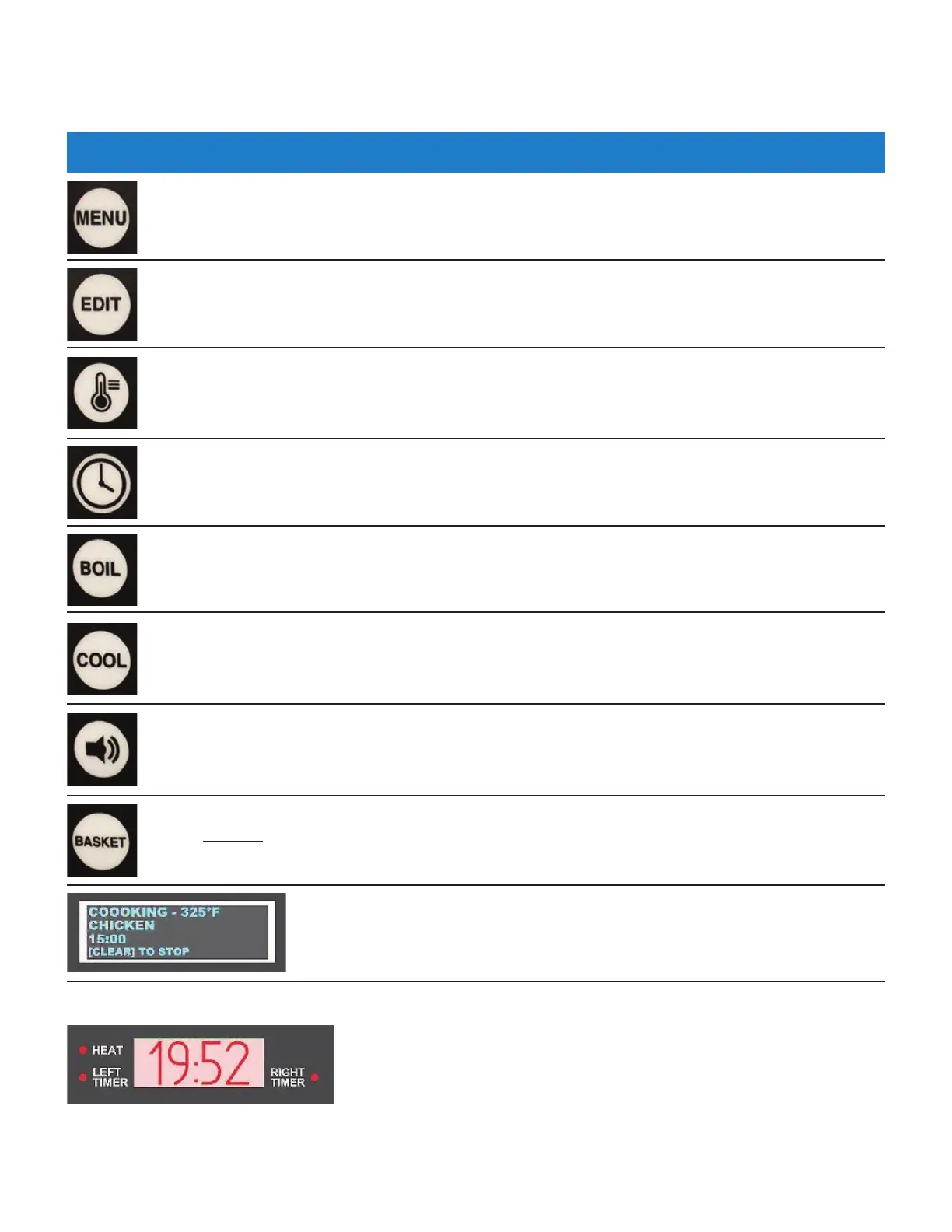
MENU key: Action key which is pressed in combination with other keys to access programmed
menu presets. Fifty (50) different Menu Item cooking presets can be programmed.
ALARM Reset Key: Pressing this key silences the controller alarm and acknowledges certain status
messages.
CLOCK key: Press to begin manually setting a cooking time (mm:ss).
4.01.1 Keys and Functions - continued
BASKET Key: Activates arrow the keys [2]‐UP & [8]‐DOWN for manually operating basket lifts. Key
is disabled
during PREHEAT mode to prevent lowering product into oil that is not yet at cooking
temperature. Key is INACTIVE unless optional Basket Lifts are installed.
EDIT key: Action key which is pressed in combination with other keys to enter edit mode for
changing or entering new Menu Item cook setting presets.
TEMP key: Press to begin setting a cooking oil temperature setpoint. When fryer is in READY
state, pressing key twice (2x) displays real‐time actual oil temperature on the Lower Display for
approximately 20 secs. NOTE: During PREHEAT mode, real‐time actual temperature is always
displayed.
While still in PREHEAT mode, press key to start the BOIL‐OUT program. Temp setpoint and time
will change to the BOIL TEMP and BOIL OUT TIME settings specified in User Settings (Section
4.01.8). Defaults = 200°F
& 30 mins.
Press this key to place fryer into COOL mode. This feature lowers temperature setpoint during
inactive periods to save energy. Setpoint changes to the COOL TEMP specified in User Settings
(Section 4.01.8). Default = 275°F.
Upper OLED Display (blue graphic): Displays status information, cook settings,
operational instructions, alarm/error messages, etc..
Lower 7‐Segment Display (red graphic): Displays status information, cook
cycle time countdown, temperature, error codes, etc.
[HEAT] indicator illuminates when controller output is signaling the heating
elements to energize.
[LEFT/RIGHT Timer] indicators illuminate to show which basket timer is
being shown on the display.



 To Next Page