40
Fryer Operation
GBF-50 Fryer
4.01.6 Cooking Cycle General Overview
COOKING TEMPERATURE • ITEM NAME • COOK TIME • STIR OVERRIDE • FISH
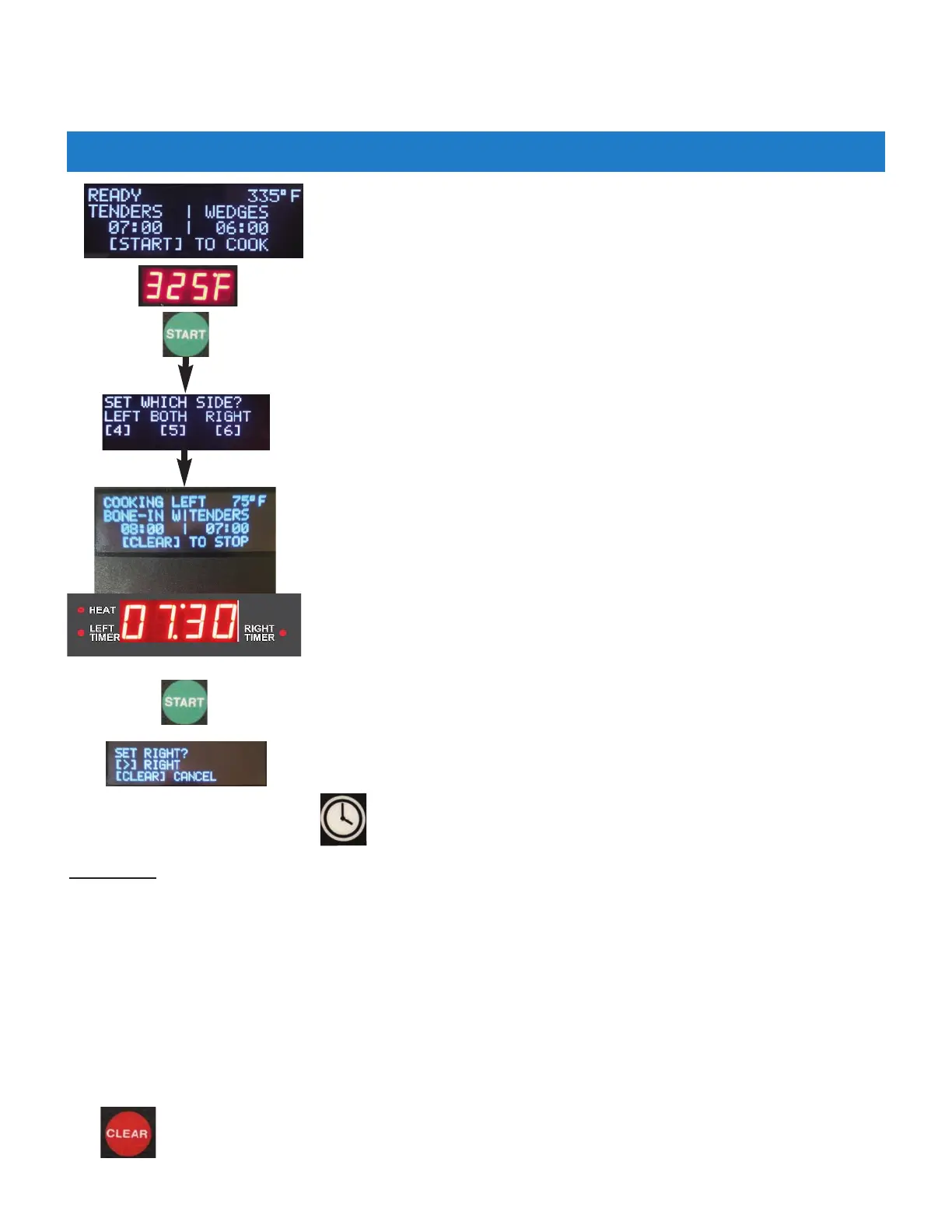
FILTER settings are shown on the upper display. READY message indicates that
cooking oil is at proper temperature and fryer is ready for cooking.
When in READY state, temperature setpoint will be shown on lower display.
After selecting a menu item preset, or manually entering a cooking time, start
the cook cycle by pressing the [START] key once.
You are then prompted to select basket side. Either or both can be selected ...
press appropriate key to select.
When side is selected, controller enters COOK state ...
NOTE: Fryer will not enter COOK unless it was in READY state.
If fryer is equipped with automatic basket lifts and they are enabled, the
basket(s) will be lowered into cooking oil and the programmed cooking time
will begin counting down on the lower display. If lifts are not installed (or not
enabled), manually place basket into oil, resting it on support screen in vat
bottom.
The upper display indicates the side that is cooking, and displays the
temperature setpoint. Timer Indicators beside the lower display will indicate
which timer is being displayed.
Two different menu items can be selected and started together as described in
Section 4.01.5.2.
After selecting a second menu item preset (or entering different time), press the
[START] key once again and when prompted (there is now only one selection),
press the appropriate arrow key (<4 or 6>) to start the second timer. Lower
display and timer indicator will change to show the second timer.
When both timers are running, pressing the [TIME] key 2 times
will toggle lower display between timers.
x 2
x 2
To cancel a running cook cycle press the [CLEAR] key once, then press it again to cancel
‐ OR ‐ press [4] to continue cooking.
STIR ALARM: When enabled, an alarm and display prompt is issued at a specified time during the cook cycle,
signaling operator to stir the product as it cooks. Stirring helps to promote even cooking and prevent sticking. The
feature must be enabled in User Settings, Section 4.01.8 and a “%” parameter must be set. [STIR ALARM %] =
amount of elapsed cook time before the alarm sounds. e.g. [STIR ALARM %] = 60, then during a 10 min. cook cycle,
the alarm will sound after 6 mins. of time have elapsed.
Factory default: [STIR ALARM ENABLE] = ON • [STIR ALARM %] = 62.
A menu item STIR OVERRIDE setting overrides the [STIR ALARM ENABLE] setting, see Section 4.1.05.1.
When the cooking cycle time is complete, an alarm will sound and a message “DONE COOKING ‐ (LEFT) (RIGHT) or
(BOTH)” is displayed, as appropriate. If fryer is equipped with basket lifts, the basket is automatically raised from
the oil. Press the [ALARM] key to silence alarm ... fryer re‐enters READY state, awaiting the next load of product.



 To Next Page