44
Fryer Operation
GBF-50 Fryer
4.01.9 PASSWORD Protection
4.01.10 Power Up Procedure
PASSWORD protection feature can be specified for certain controller functions and editing activities. This is a
factory‐applied setting that is generally disabled. If PASSCODE ENABLE is set to [ON], user is prompted to enter a
password before performing editing activities, making cooking parameter changes, or accessing and changing User
Settings.
If you desire to have password protection enabled, or have questions concerning this feature, please call Giles
Technical Services at 800.554.4537 to request the passcode and instructions as to how to enable the feature.
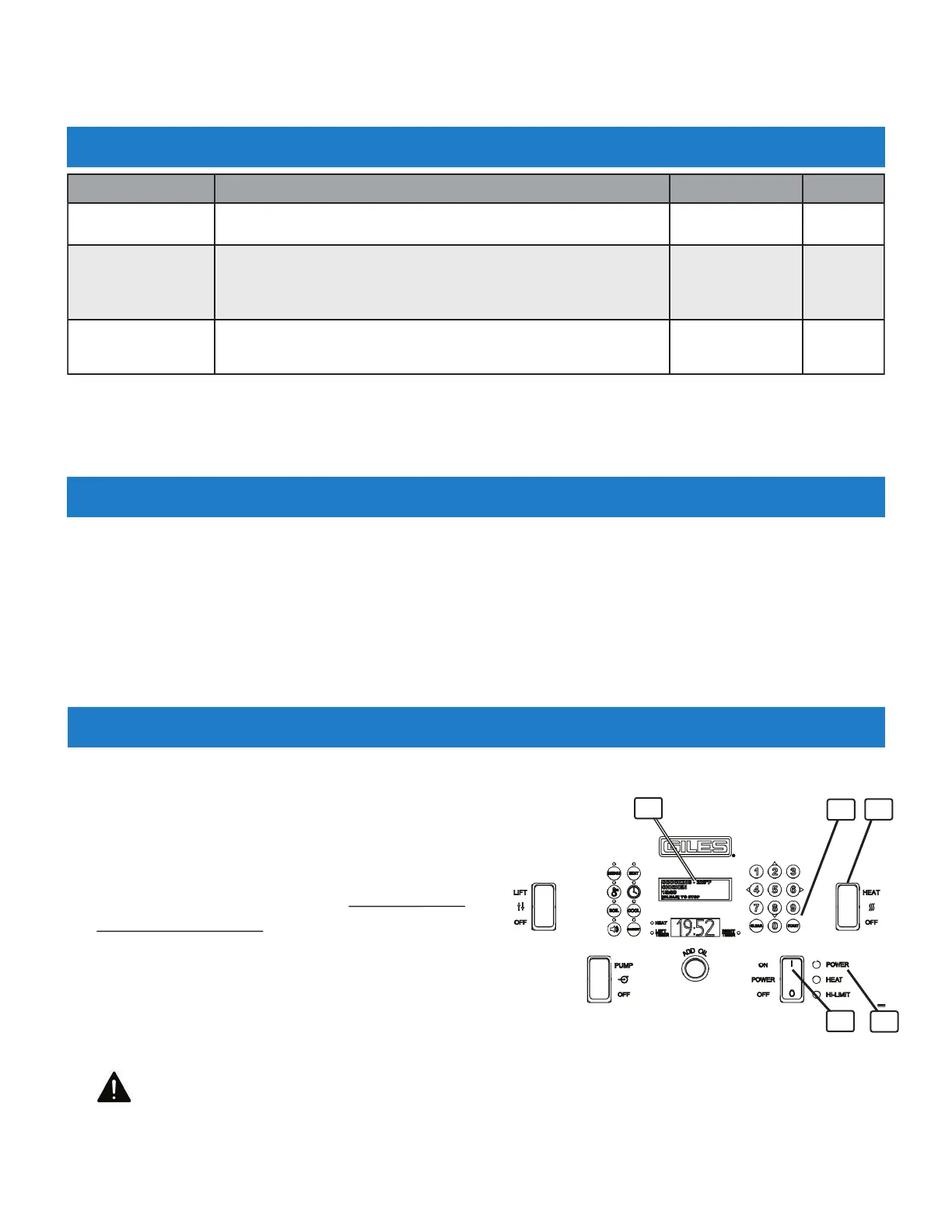
1. Ensure that Heat Switch
①
is in the [OFF] position.
2. Place Power Switch
②
in [ON] position.
Green POWER light
③
will illuminate, controller powers‐
up and enters power failure mode. An alarm sounds and
message “POWER FAILURE [PRESS START TO PREHEAT]”
is shown on the upper display
④
. This a is normal
safety interlock feature
to prevent unattended re‐
energizing of fryer after a power interruption. Press
[START] key
⑤
to silence alarm and start PREHEAT.
Cook settings shown on the upper display are the last
used. Controller will indicate that fryer is heating, but until the Heat Switch
①
is placed in the
[HEAT] position, heating elements do not turn ON.
CAUTION! DO NOT place Heat Switch in [HEAT] position until fry vat has been properly
filled with cooking oil (or water).
3. See Section 4.02, Cooking Procedures.
1
4
5
NAME DESCRIPTION RANGE DEFAULT
LANGUAGE Selects controller language
English‐Spanish‐
French
English
COOK ON MENU
SELECT
When [ON], selecting a Menu No. for cooking will automatically
begin the cooking cycle. Reduces number of keystrokes needed
to start a cycle. ONLY available for dual‐timer controllers.
ON ‐ OFF OFF
[0] KEY EXTRA TIME
When [ON], operator can add extra time to a cook cycle (after
or during) by pressing [0] + the number of minutes to add.
ON ‐ OFF OFF
4.01.8 User Settings - continued
2
3



 To Next Page