53
Fryer Operation
GBF-50 Fryer
4.03 Maintaining Oil Level with Optional Oil Top-Off Systems
During normal operation, cooking oil volume is naturally depleted by absorption, drag‐out,
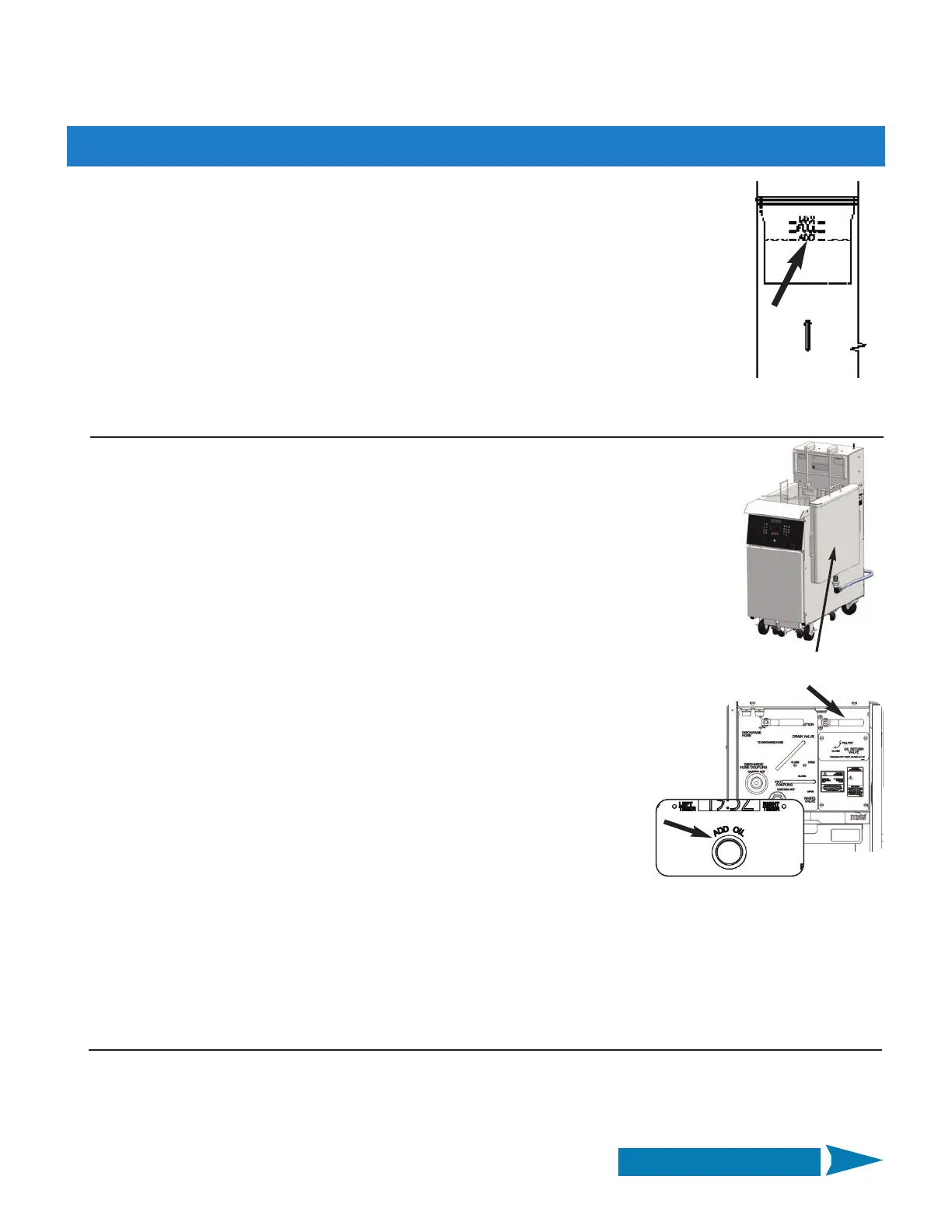
splash, etc. Continuing to cook with an oil level consistently below the [ADD] mark increases
the risk of oil fires. To help minimize this risk, the fryer controller has a built‐in interlock that
will issue a LOW OIL LEVEL alarm, and shutdown the heating elements, as a safeguard. To avoid
possible cooking interruptions and ensure error free operation, the oil level should be routinely
monitored between loads cooked and replenished with fresh oil, as needed.
The GBF‐50 fryer can be purchased with two different optional oil top‐off capabilities ... an on‐
board system or factory‐installed fryer plumbing for directly connecting to a customer‐provided
bulk oil management system (fresh supply and/or waste disposal).
A. Using On‐Board Oil Top‐Off System (w/Saddle Tank):
The on‐board system features an oil storage tank, hanging freely on the cabinet side and
having capacity for approx. 11.5 gallons of fresh liquid shortening. A flexible hose with quick‐
connect/disconnect coupling connects the tank to the on‐board top‐off oil pump. Removable
cover protects stored oil from contaminates.
This single tank provides fresh oil to all wells of a banked battery system.
Fresh oil supply in the tank must be physically monitored and maintained by operating
personnel. Tank is easily removed (without tools) for cleaning.
1. Before first use, thoroughly clean tank interior and cover ... allow to dry completely.
2. Place the tank onto the hanger bracket attached to the fryer cabinet and connect the
flexible hose. Fill tank with your preferred fresh cooking oil (fill only to about 1” below
top lip). Place top cover onto tank.
3. Check oil level in vat after every 2 or 3 loads cooked. If level is at or below the [ADD]
mark, open cabinet door (unit to fill) and place the OIL RETURN VALVE handle in the [FILL
POT] position. On a banked system, the valves in all other units of the battery must be in
the [CLOSE] position.
4. Press & hold the ADD OIL push‐button switch in center of the control panel.
The internal top‐off pump will start and begin pumping fresh oil from the saddle
tank into the vat. NOTE: Only one control panel of a multi‐well banked battery
is equipped with the push‐button, typically it is the unit containing the filter pan.
5. The pump only runs while button is being pressed ... continue holding and observe filling. Release switch when
level reaches the [FULL] mark.
NOTE: Oil fill ports are located in vat bottom, there will be no visible flow of oil into vat, rising level is only
indication of oil flow.
6. If the amber HEAT light turns ON while adding oil, it is recommended to stir until the light turns OFF, to ensure
that the total volume of oil has returned to the set cooking temperature and is ready for the next load.
Saddle Tank
B. Using a third‐party Bulk Fresh Oil Supply System:
Be sure that the fryer is properly connected to the bulk fresh oil supply system according the system manufacturer’s
instructions and guidelines. The bulk system internal pump must be wired directly into the push‐button switch on
the fryer control panel.
A single connection provides fresh oil to all the wells of a banked battery system.
Continued on Next Page



 To Next Page