39
Fryer Operation
GBF-50 Fryer
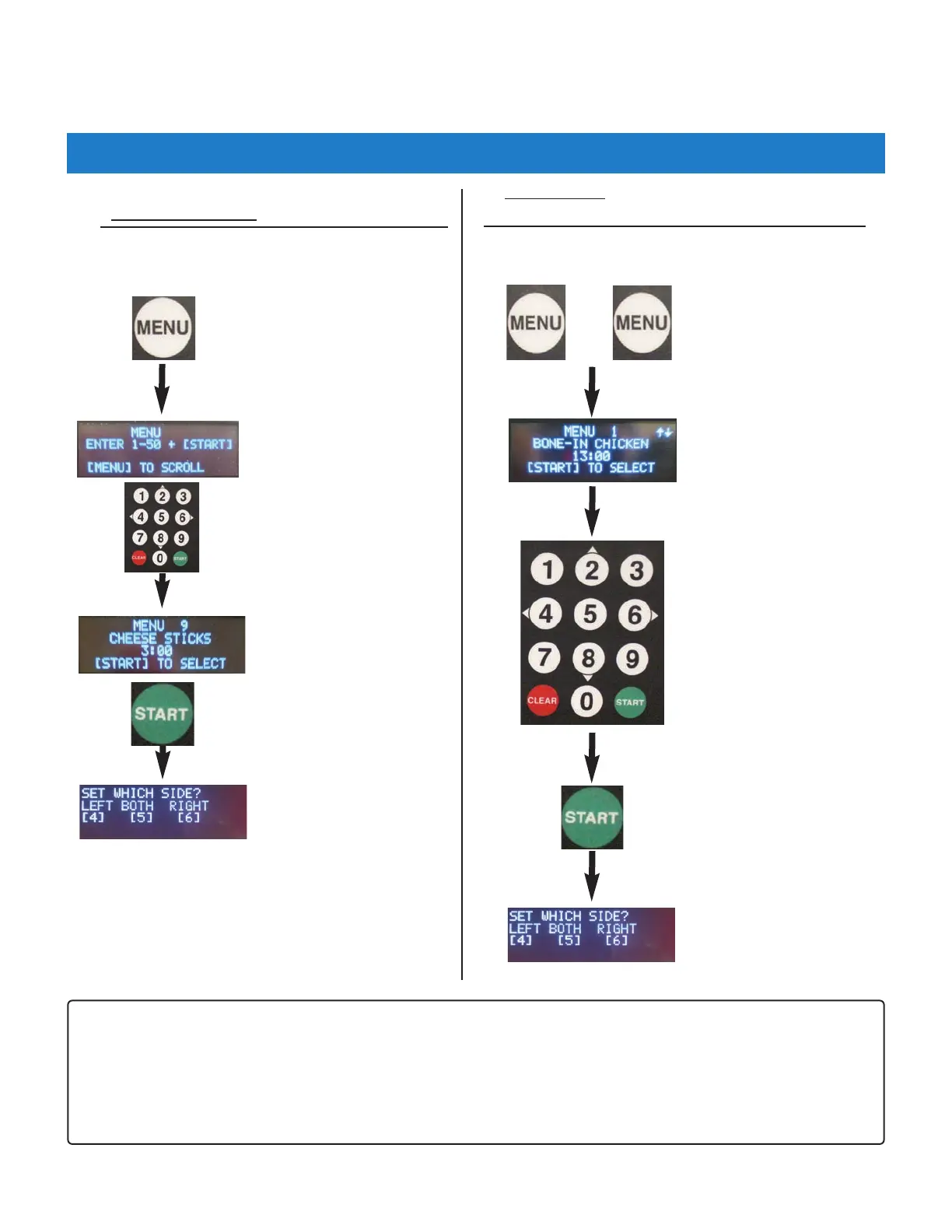
4.01.5.2 Selecting a Menu Item Preset for Cooking
Enter desired Menu no. [1‐50].
NOTE:
• If the User Setting “COOK ON MENU SELECT” is set [ON] and fryer is in READY state, it will automatically enter
COOK mode as soon as the basket side is selected; cooking time begins counting down on lower display.
• If this setting is set [OFF] (default), the cooking cycle must be started as explained in Section 4.01.6.
Press [START] key to select
this menu setting.
Use keypad to select side
[4]=Left [5]=Both [6]=Right
A. Direct Entry Method ‐ desired Menu is known.
Press the [MENU] key once
‐ OR ‐
Skip and directly enter the
desired Menu No.
+
Press the [MENU]
key two times (2x)
Use numeric keypad
[2] & [8] (up/down) to
scroll through list to a
the desired menu item.
Press the [START] key to
select this menu item.
Use keypad to select side
[4]=Left [5]=Both
[6]=Right
B. Scroll Method ‐ Scroll through list of Menu Presets.
Settings are shown on the upper display.



 To Next Page