36
Fryer Operation
GBF-50 Fryer
Continued on Next Page
4.01.5.1 Editing a Menu Item Preset
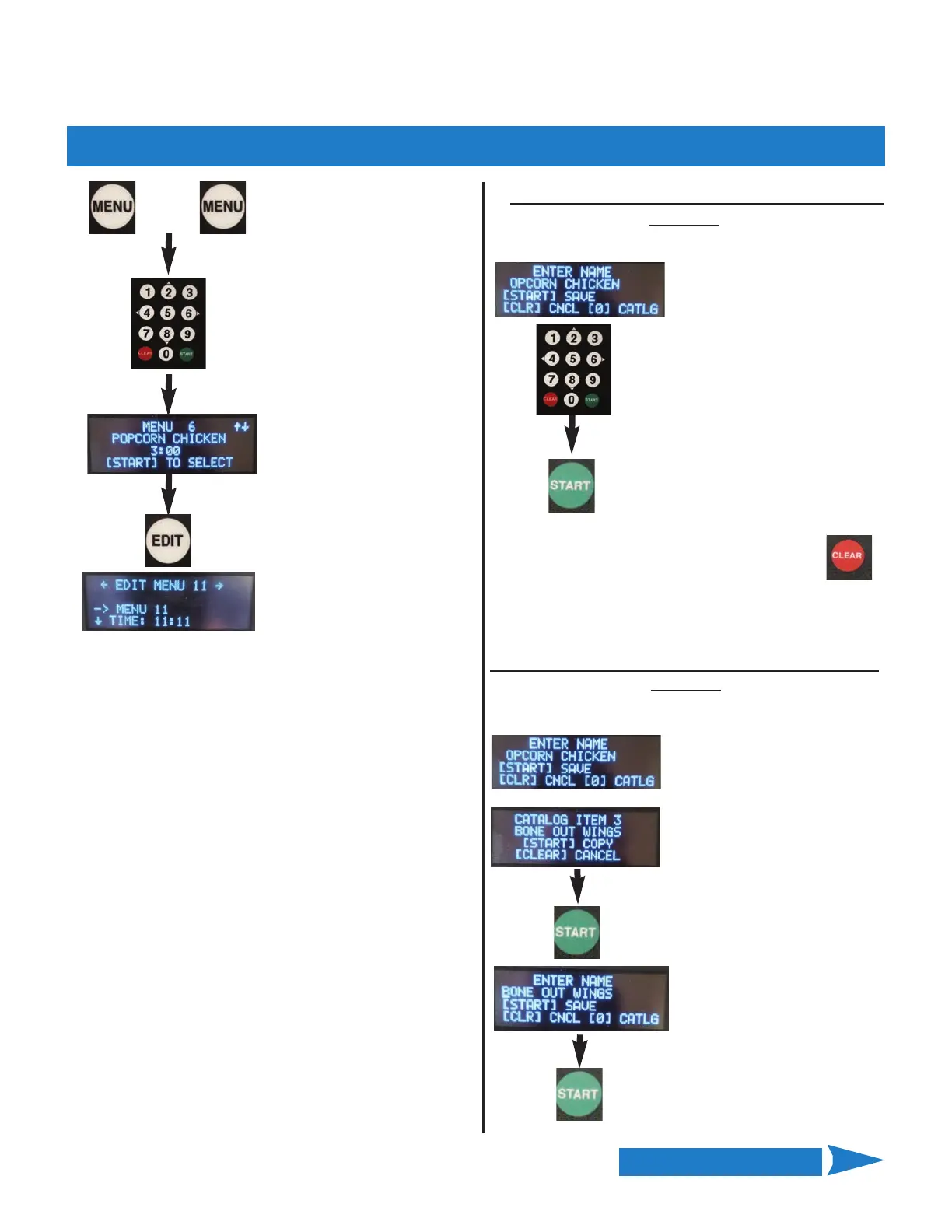
Press the [MENU] key two
times (2x)
Use keys [2] Up & [8] Down to
scroll through items until Menu
No. you want to edit is displayed.
Press the [EDIT] key (not START) to
begin edit ... current settings are
displayed.
Use arrow keys [2] & [8] to scroll the settings until the
cursor [‐‐>] points to the item you want to edit:
NAME
—>TIME
STIR OVERRIDE
FISH FILTER
To edit [NAME] or [TIME], press [START] key to
select.
NOTE: When editing the [STIR] or [FISH] setting,
pressing [START] toggles through the available
values.
Pressing the [4] key backs‐up to a previous setting or
pressing the [6] key advances to a next setting.
Select the NAME setting as
shown at left. Flashing
cursor appears at 1st letter
of current entry. Use
up\down arrow keys [2 & 8]
to scroll alphabet; character
at cursor changes ... stop on
desired letter. Press right
arrow key [6>] to move
cursor to next character;
repeat this until name is
spelled.
When finished editing, press [START] to Save
‐ OR ‐ press [CLEAR] to Cancel and Exit
without saving
+
Method 2
Select a NAME from catalog of programmed names.
Select the NAME setting as
shown at left. Again cursor
appears at 1st letter. Press
[0] key to open catalog of
programmed names; use
up/down arrow keys [2 & 8]
to scroll through list. At the
desired name, press
[START] to copy choice to
the item being edited;
previous display returns.
When finished, press
[START] to Save
‐ OR ‐
Press [CLEAR] to Cancel and
Exit without saving ‐ OR ‐
Press [0] to re‐open catalog.
Edit NAME: Two methods available
Method 1
Enter NAME letter by letter
Use left arrow key [<4] for backspace to erase an
incorrect entry.



 To Next Page