GM Energy V2H Bundle Installation Manual 23
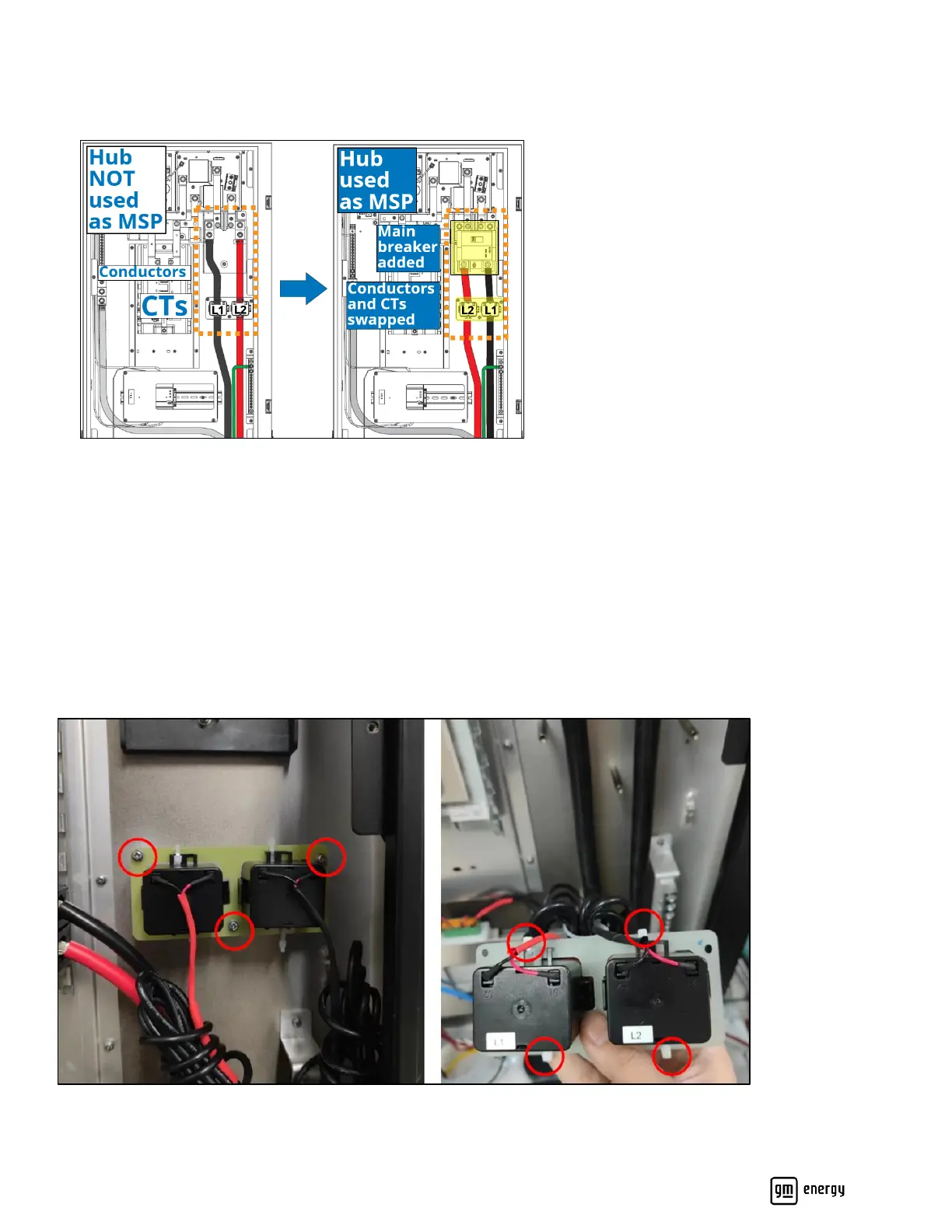
The polarity of L1 and L2 is swapped inside Eaton CSR Series main breakers. Therefore, when wiring power conductors
into the Hub (see Section 4.4), you must swap the position of the L1 and L2 conductors after installing the main breaker
in the Hub, and swap the position of the CTs (Figure 14):
Figure 14: L1/L2 conductors and CTs to be swapped when main breaker added
Apply PCS warning labels to CTs during installation. Only in cases where the conductors in the Hub will be greater than or
equal to ( ≥ ) AWG 1/0, you must remove the bracket that the CTs are attached to, remove the CTs from the bracket, and
then attach the individual CTs to the conductors (Figure 15):
1. Unscrew the three M4 screws holding the CT bracket to the back wall of the Hub.
2. Connect the appropriate L1 and L2 conductors.
3. Cut the four small zip ties that secure the CTs to the bracket.
4. Remove the two CTs from the bracket.
5. Fit the L1 and L2 CTs around their respective conductors, and attach each to the conductor with one zip tie below
and one zip tie above.
Figure 15: Location of CT bracket screws and zip ties holding CTs to bracket



 To Next Page