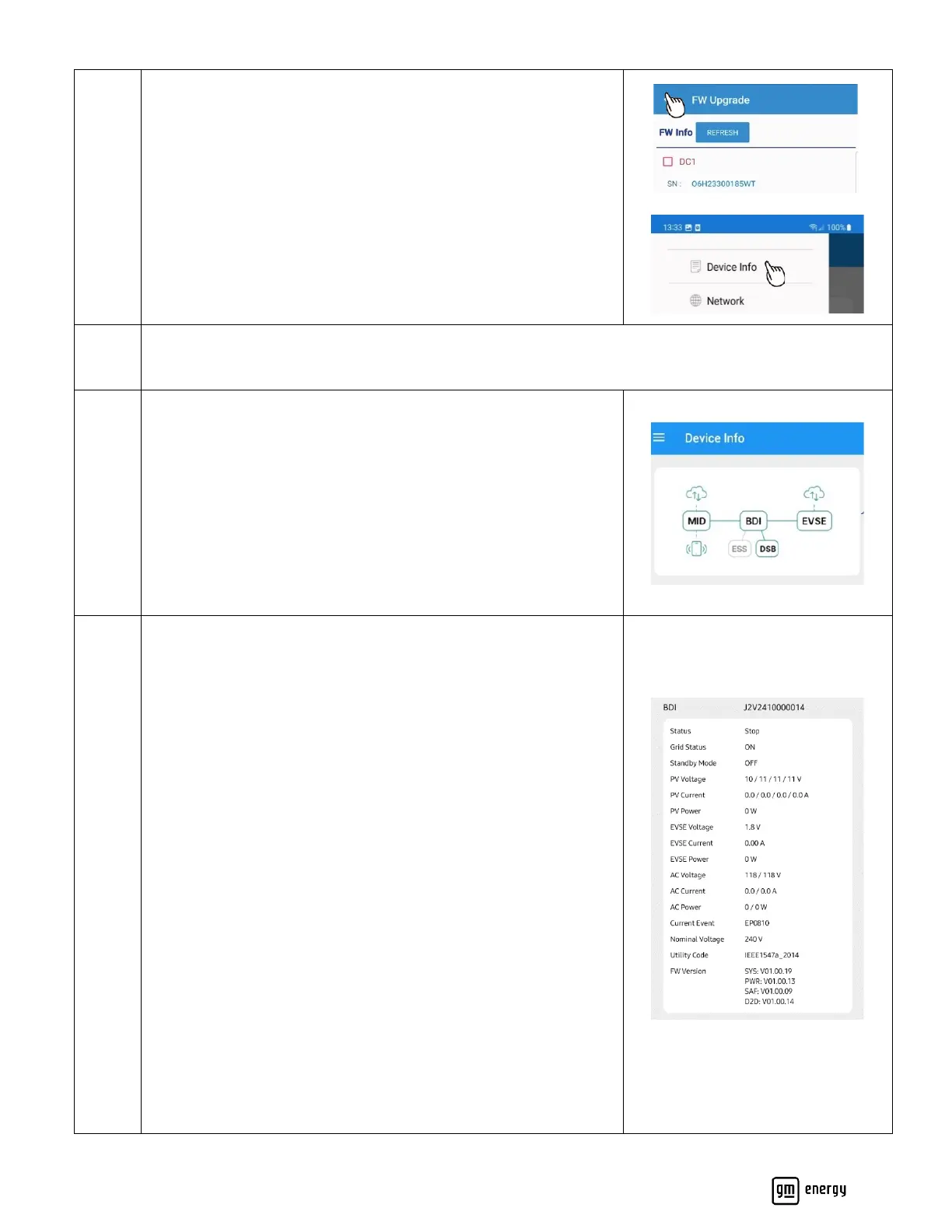
Confirm Cloud and hardwired connections:
The image will show green connections if complete; a disconnected
device will display gray.
Red text will display with the type of error in the connectivity of
the system if disconnected due to a fault.
Please go to maintenance section of network settings and try to
connect the system again. If further issues occur call GM Energy
Customer Support Center at 1-833-64POWER
Confirm BDI Setup:
Status: Confirm status is not in alarm or fault
Standby Mode: Default is off. This mode can be used if a AHJ
and/or Utility has not approved the system to operate yet. This
mode can be changed to “ON” in the maintenance section of this
app. If selected “ON” the installer will need to return to the site to
disable Standby Mode once AHJ/Utility approval is granted. Please
confirm with the AHJ and/or utility, as applicable, whether they
will allow system operation prior to inspection and/or PTO;
requirements may vary by system setup and AHJ/utility.
DC PV Voltage, Current, Power: Should be 0 as DC solar is not
supported at this time
EVSE Voltage, Current, Power: Confirm accurate values
AC Voltage, Current, Power: Confirm accurate values
Current Event: Note EP0810 is an acceptable event code. If any
other event code is present, you can go to “Event History” in the
Maintenance portion of this app to see more details about this
error.
Nominal Voltage and Utility Code: Confirm previous selections
from BDI setup



 To Next Page