GM Energy V2H Bundle Installation Manual 59
If any questions on how to troubleshoot a fault, please call GM
Energy Customer Support Center at 1-833-64POWER
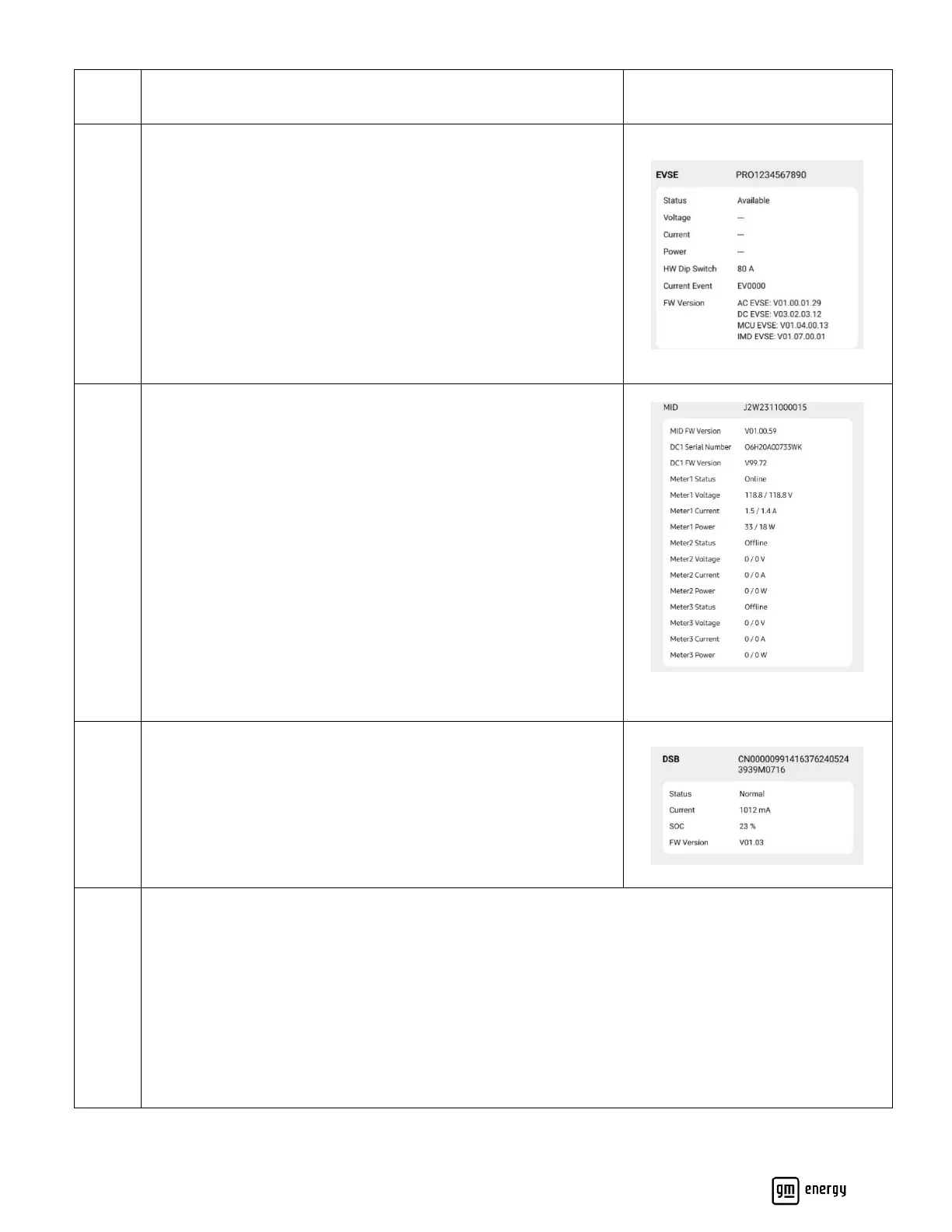
Confirm EVSE setup:
EVSE Voltage, Current, Power: Confirm accurate values
HW Dip Switch: Confirm this is reading the proper value set
Current Event: EV0000 is an acceptable event code. If any other
event code is present, you can go to “Event History” in the
Maintenance portion of this app to see more details about this
error.
If any questions on how to troubleshoot a fault, please call GM
Energy Customer Support Center at 1-833-64POWER
Confirm MID setup:
Meter 1: Confirm this is online and reading the grid (or partial
loads) properly by checking voltage, current, power. If possible,
check values are accurate using a multimeter or other external
measurement device
Meter 2: If this system was installed with AC Solar check the status
and voltage, current, and power readings to confirm accurate
readings. If possible, check values are accurate using a multimeter
or other external measurement device.
Meter 3: Should read 0 for this system
NOTE: Meter status should show online with proper values, if
shown offline or values are not accurate, check the meter and CT
connections.
Confirm DSB setup:
Status: confirm this is showing “normal”
Current: confirm current reading is accurate
SOC: confirm reading is non-zero. DSB will ship below 100% SOC.
Positive current should be seen when below 80%.
Functional Checks:
If the system is safely installed per the previous installation manual requirements above and already
approved to operate at this point, the installer can test functionality of system.
If the user’s EV is available confirm the following.
Charging. Attempt to charge the vehicle. Confirm the EVSE status on the “Device Info” page shows
charging.
Discharging: Attempt a discharge by flipping the main circuit breaker.



 To Next Page