July 2017 PLT-01067, Version: A.7
Key Management Page 7-7
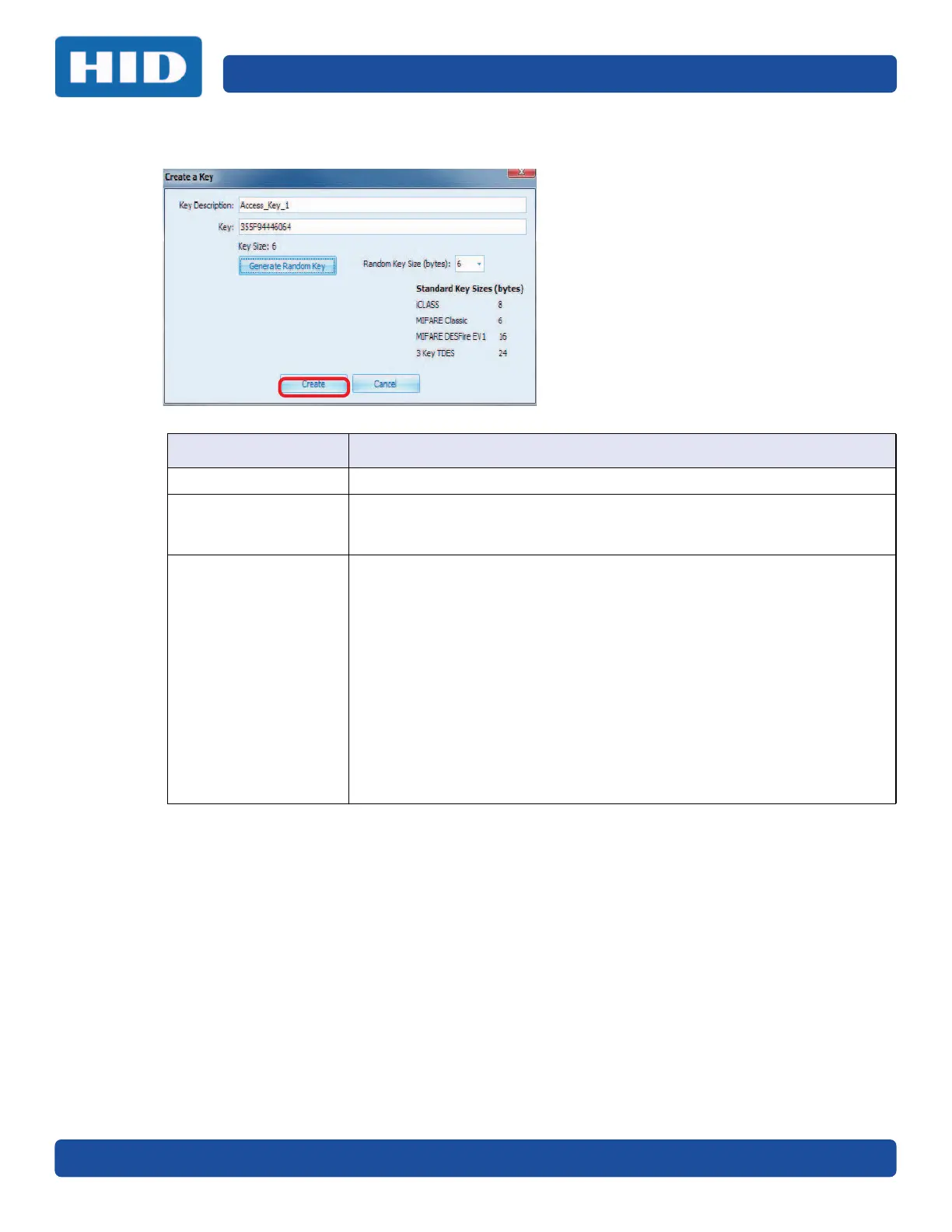
3. Enter the following information on the Create a Key window and click Create.
Field Description
Key Description Enter a description for the key.
Key This can either be manually entered (hexadecimal) or click Generate
Random Key, which generates a key based on the Random Key Size field and
fills the field.
Random Key Size
(bytes)
From the drop-down menu set the key size value.
The following are technology and encoder key sizes:
• MIFARE = 6 bytes
• MIFARE DESFire = 16 bytes
• iCLASS Authentication = 8 bytes
• iCLASS Encryption = 16 bytes
• DES = 8 bytes
• 2kTDES = 16 bytes
• 3kTDES = 24 bytes
• AES = 16 bytes
• Encoder Configuration Keys = 16 bytes
• SO Keys = 16 bytes


 To Next Page