Graphical Caregiver Interface (GCI)® Controls
36 Progressa™ Bed User Manual (171528 REV 1)
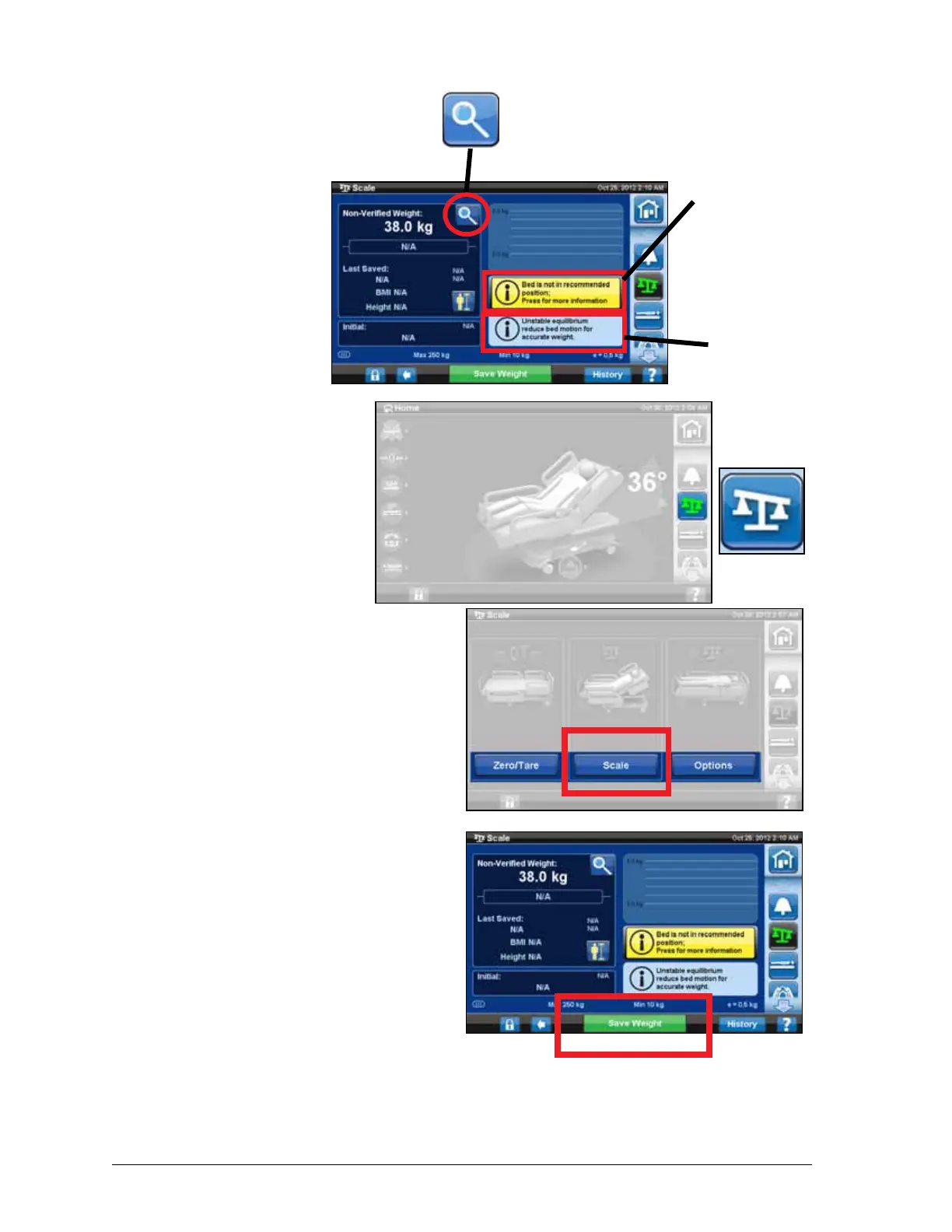
Magnification Mode
(Extended Weighing
Device)
Only available on the NAWI
Compliant (EN 45501) Scale.
Pressing the magnifier button
will change the scale display
increments to 0.1 kg for 5
seconds. Weights cannot be
saved in the Magnification
Mode.
Save Weight
1. Make sure the patient is
centered and laying on the
bed.
2. Press the Scale control on
the GCI.
3. Press Scale.
4. Verify the weight by
removing items from the
weighing area that were
not zeroed.
5. Press Save Weight.
Follow the on screen
instructions.
– Caregiver has verified
and saved the patient
weight.
NOTE:
If the Non-Verified Weight
has two red dashes and the
Save Weight button is
greyed out, then
re-zero/tare the bed.
Magnification Mode
Bed not in
recommended
position button
Unstable
equilibrium
indicator











 To Next Page