Surfaces
56 Progressa™ Bed User Manual (171528 REV 1)
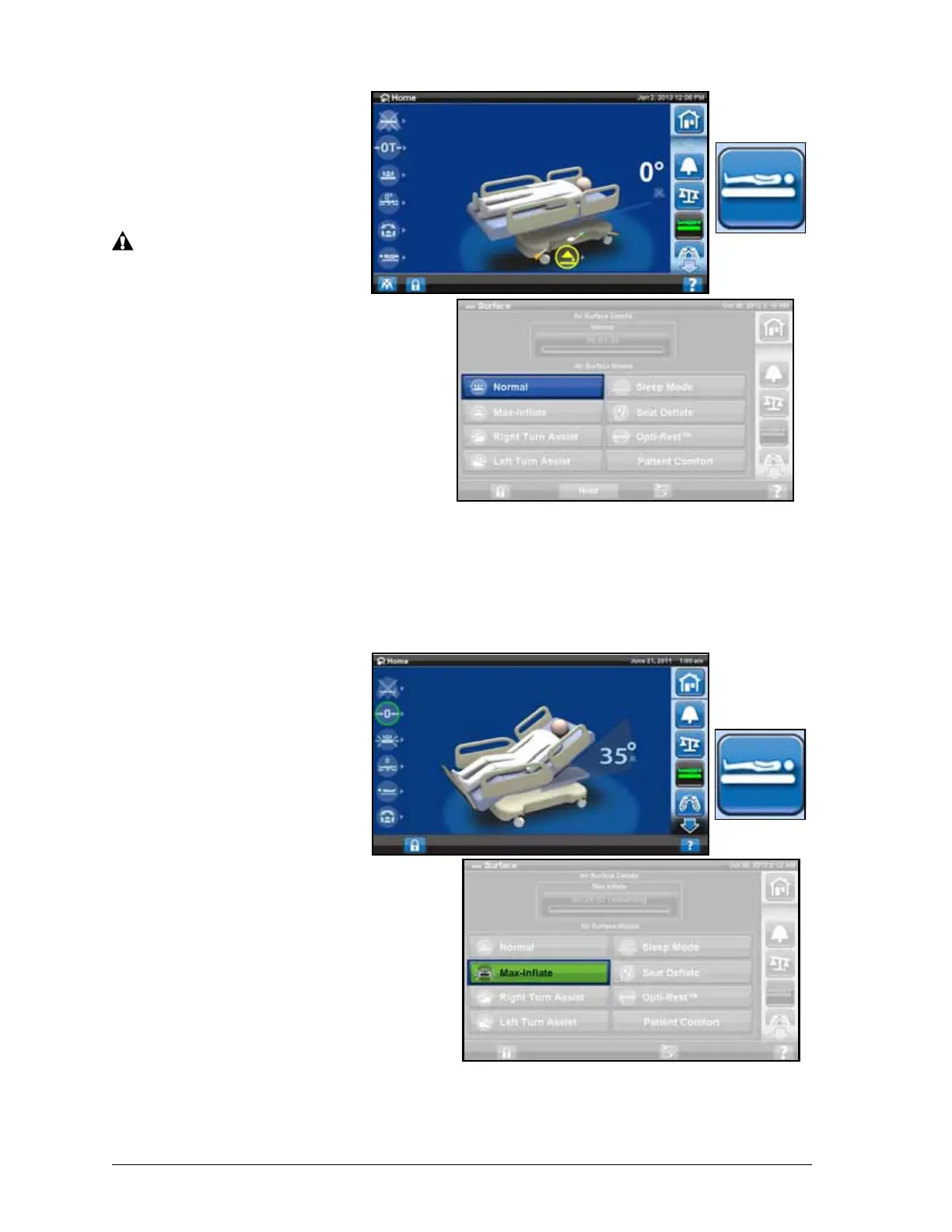
To Put the Mattress in Normal
mode
1. Press Surface control
on the GCI home
screen.
2. Press Normal.
WARNING:
Patients with body weight or
height near the
recommended limits should
be monitored more
frequently for desired results.
Lower the head section to
optimize pressure
performance if necessary.
Max-Inflate
The Max-Inflate mode
maximizes the firmness of the
primary section of the patient
surface. This assists in patient
surface-to-surface transfers and/or repositioning.
The Therapy Surface will automatically exit the Max-Inflate mode and return to normal mode after
30 minutes. After 28 minutes, a beep will sound and a message will show on the GCI that there are
2 minutes left. The caregiver has the option of keeping the surface in Max-Inflate or let it return to
normal mode.
To Activate
1. Press the Surface control
on the GCI.
2. Press the Max-Inflate
control.
To Deactivate
1. Press the Surface control
on the GCI.
2. Press the Normal control.
To Activate—Siderail method
Press the Max-Inflate control.
To Deactivate—Siderail method
Press the Max-Inflate control.











 To Next Page