Surfaces
Progressa™ Bed User Manual (171528 REV 1) 61
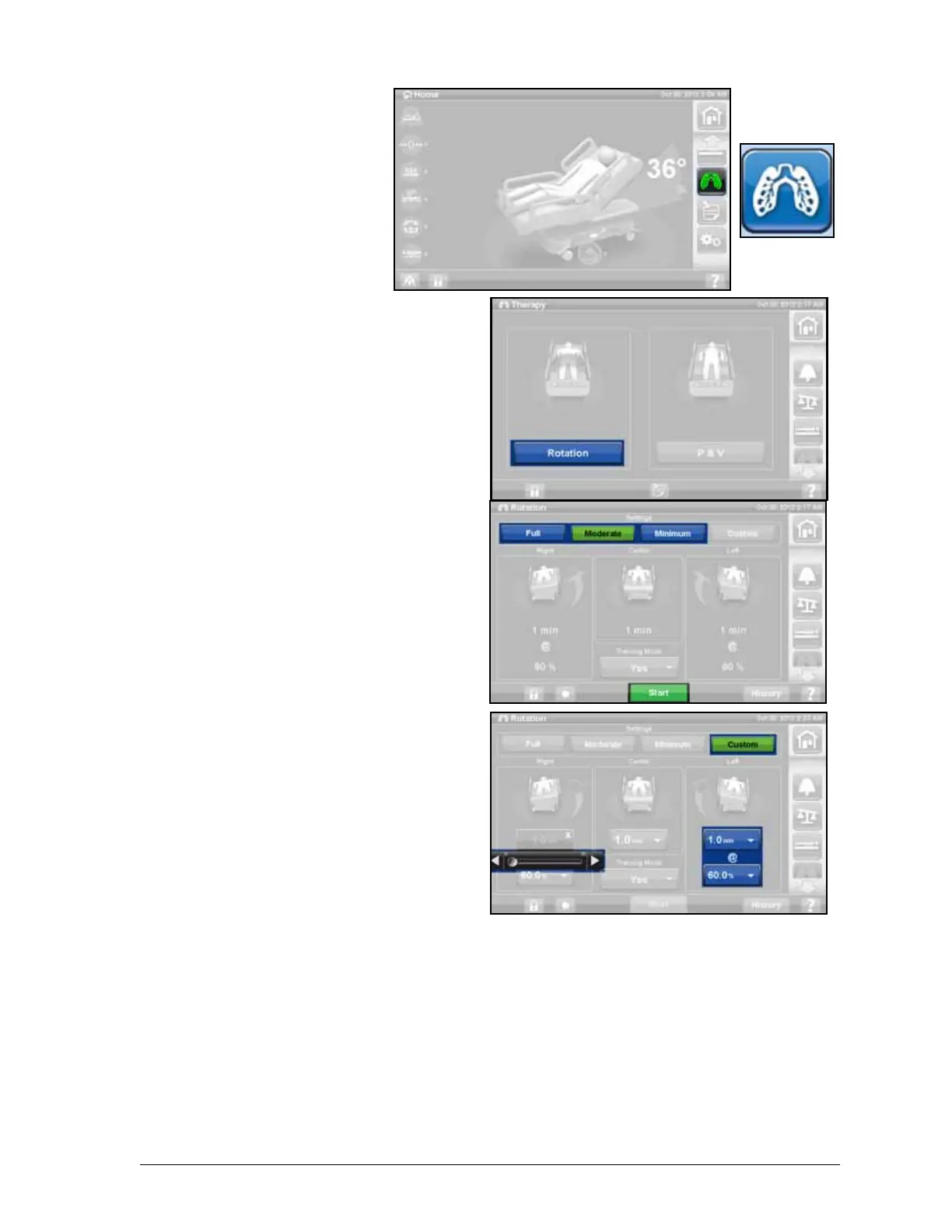
Start Rotation
1. Press the Pulmonary
Therapy control on the
GCI.
2. Select Rotation.
3. Select Full, Moderate,
Minimum or Custom.
4. Training: Yes/No (Starts
rotation at 50% of
maximum programmed
turn and increases 10%
each hour for patient
acclimation).
5. Press Start to being
Rotation.
NOTE:
If Rotation Therapy is
desired with Bed Exit on,
Bed Exit must be turned
on before Rotation
Therapy is started. Only
Out of Bed Mode will work
during Rotation Therapy.
Stop Rotation
1. Press the Pulmonary
Therapy control on the
GCI.
2. Press Rotation.
3. Press Stop Therapies or
On the GCI home screen,
press Stop Therapies.
Set Custom Setting
1. Press Custom or the
desired setting.
2. Press the value for the
applicable setting.
3. Move the slider bar to the
applicable setting.
4. Press Start when all settings are correct.
The following settings can be customized
• Right turn %: Customize the amount of turn to the right
• Pause Time (Right, Center, Left): Amount of time in side-lying or centered position
• Left turn %: Customize the amount of turn to the left side











 To Next Page