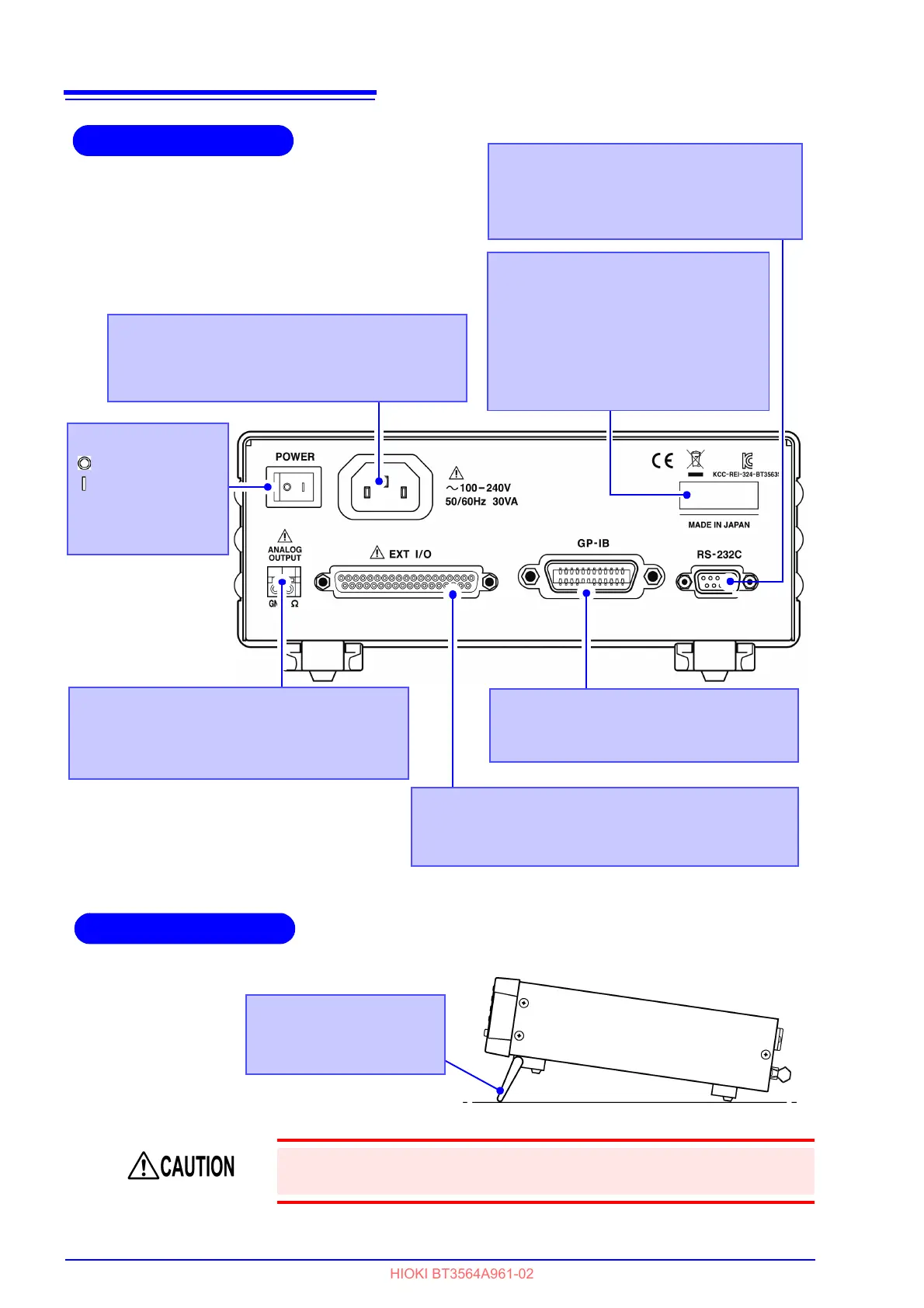
EXT I/O Connector
Connect here to use the EXT I/O interface.
See "Chapter 5 External Control (EXT I/O)" ( p.75)
GP-IB Connector
Connect here to use the GP-IB interface.
See " Attaching the Connector" ( p.98).
Power Inlet
Connect the supplied power cord here.
See "2.2 Connecting the Power Cord" ( p.16).
Rear Panel
Analog output connector
Connect when using analog output measured
resistance value.
See "Chapter 7 Analog Output" ( p.93)
Main power switch
: Main power off
:Main power on
See "2.4 Turning the
Power On and Off"
( p.18)
Serial Number
The serial number consists of 9 digits.
The first two (from the left) indicate the
year of manufacture, and the next two
indicate the month of manufac-
ture.Required for production control.
Do not peel off the label.
RS-232C Connector
Connect here when using RS-232C
interface or the printer.
See
" Attaching the Connector" (
p.98).


 To Next Page