BASE STATION
4
Base Station Display Screen
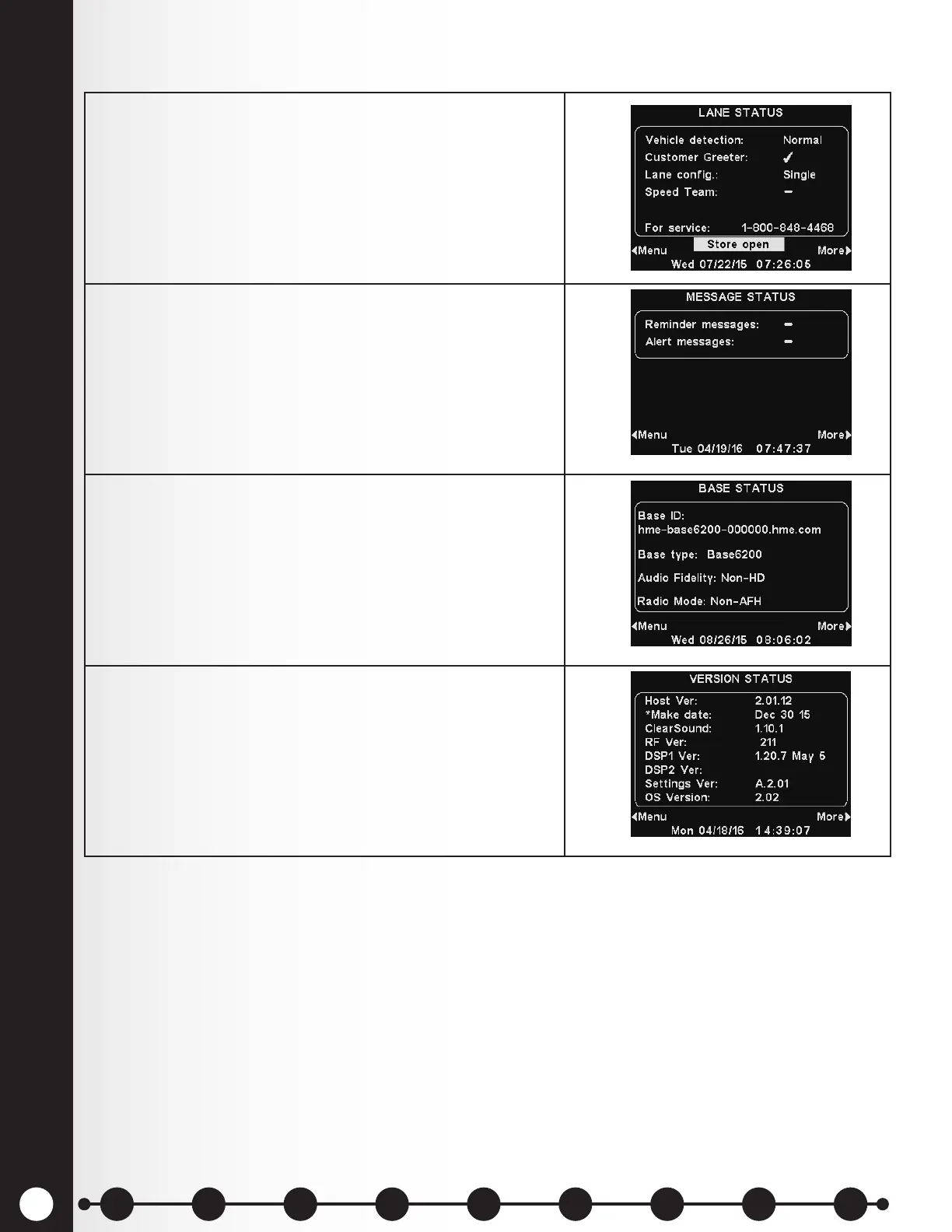
1. The LANE STATUS display shows current, lane-related
status information. It also lists the HME Technical
Support toll-free phone number to call for service.
The date and time are shown at the bottom of the
screen.
Press the More button at the bottom-right of the
LANE STATUS display to view STATUS displays.
2. To view additional system status displays, press the
More button at the bottom-right.
3. Continue to press More. The information on each
STATUS display shows other base station information
needed to operate the system on a network and
identify its version data.
4. To view the MAIN MENU and review all of the system’s
settings, press the Menu button at the bottom-left of
any STATUS display.
Note: These instructions and the display screens shown are primarily for single-lane drive-thru
operations.
In multiple-lane operations, the LANE STATUS display shows Vehicle detection for L1 (Lane 1) and L2
(Lane 2), and Lane Cong shows the lane conguration setting. The Dedicated mode ✔ (on) or − (off)
setting is also shown.
1 2 3 4 5 6 7 8 9
Introduction
EOS|HD
Equipment
EOS|HD
Operation
Audio Processing
Functions
Equipment Care
and Cleaning
Troubleshooting
Equipment
Specications
EOS|HD Message
Center Guide
Important
Notices



 To Next Page