EOS
|
HD OPERATION
39
Volume Adjustments
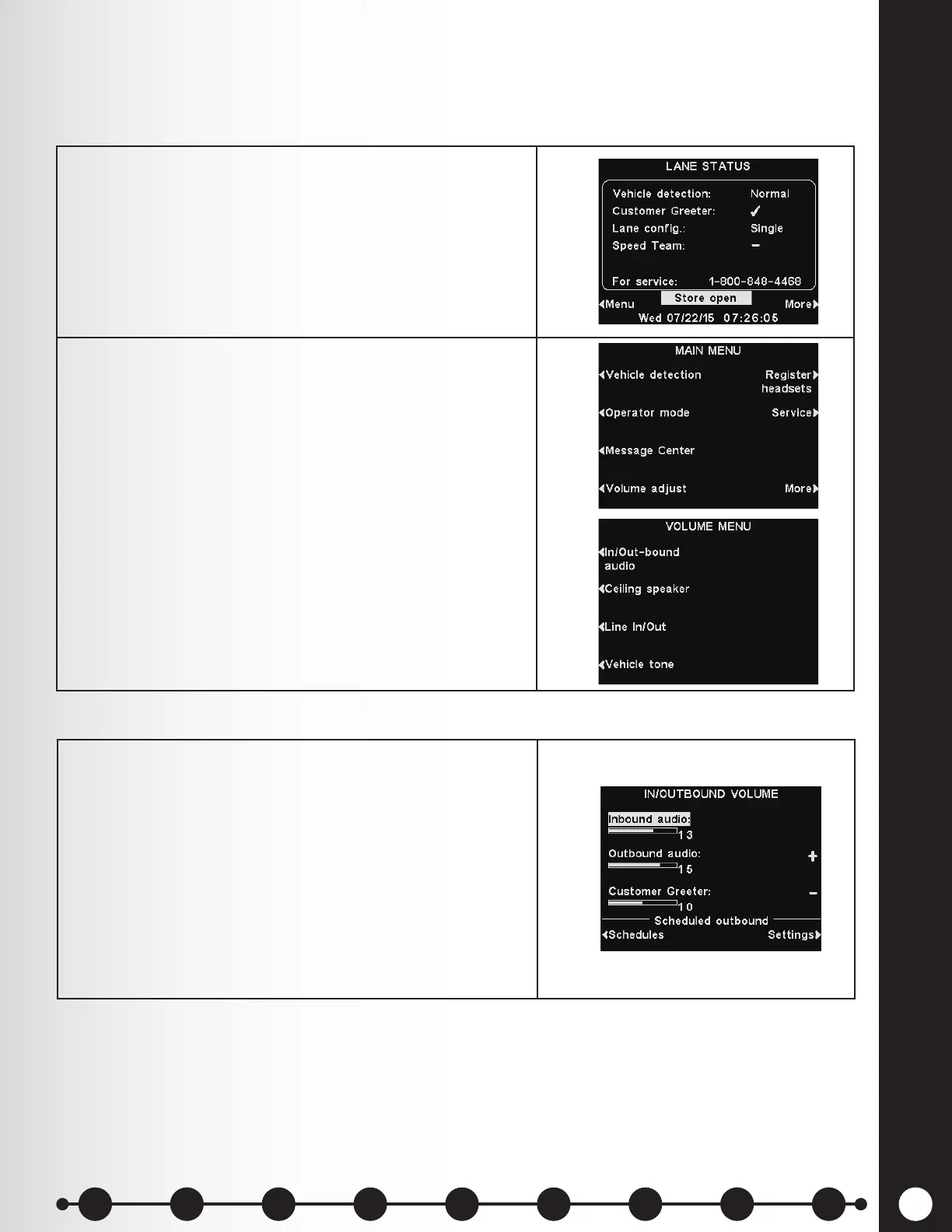
Adjust the volume for inbound and outbound audio, customer greeter messages, ceiling speaker and
vehicle tones, or schedule outbound audio levels.
1. On the LANE STATUS display, select Menu and then,
on the MAIN MENU select Volume adjust to access
the settings.
2. Press the button corresponding to the VOLUME
MENU option you want to adjust.
In/Out-bound Audio Volume
1. On the IN/OUTBOUND VOLUME display, select which
volume you would like to adjust, and then use the +
and − buttons to raise and lower the volume level.
The rst two settings adjust the audio level to and
from the outside speaker/microphone and the third
setting sets the level of the outbound Customer
Greeter message.
When a volume is set to 0, the function is turned
off. For dual-lane operations, these settings will be
available for Lane 1 and Lane 2.
1 2 3 4 5 6 7 8 9
Introduction
EOS|HD
Equipment
EOS|HD
Operation
Audio Processing
Functions
Equipment Care
and Cleaning
Troubleshooting
Equipment
Specications
EOS|HD Message
Center Guide
Important
Notices



 To Next Page