HEADSET USAGE
8
Headset Registration
During installation of the EOS|HD, each headset was registered for use with the base station. After
each headset is registered to a base station, that base station recognizes the headsets and differentiates
between them and other electronic equipment operating on similar frequencies.
Up to 15 headsets can be registered to a base station. Replacement headsets must be registered before
they can be used. When a headset is replaced, the replaced headset remains in memory. If the maximum
number of 15 (in memory) is exceeded, you must clear some or all of the current registrations to free up
memory and register the new headset (see Clear Headset Registration, next page).
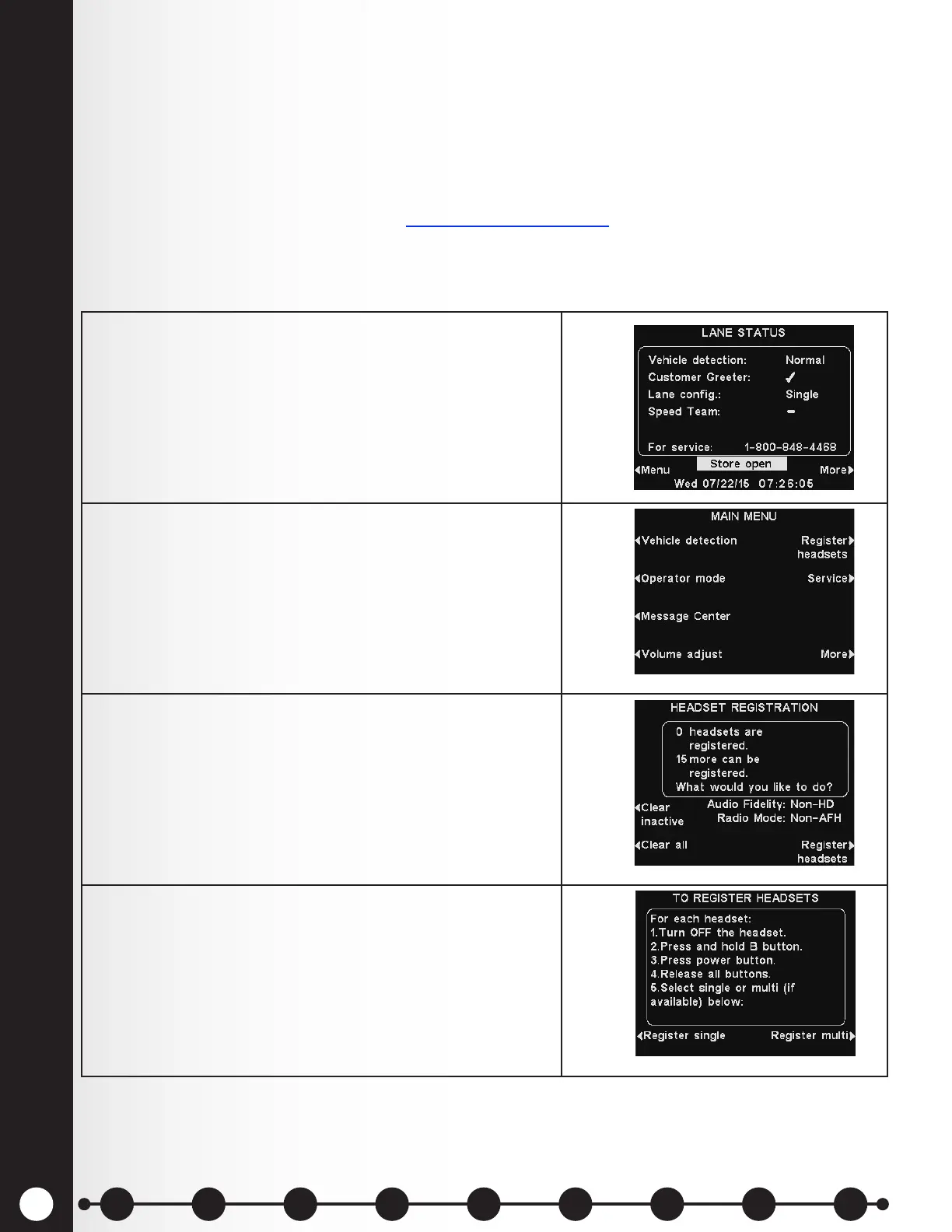
Register each headset as follows:
Headsets must be within 6 feet (1.83 meters) of the base station while being registered.
1. Be certain all headsets to be registered are turned Off,
and the base station power is On.
On the base station LANE STATUS display, press the
Menu button.
2. From the MAIN MENU, press the Register headsets
button.
3. From the HEADSET REGISTRATION display, press the
Register headsets button.
4. If you are registering only one headset, press the
Register single button.
If you are registering more than one headset, press the
Register multi button and continue registering each
headset, one at a time.
1 2 3 4 5 6 7 8 9
Introduction
EOS|HD
Equipment
EOS|HD
Operation
Audio Processing
Functions
Equipment Care
and Cleaning
Troubleshooting
Equipment
Specications
EOS|HD Message
Center Guide
Important
Notices



 To Next Page