EOS
|
HD OPERATION
52
Network Settings
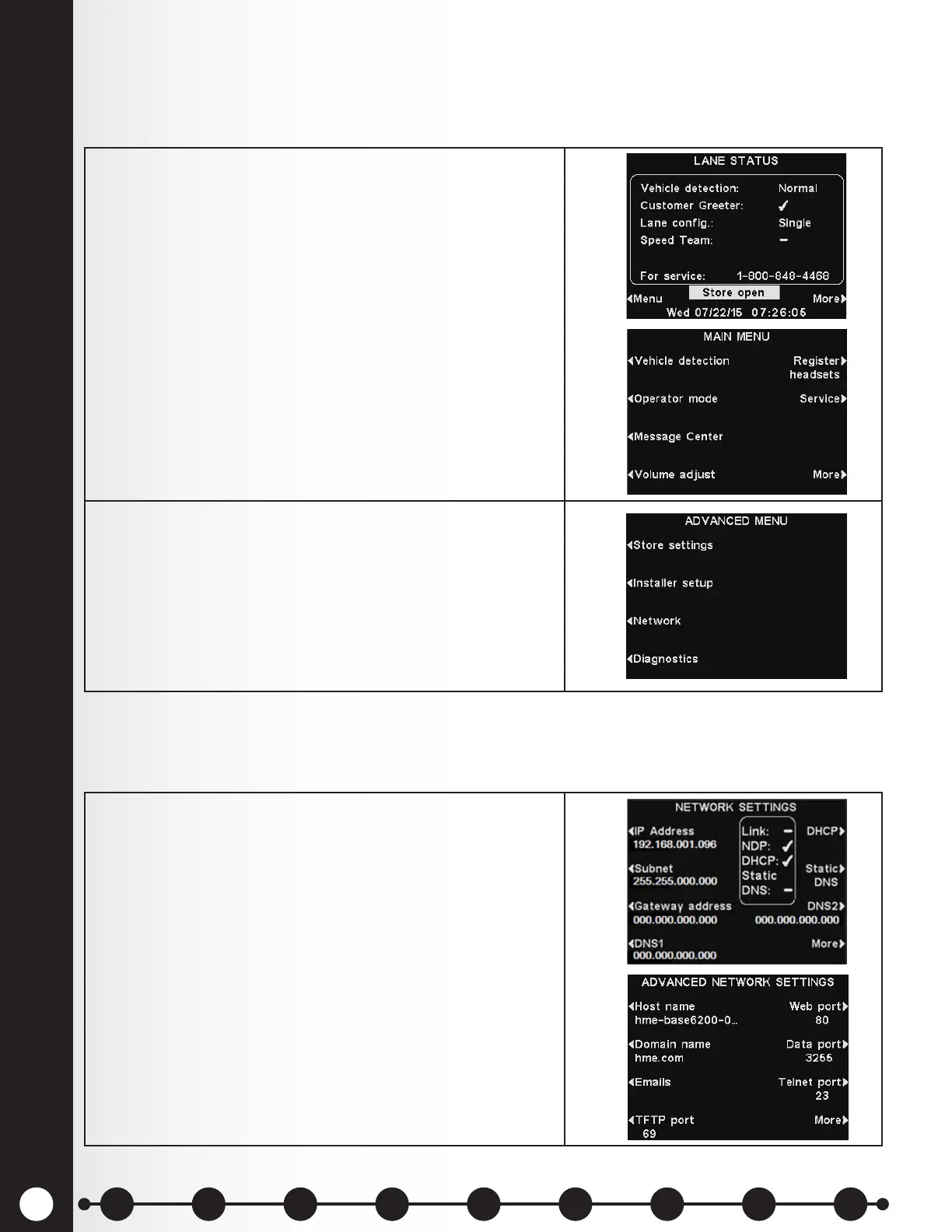
If the base station is connected to a computer network for remote access, you must enter the network
data based on information from your IT support. To adjust this setting:
1. Select the Menu button on the LANE STATUS display,
and then select More on the MAIN MENU.
2. Press the Network button on the ADVANCED MENU
display to open the NETWORK SETTINGS display.
Note: Some network settings changes will cause the
base to automatically reset.
1. For additional advanced network settings, press the
More button on the NETWORK SETTINGS display.
The advanced network settings are explained below.
Press the respective button on the ADVANCED
NETWORK SETTINGS display for each setting you
would like to view or change.
Advanced Network Settings
For additional advanced network settings, press the More button on the NETWORK SETTINGS display
to view Advanced Network Settings.
1 2 3 4 5 6 7 8 9
Introduction
EOS|HD
Equipment
EOS|HD
Operation
Audio Processing
Functions
Equipment Care
and Cleaning
Troubleshooting
Equipment
Specications
EOS|HD Message
Center Guide
Important
Notices



 To Next Page