EOS
|
HD OPERATION
53
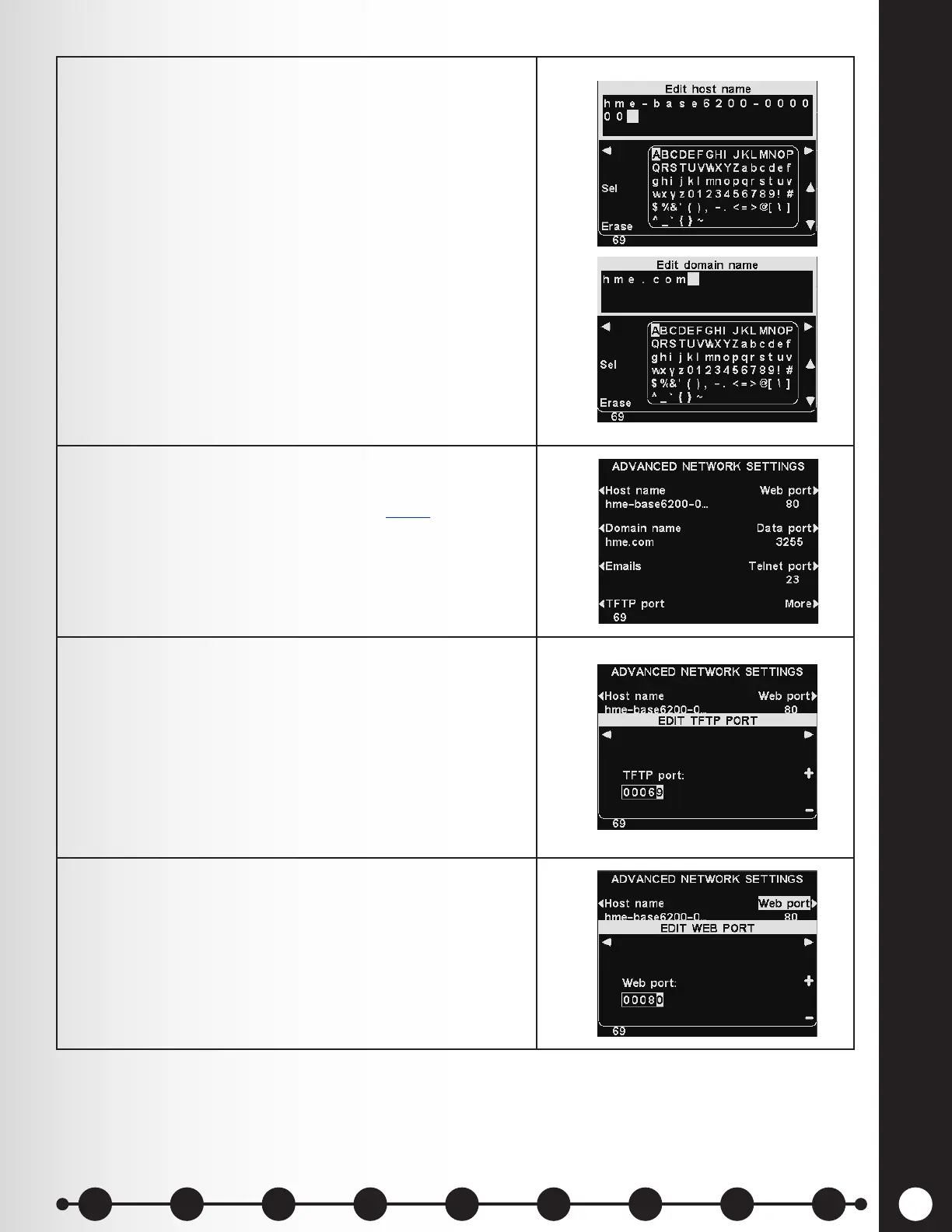
2. Host name / Domain name – These names combine
to uniquely identify the base by name on the network.
This name can be used to access the base over the
network instead of using the IP address.
This feature only works if DHCP is enabled on
the NETWORK SETTINGS display, a DNS server
is installed on the local network and if DHCP is
congured to receive updates from the DHCP server.
To enter or change host or domain name, press the
Edit host name or the Edit domain name button on
the ADVANCED NETWORK SETTINGS display.
On the respective Edit display, use the Erase button
to clear unwanted characters. Use the ◄, ►, ▲
and ▼ buttons to move the highlight to a desired
character, and then press the Sel (select) button to
enter it. Press the Back button to save the name.
3. Emails – The base is capable of sending emails to
store managers when alert conditions are triggered in
the store. For email settings, refer to Email, pg. 55.
4. TFTP port – This port is used for transferring audio
les and updated settings les to the base and
receiving settings les from the base. The port value
is 69, but it can be set at 0 to disable the port if
necessary.
To edit the TFTP port number, use the ◄ and ►
button to move the highlighted box, and then use
the + and − buttons to change the number in the
highlighted box.
5. Web port – This port is used for web access of the
bases’ web pages and view control settings. The port
value is 80, or it can be set at 0 to disable the port.
To edit the web port number, use the ◄ and ► button
to move the highlighted box, and then use the + and −
buttons to change the number in the highlighted box.
1 2 3 4 5 6 7 8 9
Introduction
EOS|HD
Equipment
EOS|HD
Operation
Audio Processing
Functions
Equipment Care
and Cleaning
Troubleshooting
Equipment
Specications
EOS|HD Message
Center Guide
Important
Notices



 To Next Page