EOS
|
HD OPERATION
54
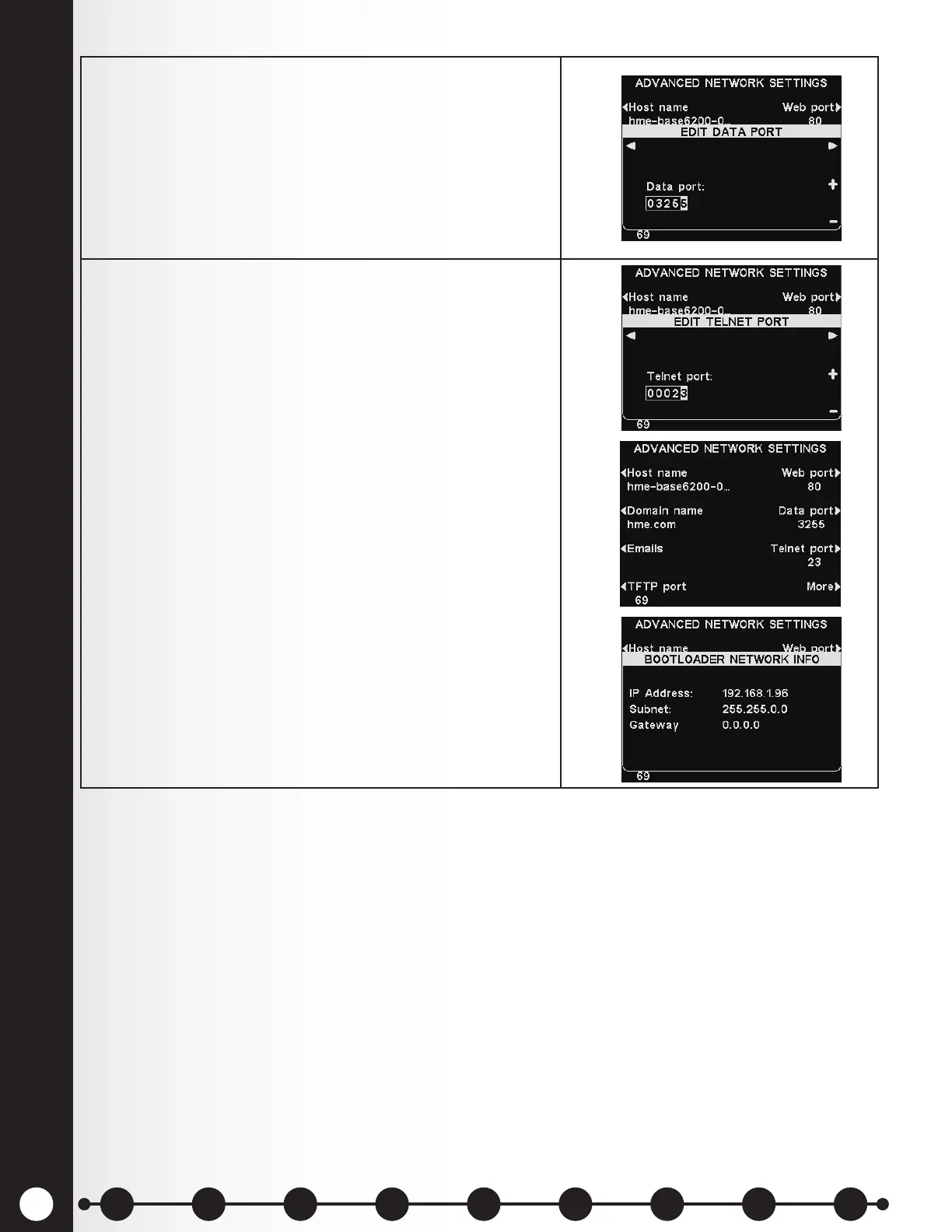
6. Data port – This port is used for sending HME-
supported commands to the base over a TCP/IC
socket. The port value is 3255, or it can be set at 0 to
disable the port.
To edit the data port number, use the ◄ and ►
button to move the highlighted box, and then use
the + and − buttons to change the number in the
highlighted box.
7. Telnet port – This port is reserved for use by HME
Technical Support.
If instructed by HME Technical Support to edit the
Telnet port number, use the ◄ and ► button to move
the highlighted box, and then use the + and − buttons
to change the number in the highlighted box.
Press the More button on the ADVANCED NETWORK
SETTINGS display to access the BOOTLOADER
NETWORK INFO display.
Bootloader information is used by HME Technical
Support.
1 2 3 4 5 6 7 8 9
Introduction
EOS|HD
Equipment
EOS|HD
Operation
Audio Processing
Functions
Equipment Care
and Cleaning
Troubleshooting
Equipment
Specications
EOS|HD Message
Center Guide
Important
Notices



 To Next Page